

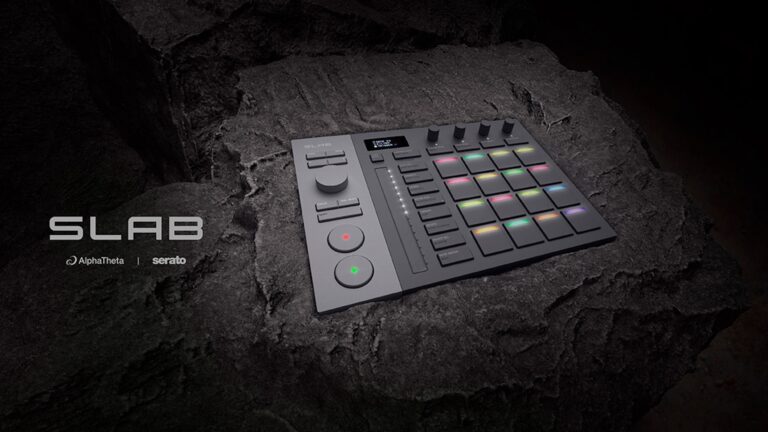
“The SLAB arrives as a compact, pad-centric MIDI controller that’s small enough to slip into a backpack alongside a laptop, yet it still feels solidly built.”
Over the past decade, the worlds of DJing and beat production have continued to blur together in interesting ways. DJs who once focused solely on mixing tracks are now as likely to be dabbling in beatmaking, sampling, and light production work as they are preparing their next club set.
Software has played a big role in that shift, and Serato has been steadily expanding beyond its DJ roots with tools aimed squarely at the producer community. Between Serato Studio for beat production, the Serato Sample plug-in for use inside other DAWs, and the long-standing Serato DJ Pro platform, the company now has a surprisingly broad ecosystem that stretches well beyond the DJ booth.
Hardware, of course, tends to follow software. Pad-based MIDI controllers designed for manipulating samples and building beats have been plentiful for years, but the introduction of the Serato SLAB signals something slightly different: a device purpose-built to sit directly inside the Serato universe. The collaboration between AlphaTheta (the successor to the Pioneer DJ brand) and Serato suggests a deliberate effort to tighten the connection between DJ culture and beat-creation workflows.
For DJs who’ve occasionally flirted with production tools, that’s an interesting proposition. A controller like the SLAB promises a more tactile way to interact with samples and sequences, potentially making the jump between mixing records and creating original material feel more natural. In theory, it’s a bridge between two adjacent worlds that many DJs already move between.
Whether that promise holds up in practice depends largely on how well the controller integrates into those workflows, and whether it becomes a natural extension of them.
First Impressions
The SLAB arrives as a compact, pad-centric MIDI controller that’s small enough to slip into a backpack alongside a laptop, yet it still feels solidly built. Its name is apt, too; it’s a chunky slab with a two-tone gray finish that feels solid in the hand, with the pad matrix dominating the top surface.
Those pads are 16 velocity-sensitive, RGB-illuminated ones arranged in the familiar four-by-four grid. They feel responsive and appropriately firm, with just enough travel to make finger drumming and sample triggering feel satisfying. Around the pads you’ll find a collection of buttons and rotary encoders that provide access to transport controls, navigation, sample manipulation, and sequencing functions.
Connectivity is simple and modern; the SLAB connects to a computer via USB-C and is bus-powered, meaning there’s no need for an external power supply. That simplicity reinforces the device’s role as a companion controller rather than a standalone production tool. There is no audio interface or additional I/O to worry about here; it’s strictly about providing hands-on control over software.
Physically, the device strikes a nice balance between minimalism and usability. It avoids the trap of overloading the surface with controls while still giving you enough direct access to key functions to keep your hands off the mouse much of the time. It’s a tidy little unit that’s purpose-built for its intended role.
If anything stands out in those early moments, it’s how clearly the SLAB signals its primary use case. While it might function as a generic MIDI controller, if needed, its layout and labeling make it obvious that it was designed first and foremost with Serato’s production tools in mind.
Hands On
In practice, the SLAB’s most natural pairing is with Serato Studio. The software has built a reputation as one of the more approachable beat-making environments on the market, emphasizing fast workflows built around sampling, slicing, and pattern creation. With the SLAB connected, much of that workflow moves directly to the hardware.
Pads can trigger slices from samples, play drum kits, or launch patterns, while the four rotary encoders provide hands-on control over parameters. In Serato Studio, their default role is real-time stem control, allowing you to independently adjust elements like drums, bass, melodies, or vocals from a sample. The encoders can also be reassigned for other parameters such as pitch, filters, or sample start points depending on the workflow. The overall experience feels immediate and tactile in a way that’s hard to achieve when clicking around with a mouse. Building drum patterns or experimenting with chopped samples becomes a more fluid process, and the controller’s tight mapping to Studio’s functions makes it easy to stay focused on the creative side of things.
One particularly useful element in day-to-day use is the SLAB’s small onboard OLED display, which also works in tandem with the controller’s touch-sensitive encoders to show parameter values and contextual information. Depending on what you’re doing, the display can show things like the currently selected sample bank, slice or pad assignments, parameter values for knobs, or navigation through sounds and patterns. In practice, that means you can browse samples, tweak parameters, or confirm settings without constantly shifting your eyes back to the computer screen.
That becomes especially helpful when working quickly with samples in Serato Studio. As slices are triggered from the pads or parameters are adjusted with the encoders, the display reflects those changes in real-time, giving you a quick visual confirmation of what’s happening. It’s a small touch, but it contributes to a workflow that feels much more hardware-oriented.
Another clever addition is what AlphaTheta calls Focus Control. With the Focus button engaged, the large central encoder can automatically take control of whatever plug-in parameter your mouse is currently hovering over on-screen. In practice, that means you can reach for a physical knob and immediately adjust a filter, resonance, or any other parameter in a plug-in without needing to create a manual MIDI mapping. It’s a deceptively simple idea, but one that quickly becomes addictive once you start experimenting with different instruments and effects inside a DAW.
For producers working in other DAWs, the SLAB also works nicely with the Serato Sample plug-in. Sample has become a favorite among producers for its ability to quickly detect keys, slice audio intelligently, and turn existing material into playable instruments. With the SLAB mapped to those functions, triggering slices and manipulating samples from the pads feels intuitive, particularly when experimenting with rhythmic chops or melodic fragments. Here, the display typically reflects pad assignments or parameter changes associated with the plug-in, helping maintain that same sense of direct control.
The third potential use case involves Serato DJ Pro. While the SLAB can be used within the DJ software environment, primarily for triggering samples, cue points, or performance features, this feels more like an auxiliary role than anything else. DJs who already use Serato DJ Pro may find it useful for expanding performance capabilities, but the controller’s design and layout clearly lean more toward beatmaking and sampling than traditional DJ control.
As with many compact controllers that pack a lot of functionality into a limited number of physical controls, there is a learning curve involved. To really integrate the SLAB into a workflow requires spending enough time with it that the various modes and shortcuts become second nature. That’s not unusual in this category of gear, but it does mean the controller rewards a bit of patience. Once muscle memory kicks in, however, the experience becomes far more fluid.
After several sessions using the controller, it became clear that the SLAB is at its best when treated as a creative sketchpad for sampling and beat ideas. In that role, it encourages experimentation: tapping out rhythms, reshaping samples, and quickly testing musical ideas without getting bogged down in software menus.
Conclusions
The AlphaTheta/Serato SLAB is an interesting addition to the growing ecosystem surrounding Serato’s production tools. Rather than trying to be a universal solution for every workflow, it focuses on providing hands-on control for sampling and beat creation within the Serato environment.
Its strongest pairing is clearly with Serato Studio, where the controller feels like a natural extension of the software’s design philosophy. Integration with the Serato Sample plug-in also makes it a useful tool for producers working inside other DAWs, while support for Serato DJ Pro adds a bit of additional flexibility for DJs who want to incorporate sampling into their sets.
At the time of writing, the AlphaTheta/Serato SLAB carries a MAP price of $329 through major retailers, which includes a full license for Serato Studio, adding meaningful value for DJs or producers who may not already be using the software. For producers already working inside the Serato ecosystem, or DJs curious about stepping into beatmaking, it offers a streamlined and approachable way to bring sampling and rhythm creation, directly under your fingertips.
</div>