

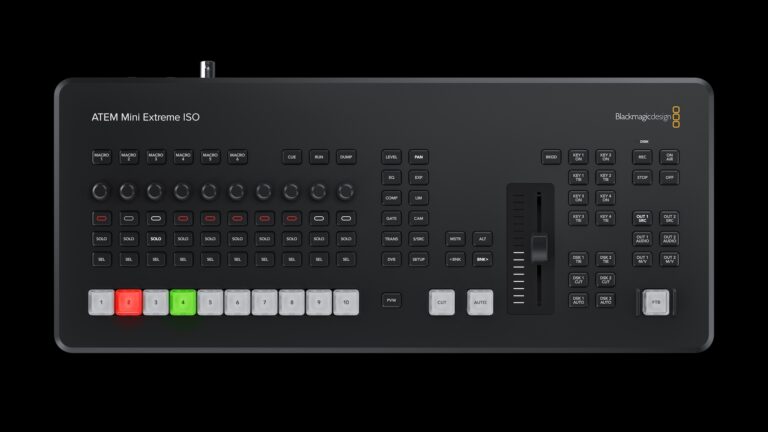
“There is another ATEM Mini Pro, but the ATEM Mini Pro ISO takes everything good about the standard model and turns it into a powerful multi-ISO recorder.”
In the previous issue, I reviewed the Blackmagic Design Pocket Cinema Camera 6K Pro and wrote: “Today, live-streamed DJ sets are no longer just a stopgap. They have become a legitimate path to real bookings, wider exposure, and sustainable DJ careers.” So, in this following issue, I want to help DJs build off that idea.
When I was live-streaming during the pandemic, one of the benefits I had was location. I was streaming outdoors, and the backgrounds of the many New York City locations I picked every Sunday morning and Monday evening were enough to lure viewers in, along with the exclusives I was playing at the time.
For this article, however, we are going to focus on being inside. And there lies the problem.
With one camera angle, presumably focused on you DJing in front of your gear, things can get boring after a while. That is why I highly recommend adding a second, or if possible, a third camera angle. Maybe a side view. Maybe a top-down view.
“But Mike, how can we rotate or switch between those shots live?”
Simple. An HDMI switcher.
A switcher allows you to rotate or manually switch through different cameras while live-streaming or recording. And the No. 1 HDMI switcher I have tested for this purpose is the Blackmagic ATEM Mini Pro ISO.
There is another ATEM Mini Pro, but the ATEM Mini Pro ISO takes everything good about the standard model and turns it into a powerful multi-ISO recorder. Physically, it is identical to the original ATEM Mini Pro. Under the hood, however, Blackmagic added recording capabilities that completely change the way live productions are captured and edited.
ISO Recording Workflow
The ATEM Mini Pro ISO’s big idea is simple, but powerful: Record everything!
The ATEM Mini Pro ISO records your program output, which is what your audience sees on screen, but it also records each HDMI input separately. That gives you full-quality, standalone files of each camera or source instead of forcing you to live with a single, mixed program feed.
If you are a one-person operation and did not get a chance to switch to the overhead shot while you were cutting it up live, no problem. In post-production, you can swap to that shot because the switcher recorded all the individual video ISOs.
Individual Video ISOs
Each HDMI input is captured as its own H.264 MP4 file. That means if you want to re-edit the live show, create highlight reels, or correct a bad cut, you have the original footage available without additional capture steps.
Multi-Track Audio
Audio is recorded independently as well. The ATEM produces separate audio files for each input and mic source, which allows you to remix or rebalance levels in post.
If your audio levels or routing were imperfect during the live production, you can fix that cleanly during editing. And for my Twitch friends, this is a big one. You can route your mic to one input and your music to another so your replay does not have you shouting out, “Mr.Hotbod108764!” every time someone drops bits or subs.
Automatic DaVinci Resolve Project
While you are switching live, the ATEM Mini Pro ISO is constructing a timeline behind the scenes. It logs cuts, dissolves, overlays, DSKs, stills, and graphics.
When recording stops, the unit exports that timeline as a DaVinci Resolve project file. (I will explain DaVinci Resolve in a second.) Open that project and you get a timeline reflecting exactly what happened live, with each source on its own track. From there, you can adjust cuts, change transitions, or swap in different camera footage without starting over.
What’s DaVinci Resolve?
Super simple… DaVinci Resolve is a free video-editing program that lets you cut videos, fix audio, adjust lighting and color, and export finished videos all in one place. If you have ever used an app like CapCut or InShot on your phone, Resolve does the same basic job, just with way more control and better quality.
Apps like CapCut and InShot are great for quick social clips, but they are designed to be fast and limited. DaVinci Resolve’s free version gives you tools normally found in paid, professional software without a subscription, which, let’s face it, us DJs do not need another subscription.
Basically, with Resolve, you can:
- Edit long videos like DJ sets, interviews, or livestream replays
- Improve bad lighting from club, bar, or home studio footage
- Clean up audio so that voices and music sound balanced and professional
- Create content for YouTube, Instagram, and podcast video from the same project
If CapCut is like mixing on a controller with sync and presets, DaVinci Resolve is like stepping into a full DJ booth. It takes a little more learning, but you are not boxed in, and you do not have to pay to get started.
Why This Matters?
It’s about editability and speed. Now, going back to the Automatic DaVinci Resolve projects, this workflow bridges live production and post production in a way that makes it both faster and more flexible. Instead of accepting the live program as final, you can:
- Move cuts slightly earlier or later to improve pacing
- Change a fade to a hard cut or vice versa
- Replace a mixed program clip with the full-quality ISO from a camera
- Fix audio problems by using the separate audio files to rebalance levels or remove noise
For anyone producing VOD versions of live streams, show highlights, or polished masters, that ability to surgically edit the live output is a game-changer.
Integration with Blackmagic Pocket Cinema Cameras
The ATEM Mini Pro ISO becomes even more powerful when paired with Blackmagic Pocket Cinema Cameras like the Pocket Cinema Camera 6K Pro that I previously reviewed.
You can enable camera recording directly from the ATEM, and the cameras will record continuously in Blackmagic RAW with synced timecode. That means you can:
- Live switch in HD while capturing full-resolution RAW from each camera
- Open the Resolve project and relink to RAW files to build a full UHD master
- Use Resolve’s grading tools on RAW footage for cinematic color and dynamic range
In short, you get the speed of live switching with the finishing quality of a multi-camera RAW shoot.
Practical Use Cases:
In-Depth DJ Streams
Gamers love ISO workflows because they can capture their console feed, face cam, overlays, and other HDMI sources separately. For DJs, imagine switching to your Serato, rekordbox, or djay Pro screen to show jog work or crate digging. That makes it easy to cut highlight reels or reframe content in post without compromise.
Interviews & Panel Shows
As someone who has hosted and produced an interview show with many big names in dance music (“DJs After Dark”), I can tell you live conversations move fast. Sometimes a reaction gets missed or a camera punch comes late. With per-input recordings and a Resolve timeline, you can recover those moments, refine pacing, and clean up cuts for a polished final edit.
Who Benefits Most?
The ATEM Mini Pro ISO is ideal for creators who want fast turnarounds and the ability to improve live mixes in post. That includes DJ streamers, studio DJs, event producers, content creators, and anyone using Blackmagic cameras who wants a smoother pipeline into DaVinci Resolve.
Final Thoughts
The ATEM Mini Pro ISO turns a compact switcher into a hybrid live and post-production tool. By recording multiple ISOs, separate audio, and exporting a Resolve project that mirrors the live mix, it removes many of the compromises traditionally faced when delivering both live and on-demand versions of a show.
Plain and simple, any DJ who is trying to heighten their online presence using video would be crazy not to consider the ATEM Mini Pro ISO. The Pro ISO turns a boring DJ stream into a fully produced behemoth. It saves time and increases creative control to the point where it looks like you have a team behind you.
If you are serious about properly recording your DJ sets, the ATEM Mini Pro ISO is a non-negotiable.
Key Features at a Glance:
- Five simultaneous recorders, program output plus four HDMI input ISOs
- Multi-track audio files, separate audio tracks recorded for post-production
- Real-time DaVinci Resolve project, the switcher builds a timeline while you cut and saves it when recording stops
- Compatible with Blackmagic Pocket Cinema Cameras, record RAW files with synced timecode
- MAP Price, $545