
After more than 25 years in the house-music scene, I’ve learned one undeniable truth, now, more than ever: Music productions open doors, while just being a DJ does not. It’s as simple as that! Whether you’re a house DJ, an open-format DJ, or spinning hip-hop or Latin music, original productions, remixes, and even well-crafted edits can help separate you from the pack.
Like many DJs, I’ve dabbled in production over the years, even creating the theme song for my interview show “DJs After Dark.” But truthfully, one of the biggest hurdles has always been translating the ideas in my head into my DAW. Almost every producer knows the feeling… a melody, bassline, or drum pattern suddenly appears in your mind, only to disappear while you’re searching for the right sound or clicking notes into a piano roll.
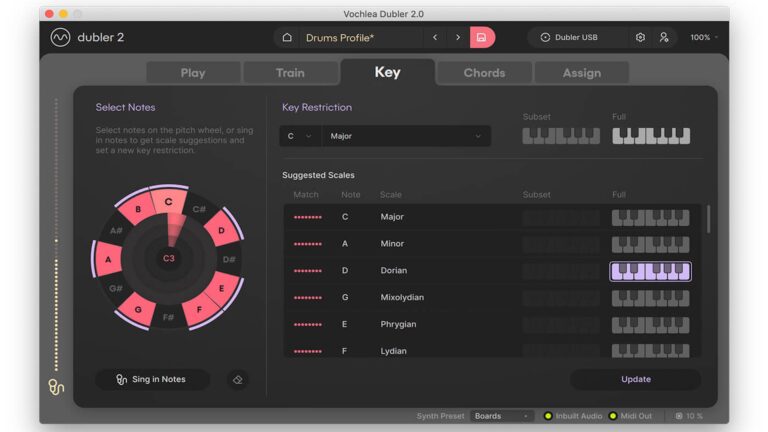
With AI-assisted music tools becoming more common, it’s easy to assume every new production tool is trying to automate the creative process. Vochlea’s desktop software app Dubler 2 takes a completely different approach. Rather than generating music for you, it turns your own voice into a real-time MIDI controller, allowing you to sing, hum, whistle, or even beatbox ideas directly into your DAW.
Instead of reaching for a keyboard or pad controller, you simply perform the idea into a microphone. Dubler 2 analyzes your voice and converts it into editable MIDI that can trigger software instruments, drum racks, synthesizers, and even external MIDI hardware.
Before the traditional producers come after me, let me be clear: Dubler 2 isn’t trying to replace a keyboard, years of musicianship, or the craft of music production. It’s simply another way to get ideas into your DAW before inspiration fades.
What Is Dubler 2?
Dubler 2 is a plug-in that analyzes incoming audio from a
microphone and converts it into MIDI. Essentially, whatever tone of noise/sound the microphone picks up, it mimics that with the instrument you have open in your DAW.
The software supports two primary approaches:
- Melodic pitch detection: Sing or hum notes to generate MIDI melodies and basslines.
- Rhythmic trigger detection: Make distinct percussive sounds to trigger MIDI notes assigned to drums or samples.
It also includes built-in sound generators for quick auditioning. However, its broader potential comes from pairing its MIDI output with instruments and sounds already used in a production set-up of your choosing such as Ableton Live, FL Studio, Logic, etc.
However, is Dubler 2 just another plug-in that gets used for a week before disappearing into your VST folder? Or is it a genuinely useful creative tool that earns a permanent place in your production workflow?
First Impressions
Seeing endless Instagram ads for Dubler 2 definitely piqued my interest. Watching producers happily singing “ba-ba-ba-da-bom” only to have it instantly transformed into a synth line looked pretty cool.
At the same time, I’ve been around long enough to know that demo videos don’t always tell the whole story. Over the years, I’ve seen more than a few products promise to revolutionize music production, only to become another forgotten plug-in. I wasn’t sure whether Dubler 2 would be genuinely useful or simply another clever idea that looked better online than it did in real life.
Getting started was surprisingly straightforward. Vochlea sent the complete kit, including its dedicated USB microphone, and I tested everything using the Dubler software alongside Ableton Live. Before you begin, Dubler 2 walks you through a quick calibration process that matches the software to your microphone (in case you decide to bring your own), voice, and input level. It only takes a minute, but I quickly learned it’s worth doing at the start of every session because it noticeably improves tracking consistency.
Vochlea recommends using its included USB microphone, and honestly, it worked very well throughout my testing. If you already have a decent microphone and audio interface, you don’t necessarily need to buy another one. Dubler 2 supports other microphones as well, and Vochlea provides set-up guides for them.
However, I do not recommend condenser mics. They are more sensitive and may capture extra breathing, room sound, and incidental noises. Dynamic microphones work best. That said, I didn’t have any issues with the included USB mic, so I stuck with it for the entire review. Installation was painless and, after calibration, I was ready to start making some noise.
The first thing that caught me off guard was the tracking.
Honestly, I expected to spend the first hour fighting with the software, trying to convince it that I wasn’t singing random notes. Instead, Dubler 2 recognized my voice with an accuracy that was far better than I anticipated. Was it perfect? No. Definitely not. But it immediately proved that the technology behind it is legitimate.
The learning curve wasn’t getting the software to understand me. It was learning how to use my voice as a controller.
That may sound obvious, but it’s a completely different mindset. As DJs, we’re used to manipulating gear with our hands. Jog wheels, mixers, pads, keyboards… that’s our comfort zone. Thinking about how clearly we’re attacking a note or how consistently we’re articulating a sound isn’t something most of us spend time doing. The cleaner and more deliberate my vocal performance became, the better Dubler 2 responded. Eventually I stopped thinking about the software and started thinking about the music.
Finding My Voice
My first goal was simple: Could I hum a melody into Dubler 2 and have it come out close enough that I didn’t feel like reaching for a keyboard? The answer surprised me.
Although Dubler 2 can generate drum triggers, basslines, chords, and expressive MIDI control, I found myself coming back to one feature over and over again: melodies. Humming a lead line into Ableton Live felt much more natural than hunting around a keyboard for the right notes. Was the MIDI always perfect? No. But it didn’t have to be. The important part was getting the idea into the session before inspiration disappeared. Cleaning up a few MIDI notes afterward was still much faster than trying to recreate a melody I’d already forgotten.
After spending a little time getting used to the software, humming melodies became second nature. The more deliberate I was with my pitch and note transitions, the better the results became. Before long, I stopped worrying about whether Dubler 2 was listening correctly and started focusing on the musical idea itself.
One thing I appreciated was that Dubler 2 doesn’t expect perfection. The MIDI it generates is editable, which means you don’t have to nail every single note on the first take. If the rhythm was right, but one or two notes were slightly off, it was usually faster to correct them in Ableton Live than it would have been to play the entire melody on a keyboard from scratch.
That ended up changing how I approached writing ideas. Instead of opening the piano roll first, I’d hum the melody, capture it as MIDI, and then refine it afterward. It felt more like sketching than programming, and for someone who doesn’t consider themselves a keyboard player, that was a refreshing way to work.
Will experienced pianists abandon their MIDI keyboards? Probably not, and they shouldn’t. Dubler 2 does not and should not replace a MIDI keyboard. It does, however, offer a different way to get ideas into a project. But that’s missing the point. Dubler 2 isn’t trying to replace traditional input methods. It’s giving people another way to get ideas out of their heads before they disappear. Maybe even fight writer’s block.
Creating Drum Patterns?
“Spit like a beatbox, the way the beat rocks, new version of Pete Rock.” Well, for Kanye West, maybe for me, kind of! Yes, Dubler 2 can trigger drums and samples using vocal percussion or other short percussive sounds. Each trained sound can be assigned to a MIDI note, which can then trigger any sound in a drum rack, sampler, or drum synthesizer.
For example, separate trigger sounds might be mapped to kick, snare, closed hi-hat, open hi-hat, clap, or percussion. The exact mapping depends on the drum instrument being controlled.
The key challenge: distinct transients
Rhythmic triggering depends on recognizable differences at the beginning of each sound. Two sounds may feel different to a person, but still have similarly shaped transients, causing the software to interpret both as the same trigger.
This is why simply attempting realistic mouth-made drum sounds is not always the best method. Clear articulation is more important than imitation. Short, deliberately different pops, clicks, consonants, or other sharply defined sounds can work better.
Vocal-percussion experience may help, but beatboxing is not the only option. Hand claps, finger snaps, tapping objects together, and other distinct acoustic sounds can also be used if they are sufficiently separated from one another.
Best types of drum parts for voice triggering
Voice-triggered drums are most compelling when the human timing and dynamics are part of the musical character. This works more for looser styles like swing-heavy hip-hop, lo-fi, trap-influenced patterns, and slower rhythmic ideas with varied velocity.
It is less efficient for parts that are simple and rigid enough to program instantly, such as a conventional four-on-the-floor beat. Rapidly repeated hi-hats and densely layered drum arrangements can also be challenging because they demand highly consistent articulation and timing.
Is Dubler 2 Worth It?
In a world of AI-created tracks, Vochela’s Dubler 2 can keep original creativity a viable option by reducing the gap between hearing an idea and getting that idea into a DAW. Dubler 2 makes it easy for anyone who wants to flip that idea in their head into an originally created track. It is definitely worth considering for beginners or musicians who want to compose with their voice, rapidly capture melodic ideas, or add a more physical and expressive way to control MIDI instruments. Its strongest role is as a creative bridge between an imagined musical idea and an editable arrangement.
It is particularly promising for sung melody capture, loose drum programming, expressive synth control, and experimental workflows involving nontraditional sound sources. It can also be useful for producers who do not see themselves as keyboard players, but can hear and perform ideas vocally.
What it is not, however, is a universal replacement for sequencing, finger drumming, or a MIDI keyboard. It will not turn you into Louie Vega or Kanye West. But if you treat it as another composition tool with specific strengths – natural melodic input, flexible MIDI control, and fast conversion of vocal sketches into material that can be developed further – you can see your workflow expanded tremendously.
Dubler 2 Cost
Standalone Dubler 2 software is priced at $99, which is ideal if you already own a reliable studio Dubler Studio Kit 2 costs $219 including software with Vochlea’s custom-calibrated USB mic. Dubler microphone separately costs $129.