

Facebook Twitter Instagram
    Trending
    • Rane System One: Superb Standalone [Review]
    • Armin van Buuren & Laidback Luke Join Moises to Shape the Future of AI for Musicians
    • Amsterdam Dance Event Reveals Second Wave of 30 YEARS ADE Lineup
    • Denon DJ Unveils PRIME 4 G2
    • Mike Walter: Greatest Songs Ever? [Interview]
    • DJX Brings Big Names, New Faces, & New Experiences
    Facebook Twitter Instagram
    DJ LIFE Magazine DJ LIFE Magazine
    • Home

      Rane System One: Superb Standalone [Review]

      September 3, 2026

      Armin van Buuren & Laidback Luke Join Moises to Shape the Future of AI for Musicians

      September 3, 2026

      Amsterdam Dance Event Reveals Second Wave of 30 YEARS ADE Lineup

      September 1, 2026

      Denon DJ Unveils PRIME 4 G2

      September 1, 2026

      Mike Walter: Greatest Songs Ever? [Interview]

      August 27, 2026
    • Magazine
      1. Issues
      2. Buy Print Issue
      3. Subscribe
      Featured

      DJ LIFE Magazine – August 2026 Issue Vol.6 No.4

      By Mark MancinoAugust 10, 2026
      Recent

      DJ LIFE Magazine – August 2026 Issue Vol.6 No.4

      August 10, 2026

      DJ LIFE Magazine – June 2026 Issue Vol.6 No.3

      June 22, 2026

      DJ LIFE Magazine – April 2026 Issue Vol.6 No.2

      April 30, 2026
    • Interviews
      1. Interviews
      2. Mobile DJ Profiles
      Featured

      Mike Walter: Greatest Songs Ever? [Interview]

      By Jim TremayneAugust 27, 2026
      Recent

      Mike Walter: Greatest Songs Ever? [Interview]

      August 27, 2026

      Jason Ross: Finds His True North [Interview]

      August 26, 2026

      Roger Sanchez: Spectrum Sounds [Interview]

      August 25, 2026
    • Tech
      1. Tech News
      2. Tech Reviews
      Featured

      Rane System One: Superb Standalone [Review]

      By DJ DeetsSeptember 3, 2026
      Recent

      Rane System One: Superb Standalone [Review]

      September 3, 2026

      Armin van Buuren & Laidback Luke Join Moises to Shape the Future of AI for Musicians

      September 3, 2026

      Denon DJ Unveils PRIME 4 G2

      September 1, 2026
    • Music
      1. Music
      2. DJ Playlists
      3. Mixes
      4. DJ National Club Charts
      Featured

      10 Songs You Should Never Play at Any Wedding. Ever.

      By Herbert HollerAugust 19, 2026
      Recent

      10 Songs You Should Never Play at Any Wedding. Ever.

      August 19, 2026

      Above & Beyond Marks 25 Years With Career-Spanning Apple Music One Mix

      July 28, 2026

      Martin Garrix Joins U2 on “Fireflies”

      July 24, 2026
    • Events

      Amsterdam Dance Event Reveals Second Wave of 30 YEARS ADE Lineup

      September 1, 2026

      DJX Brings Big Names, New Faces, & New Experiences

      August 27, 2026

      RCF to Bring Expanded EVOX Lineup, Live Demonstrations to DJX ’26

      August 7, 2026

      Momentous 2026 Unveils Lineup as Arkansas Music Festival Returns This November

      August 6, 2026

      Escape Psycho Circus ’26: Massive 80+ Artist Lineup for Halloween Weekend Revealed

      August 5, 2026
    • Tips
      1. DJ Tips
      2. Business Tips
      3. DJ Life Lessons
      Featured

      10 Timeless Tips: A Wedding Expert’s Guide

      By Brian LawrenceAugust 25, 2026
      Recent

      10 Timeless Tips: A Wedding Expert’s Guide

      August 25, 2026

      The Side-Hustle DJ

      August 20, 2026

      How to Request a Song from a DJ

      August 7, 2026
    • Mobile DJ
      1. Mobile DJ Profiles
      2. Mobile Monday Spotlights
      3. Wedding DJ
      4. Business Tips
      5. DJX Subscribe
      Featured

      10 Timeless Tips: A Wedding Expert’s Guide

      By Brian LawrenceAugust 25, 2026
      Recent

      10 Timeless Tips: A Wedding Expert’s Guide

      August 25, 2026

      Mark Brenneisen: Upstate DJ Does EPIC Events [Mobile DJ Profile]

      August 24, 2026

      10 Songs You Should Never Play at Any Wedding. Ever.

      August 19, 2026
    • DJX Show
    DJ LIFE Magazine DJ LIFE Magazine
    Home»Tech»Tech Reviews»Bitwig Connect 4/12: Total Studio Control [Review]
    Tech Reviews

    Bitwig Connect 4/12: Total Studio Control [Review]

    By Wesley KingDecember 30, 2025
    Share
    Facebook Twitter LinkedIn

    “Connect 4/12 is a compact brute of a bus-powered box that moonlights as CV bridge, transport controller, and a precision dial.” 

    It seems that software companies (in the music space, and elsewhere) keep jumping the fence into hardware. Part of it is surely profit motive; but beyond dollars and cents, there are benefits to owning more of the user experience and removing points of friction.  

    We’ve seen it with Ableton’s Push, and more recently with Move. Native Instruments has done it in the studio with Maschine, and for DJs with the Traktor controller line. So, I’ll admit to being both surprised and unsurprised to see Germany’s Bitwig join the fray.  

    And Bitwig, the quietly relentless Berlin-based DAW-maker that’s flown under the radar for years, has stepped into the ring in an equally quiet, but no-less compelling way with the Connect 4/12. It doesn’t just add another interface to the pile; it’s a stake in the ground for a more controlled end-to-end experience for the loyal users of the Bitwig Studio DAW.  

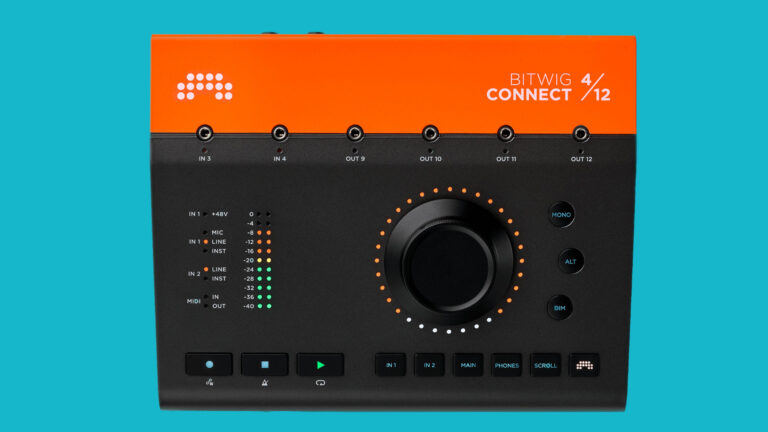
    In practice, the Connect 4/12 is a compact brute of a bus-powered box that moonlights as CV bridge, transport controller, and a precision dial for whatever you’re tweaking at the moment. That combo makes it feel less like another anonymous interface, and more like a daily driver for synth-forward producers.  

    The Basics 

    On paper, the Connect 4/12 is exactly what the name suggests: a four-mono-in, 12-mono-out audio interface, but the split is an interesting one. You get a single combo XLR/TRS suitable for mic, line, or instrument signals (with support for 48V phantom power). A separate balanced TRS that can switch between line and high-impedance instrument levels. Two additional ins on the top panel. Six TRS outs on the back. A stereo TRS plug on the back that consumes two of the outs (to give you left and right, of course), and is designed for stereo headphones. Then, four more outs on the top.  

    But the trick up Bitwig’s sleeve is a nod to the company’s long-standing embrace of modular synth users; the top panel ins and outs double as DC-coupled CV connection points to marry up the world of analog modular sound generation, and the digital world of the modern DAW.  

    Lastly, you’ll find proprietary in and out connections for MIDI, and a USB-C connector for computer connectivity and power. The Connect 4/12 is class-compliant; on macOS and Linux it’s plug-and-play, with an ASIO driver provided for Windows users. It uses highly respected AKM A/D D/A converters, and is designed to provide clean connectivity worthy of any project.  

    The headline workflow feature is the 360-degree, touch-sensitive main dial with six mode buttons. In its standard mode, it does some typical things like set input gains, adjust speaker and headphone levels, etc. In its native, Bitwig-specific mode, its bag of tricks expands a bit farther. Transport controls live up top on the unit, and loopback plus direct monitoring cover streaming and zero-latency needs.  

    Hands-On 

    I’ll confess that Bitwig is not my daily driver in the DAW department… and that puts me at a bit of a disadvantage, I suppose, in truly plumbing the depths of the Connect 4/12. But regardless, my first impression was that the preamp’s usable gain range is generous, and the noise floor stayed nicely managed. Headphone amp volume was more than adequate for my usual personal-monitoring choices. All the controls felt solid and smooth, matching the sense of the build you get from merely handling the hardware. The choices Bitwig made in what the Connect 4/12 offers were sensible and added true utility without fluff.  

    While I do have analog synths on hand and genuinely love using them, I’ve not stepped a toe onto the slippery slope of modulars generally, or CV control, specifically, but I can immediately understand the benefits of using the Connect 4/12 for those that have. Tailored specifically for use with Bitwig, the two DC-coupled inputs and four DC-coupled outputs, right on the front, make it a breeze to marry up traditional analog hardware with the modern reality of music production.  

    Bitwig Users Get Outsized ROI 

    With the Connect 4/12 set to its native Bitwig mode and matched up with the software, the unit really comes to life. Hover a parameter in Bitwig Studio and the big dial becomes a first-class controller for it, with high resolution and helpful LED color mirroring. Lock a parameter with a quick double-tap and keep moving. Automation-writing feels unusually deliberate; you’re sculpting curves with your fingertips instead of batting the mouse around. And the MCU-protocol transport means the core play/stop/record muscle memory transfers to other DAWs when you’re not in Bitwig. Still, the symbiosis here is clearly designed for Bitwig lifers and the Bitwig-curious.  

    Some Highlights  

    A few things I appreciated in my time with the Connect 4/12: 

    • The dial is super-precise. Touch sensitivity plus high resolution means you can do surgical moves on a filter cutoff or threshold without overshooting. The LED ring reflecting target color sounds like a gimmick until you’re working fast; then it’s a lifesaver.  
    • Monitor control is “one-tap obvious.” The unit makes flipping monitor settings without thinking. Your ears stay in the music, not the menu.  
    • Front-panel CV/audio jacks keep the creative loop tight. There’s no fumbling around behind the desk or whatever just to make some basic changes. 
    • Software ties that bind. Gain states can be stored with your Bitwig project, so a session opens with things intact; no scribbling settings on sticky notes. 

    That said, four analog inputs can feel tight. Depending on your use cases, you might end up feeling like you don’t have enough inputs, but then again, I’m used to using an 18/20 interface day-to-day. But for a synth-first, desktop-centric workflow, the 4/12 split is likely to serve you well.   

    Conclusions 

    It’s clear that the Bitwig Connect 4/12 is not trying to win a data-sheet showdown. Instead, it’s making a different argument: that your interface can and should be the fast lane between ideas and finished audio, especially if you live in a hybrid world of a DAW combined with CV-driven analog synths. The I/O mix is pragmatic, the CV is serious, and Bitwig Mode pulls the DAW into the tactile realm without the learning curve of a full control surface. If you’re a producer who values quick decisions, clean sound, and hands-on control (and especially if Bitwig Studio is part of your universe), this little metal slab earns the real estate. 

    At presstime, the street price hovers just under $600, which feels fair given the monitor controller functions and tight DAW integration. If your needs skew toward many simultaneous mic inputs or digital expansion, look elsewhere. But for synth-forward composers and sound designers, Connect 4/12 lands in the sweet spot between interface, controller, and CV nerve center – and it makes the whole setup feel more alive. 

    Bitwig Bitwig Connect Bitwig Studio Latest

    Related Posts

    Rane System One: Superb Standalone [Review]

    Vochlea Dubler 2: New Voice in Music Production [Review]

    Save My Gig Launches Free Platform to Help DJs

    RCF to Bring Expanded EVOX Lineup, Live Demonstrations to DJX ’26

    How to Request a Song from a DJ

    Momentous 2026 Unveils Lineup as Arkansas Music Festival Returns This November

    Comments are closed.

    Latest Posts

    Rane System One: Superb Standalone [Review]

    September 3, 2026

    Armin van Buuren & Laidback Luke Join Moises to Shape the Future of AI for Musicians

    September 3, 2026

    Amsterdam Dance Event Reveals Second Wave of 30 YEARS ADE Lineup

    September 1, 2026

    Denon DJ Unveils PRIME 4 G2

    September 1, 2026
    Facebook Twitter Instagram
    • About
    • Digital Editions
    • Subscribe
    • Contact
    • Privacy Policy
    © 2026 DJ Life Magazine

    Type above and press Enter to search. Press Esc to cancel.

    Manage Consent
    To provide the best experiences, we use technologies like cookies to store and/or access device information. Consenting to these technologies will allow us to process data such as browsing behavior or unique IDs on this site. Not consenting or withdrawing consent, may adversely affect certain features and functions.
    Functional Always active
    The technical storage or access is strictly necessary for the legitimate purpose of enabling the use of a specific service explicitly requested by the subscriber or user, or for the sole purpose of carrying out the transmission of a communication over an electronic communications network.
    Preferences
    The technical storage or access is necessary for the legitimate purpose of storing preferences that are not requested by the subscriber or user.
    Statistics
    The technical storage or access that is used exclusively for statistical purposes. The technical storage or access that is used exclusively for anonymous statistical purposes. Without a subpoena, voluntary compliance on the part of your Internet Service Provider, or additional records from a third party, information stored or retrieved for this purpose alone cannot usually be used to identify you.
    Marketing
    The technical storage or access is required to create user profiles to send advertising, or to track the user on a website or across several websites for similar marketing purposes.
    • Manage options
    • Manage services
    • Manage {vendor_count} vendors
    • Read more about these purposes
    View preferences
    • {title}
    • {title}
    • {title}