

Facebook Twitter Instagram
    Trending
    • Framework Unveils Re:Frame Season 2 With More Than 25 Nights in LA
    • Antares Introduces AutoTune Advanced
    • Experts Only Festival ’26: John Summit Wraps Second Annual Two-Day Event in NYC
    • SoundSwitch 2.11 Adds rekordbox Integration And Expanded Lighting Control
    • SXM Festival Reveals Landmark 10th Edition Lineup for St. Martin
    • Native Instruments Marks 30 Years With Maschine 3.7 Update, Three New Expansions
    Facebook Twitter Instagram
    DJ LIFE Magazine DJ LIFE Magazine
    • Home

      Framework Unveils Re:Frame Season 2 With More Than 25 Nights in LA

      September 28, 2026

      Antares Introduces AutoTune Advanced

      September 25, 2026

      Experts Only Festival ’26: John Summit Wraps Second Annual Two-Day Event in NYC

      September 24, 2026

      SoundSwitch 2.11 Adds rekordbox Integration And Expanded Lighting Control

      September 24, 2026

      SXM Festival Reveals Landmark 10th Edition Lineup for St. Martin

      September 23, 2026
    • Magazine
      1. Issues
      2. Buy Print Issue
      3. Subscribe
      Featured

      DJ LIFE Magazine – August 2026 Issue Vol.6 No.4

      By Mark MancinoAugust 10, 2026
      Recent

      DJ LIFE Magazine – August 2026 Issue Vol.6 No.4

      August 10, 2026

      DJ LIFE Magazine – June 2026 Issue Vol.6 No.3

      June 22, 2026

      DJ LIFE Magazine – April 2026 Issue Vol.6 No.2

      April 30, 2026
    • Interviews
      1. Interviews
      2. Mobile DJ Profiles
      Featured

      Mike Walter: Greatest Songs Ever? [Interview]

      By Jim TremayneAugust 27, 2026
      Recent

      Mike Walter: Greatest Songs Ever? [Interview]

      August 27, 2026

      Jason Ross: Finds His True North [Interview]

      August 26, 2026

      Roger Sanchez: Spectrum Sounds [Interview]

      August 25, 2026
    • Tech
      1. Tech News
      2. Tech Reviews
      Featured

      Antares Introduces AutoTune Advanced

      By Mark MancinoSeptember 25, 2026
      Recent

      Antares Introduces AutoTune Advanced

      September 25, 2026

      SoundSwitch 2.11 Adds rekordbox Integration And Expanded Lighting Control

      September 24, 2026

      Native Instruments Marks 30 Years With Maschine 3.7 Update, Three New Expansions

      September 23, 2026
    • Music
      1. Music
      2. DJ Playlists
      3. Mixes
      4. DJ National Club Charts
      Featured

      10 Country Bangers for Your Wedding Playlist

      By Herbert HollerSeptember 9, 2026
      Recent

      10 Country Bangers for Your Wedding Playlist

      September 9, 2026

      10 Songs You Should Never Play at Any Wedding. Ever.

      August 19, 2026

      Above & Beyond Marks 25 Years With Career-Spanning Apple Music One Mix

      July 28, 2026
    • Events

      Framework Unveils Re:Frame Season 2 With More Than 25 Nights in LA

      September 28, 2026

      Experts Only Festival ’26: John Summit Wraps Second Annual Two-Day Event in NYC

      September 24, 2026

      SXM Festival Reveals Landmark 10th Edition Lineup for St. Martin

      September 23, 2026

      Countdown NYE Reveals 75+ Artist Lineup for 2026

      September 22, 2026

      DJX ’27 Dates Announced for Atlantic City Return

      September 18, 2026
    • Tips
      1. DJ Tips
      2. Business Tips
      3. DJ Life Lessons
      Featured

      The Modern DJ: What the Hell Do DJs Actually Do?

      By Just ChrisSeptember 10, 2026
      Recent

      The Modern DJ: What the Hell Do DJs Actually Do?

      September 10, 2026

      10 Timeless Tips: A Wedding Expert’s Guide

      August 25, 2026

      The Side-Hustle DJ

      August 20, 2026
    • Mobile DJ
      1. Mobile DJ Profiles
      2. Mobile Monday Spotlights
      3. Wedding DJ
      4. Business Tips
      5. DJX Subscribe
      Featured

      10 Country Bangers for Your Wedding Playlist

      By Herbert HollerSeptember 9, 2026
      Recent

      10 Country Bangers for Your Wedding Playlist

      September 9, 2026

      10 Timeless Tips: A Wedding Expert’s Guide

      August 25, 2026

      Mark Brenneisen: Upstate DJ Does EPIC Events [Mobile DJ Profile]

      August 24, 2026
    • DJX Show
    DJ LIFE Magazine DJ LIFE Magazine
    Home»Tech»Tech Reviews»DDJ-FLX2: Doing a Lot with a Little [Review]
    Tech Reviews

    DDJ-FLX2: Doing a Lot with a Little [Review]

    By DJ DeetsJuly 2, 2025
    Share
    Facebook Twitter LinkedIn

    AlphaTheta’s DDJ-FLX2 has launched into the entry-level market with its relatively affordable ($179 street price) compact controller that offers just enough for someone to master the core tenets of DJing.  

    Of course, the DDJ-FLX2 will feel instantly familiar to anyone who has used legacy Pioneer DJ products. It feels especially reminiscent of the Pioneer DDJ-200 from a few years back. Importantly, it doesn’t feel overwhelming to users who may be graduating from solely using software or might even have no DJing experience at all.  

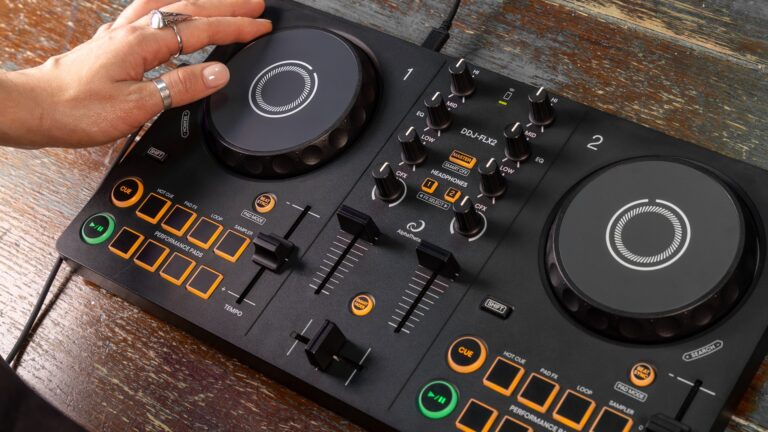
    Stretching only 5-inches wide and weighing under three pounds, it’s one of the most portable and lightweight DJ controllers on the market. It follows the widely used two-deck-and-a-mixer controller layout that’s been the industry standard for controllers for a while now. 

    Each deck section has a fairly small touch-sensitive jog wheel capable of pitch bending and scratching. Holding down shift and moving the jog wheels activates a search function. One should note that they’re not the smallest jog wheels ever fitted to a controller, but they’re certainly a far cry from CDJs or turntables.  

    Below each jog wheel are eight performance pads. Calling them pads is a bit of a misnomer – they’re really square-shaped buttons made of hard plastic and click when pressed. Nevertheless, it’s impressive the number of functions they can do. They default into hot-cue mode, but other modes are available, including Pad FX, Loop, and Sampler. To successfully change pad modes, one holds down the shift and the beat-sync button to change between pad modes.  

    Also, the top row of pads light up to indicate which mode is active. This whole process takes some time, so it’ll definitely be tricky to, for example, trigger a hot cue and then immediately begin a loop. I’m glad there is the ability to do different things with the pads (especially since some entry-level controllers only allow hot cues from their pads), but I wish there was a better way to toggle between pad modes.  
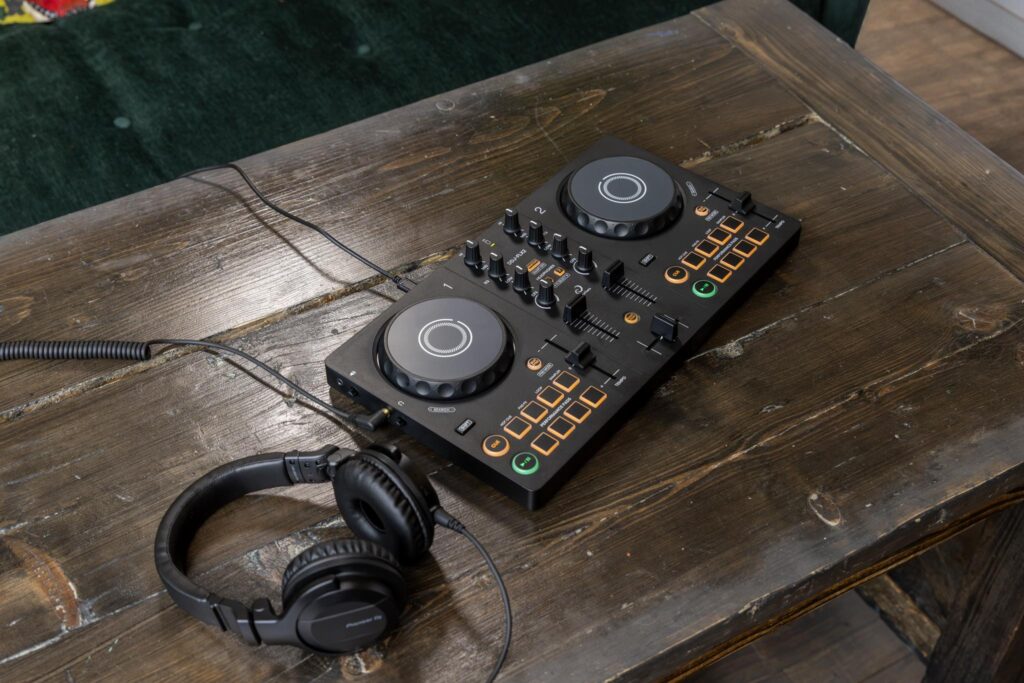
    To the right of the performance pad is a tempo slider. I really like how long they made the tempo slider and the fact that there’s a confident click when the slider is in the neutral position. Notably absent from each deck section are looping controls or any effects control beyond the pad FX. That’s not a dealbreaker, by any means, but certainly worth mentioning.  

    Moving on to the mixer section, there are two fairly short channel faders – they’re not unusably short, but I did notice they were on the shorter side. Ditto for the crossfader – again, not unusably short but on the shorter side. Each channel comes with 3-band EQ controls, and there’s a color FX knob below the EQ.  

    There is no gain knob, but I never found myself explicitly wishing I had one during my testing. Software auto gain functionality has gotten so good that physical gain knobs might not be as necessary as they once were. At the center of the mixer section, there are buttons to assign each individual channel or the master output to the headphones. 

    In terms of inputs and outputs, there are two headphone jack-style 1/8-inch TRS connectors on the left side of the unit. One is for the headphone output and the other is for the master output. There are two small knobs next to each output to control the level. I’m really glad to see this controller having its own audio output. And, I’m also not mad that the output uses a headphone jack-style connector instead of the traditional RCA connectors.  

    Headphone jacks are so commonplace these days that it may be easier to connect to various speakers at house parties using a headphone jack and aux cable. Of course, you can always buy a headphone jack to RCA cable for connecting to systems requiring an RCA cable. On the back, there’s a USB-C connector for connecting the controller to a laptop or connecting the controller to a power source, if using a phone via a Bluetooth connection. Next to the USB-C port is a Kensington lock. 

    The verdict? I really liked my time with the DDJ-FLX2. It’s a compact controller with enough hardware features to get a solid foothold in the world of DJing. Good job, AlphaTheta.  

    AlphaTheta AlphaTheta DDJ-FLX2 DDJ-FLX2 Latest Tech Review

    Related Posts

    Framework Unveils Re:Frame Season 2 With More Than 25 Nights in LA

    Antares Introduces AutoTune Advanced

    SoundSwitch 2.11 Adds rekordbox Integration And Expanded Lighting Control

    SXM Festival Reveals Landmark 10th Edition Lineup for St. Martin

    Native Instruments Marks 30 Years With Maschine 3.7 Update, Three New Expansions

    The Simulator: One Day Code Games Presents DJ Life Simulator

    Comments are closed.

    Latest Posts

    Framework Unveils Re:Frame Season 2 With More Than 25 Nights in LA

    September 28, 2026

    Antares Introduces AutoTune Advanced

    September 25, 2026

    Experts Only Festival ’26: John Summit Wraps Second Annual Two-Day Event in NYC

    September 24, 2026

    SoundSwitch 2.11 Adds rekordbox Integration And Expanded Lighting Control

    September 24, 2026
    Facebook Twitter Instagram
    • About
    • Digital Editions
    • Subscribe
    • Contact
    • Privacy Policy
    © 2026 DJ Life Magazine

    Type above and press Enter to search. Press Esc to cancel.

    Manage Consent
    To provide the best experiences, we use technologies like cookies to store and/or access device information. Consenting to these technologies will allow us to process data such as browsing behavior or unique IDs on this site. Not consenting or withdrawing consent, may adversely affect certain features and functions.
    Functional Always active
    The technical storage or access is strictly necessary for the legitimate purpose of enabling the use of a specific service explicitly requested by the subscriber or user, or for the sole purpose of carrying out the transmission of a communication over an electronic communications network.
    Preferences
    The technical storage or access is necessary for the legitimate purpose of storing preferences that are not requested by the subscriber or user.
    Statistics
    The technical storage or access that is used exclusively for statistical purposes. The technical storage or access that is used exclusively for anonymous statistical purposes. Without a subpoena, voluntary compliance on the part of your Internet Service Provider, or additional records from a third party, information stored or retrieved for this purpose alone cannot usually be used to identify you.
    Marketing
    The technical storage or access is required to create user profiles to send advertising, or to track the user on a website or across several websites for similar marketing purposes.
    • Manage options
    • Manage services
    • Manage {vendor_count} vendors
    • Read more about these purposes
    View preferences
    • {title}
    • {title}
    • {title}