

Facebook Twitter Instagram
    Trending
    • Jake Alexander (DJ Boost) [Mobile Monday Spotlight]
    • Day Trip Festival Set to Expand in ’26, Debut Long Beach Amphitheater Stage
    • How to Make Your Website Speak to AI (Without Breaking What Already Works) 
    • 2nd Gen: Rane’s Spinning-Platter Controller [Review]
    • HEAD TRIP Two-Day Event Heads to Indio Festival Grounds in October
    • Nostalgix: Setting Off an Inferno [Interview]
    Facebook Twitter Instagram
    DJ LIFE Magazine DJ LIFE Magazine
    • Home

      Jake Alexander (DJ Boost) [Mobile Monday Spotlight]

      March 16, 2026

      Day Trip Festival Set to Expand in ’26, Debut Long Beach Amphitheater Stage

      March 13, 2026

      How to Make Your Website Speak to AI (Without Breaking What Already Works) 

      March 12, 2026

      2nd Gen: Rane’s Spinning-Platter Controller [Review]

      March 11, 2026

      HEAD TRIP Two-Day Event Heads to Indio Festival Grounds in October

      March 11, 2026
    • Magazine
      1. Issues
      2. Buy Print Issue
      3. Subscribe
      Featured

      DJ LIFE Magazine – February 2026 Issue Vol.6 No.1

      By Mark MancinoFebruary 20, 2026
      Recent

      DJ LIFE Magazine – February 2026 Issue Vol.6 No.1

      February 20, 2026

      DJ LIFE Magazine Issue Vol.5 No.6

      December 18, 2025

      DJ LIFE Magazine Issue Vol.5 No.5

      October 27, 2025
    • Interviews
      1. Interviews
      2. Mobile DJ Profiles
      Featured

      Nostalgix: Setting Off an Inferno [Interview]

      By Mark MancinoMarch 10, 2026
      Recent

      Nostalgix: Setting Off an Inferno [Interview]

      March 10, 2026

      Slim McGraw: Country Beats [Interview]

      February 27, 2026

      Kaskade: Storyteller [Interview]

      December 30, 2025
    • Tech
      1. Tech News
      2. Tech Reviews
      Featured

      How to Make Your Website Speak to AI (Without Breaking What Already Works) 

      By Brian LawrenceMarch 12, 2026
      Recent

      How to Make Your Website Speak to AI (Without Breaking What Already Works) 

      March 12, 2026

      2nd Gen: Rane’s Spinning-Platter Controller [Review]

      March 11, 2026

      Bring the Bass: Trulli Audio Introduces Trulli Bass50

      March 10, 2026
    • Music
      1. Music
      2. DJ Playlists
      3. Mixes
      4. DJ National Club Charts
      Featured

      10 Fresh Wedding Songs for March 2026

      By Matthew CampbellMarch 5, 2026
      Recent

      10 Fresh Wedding Songs for March 2026

      March 5, 2026

      Kygo x Khalid x GRYFFIN Join Forces on “Save My Love”

      February 20, 2026

      Discogs Launches “My Discography,” a New Series Celebrating Stories Behind Record Collections

      February 11, 2026
    • Events

      Day Trip Festival Set to Expand in ’26, Debut Long Beach Amphitheater Stage

      March 13, 2026

      HEAD TRIP Two-Day Event Heads to Indio Festival Grounds in October

      March 11, 2026

      Apocalypse: Zombieland Reveals Phase One Lineup for ‘26

      March 9, 2026

      RESISTANCE Drops Miami Music Week 2026 Lineups at M2

      March 6, 2026

      ‘Why Not Now? Festival’ to Debut This Memorial Day Weekend in Brooklyn

      March 5, 2026
    • Tips
      1. DJ Tips
      2. Business Tips
      3. DJ Life Lessons
      Featured

      How to Make Your Website Speak to AI (Without Breaking What Already Works) 

      By Brian LawrenceMarch 12, 2026
      Recent

      How to Make Your Website Speak to AI (Without Breaking What Already Works) 

      March 12, 2026

      Easy Needle Moving: Website & SEO Tips for ’26

      January 2, 2026

      A Tool to Prevent Bad Online Reviews

      November 26, 2025
    • Mobile DJ
      1. Mobile DJ Profiles
      2. Mobile Monday Spotlights
      3. Wedding DJ
      4. Business Tips
      5. DJX Subscribe
      Featured

      Jake Alexander (DJ Boost) [Mobile Monday Spotlight]

      By Mark MancinoMarch 16, 2026
      Recent

      Jake Alexander (DJ Boost) [Mobile Monday Spotlight]

      March 16, 2026

      10 Fresh Wedding Songs for March 2026

      March 5, 2026

      Wendy Walker [Mobile Monday Spotlight]

      March 2, 2026
    • DJX Show
    DJ LIFE Magazine DJ LIFE Magazine
    Home»Tech»Tech Reviews»Next Level: OWC Solid-State Drives [Review]
    Tech Reviews

    Next Level: OWC Solid-State Drives [Review]

    By Wesley KingMarch 20, 2025
    Share
    Facebook Twitter LinkedIn

    “In the nearly 20 years I’ve been a DJ, it’s been interesting to see the evolution of technique, expectations, hardware, and software that’s taken place.”  

    When I did my very first set, I felt like I was a little ahead of the curve; at a time when plenty of DJs were still sticking CDs into CDJs, I was instead tinkering with early DJ software and a collection of MP3 files, and trying to make do by leveraging a pad-based MIDI drum controller to operate the software and mix my sets. (Wow, have things changed.)  

    It’s been years now since technology finally caught up with me — and given what both I and thousands of DJs truly wanted and needed to shift fully to digital, in terms of both hardware and software capabilities. But in a modern version of the pain of schlepping record crates around, carrying a comprehensive digital-music collection around became its own hassle — one that’s been made worse by the emergence of laptop-free digital DJ solutions that can operated standalone.  

    Sure; modern DJ solutions can leverage streaming services like Tidal, but I’ve found that not everything I want to play is necessarily available on the compatible services – and, of course, not every venue (even today) has adequate internet connectivity to use streaming reliably. 

    So, as a regular user of DJ media players, that’s meant dealing with USB storage media on which I’ve stored most or all of the music I want to play. And for a while, that meant dealing with thumb drives, anemic storage capacities, slow performance, and storage media that inexplicably fails at the worst possible moment. Thankfully, here, too, manufacturers are finally offering workable solutions to these challenges. Enter OWC (Other World Computing), and some new high-quality, high-capacity, high-performance, ultra-portable USB storage media.   

    The Basics 

    For those who don’t know the company, OWC has been around for years, and storage solutions have long been its specialty. My first introduction to OWC was in the form of upgrade kits for Apple Macs — back in the days before Apple decided to start soldering everything to their motherboards and allowing you to field-upgrade precisely… nothing.  

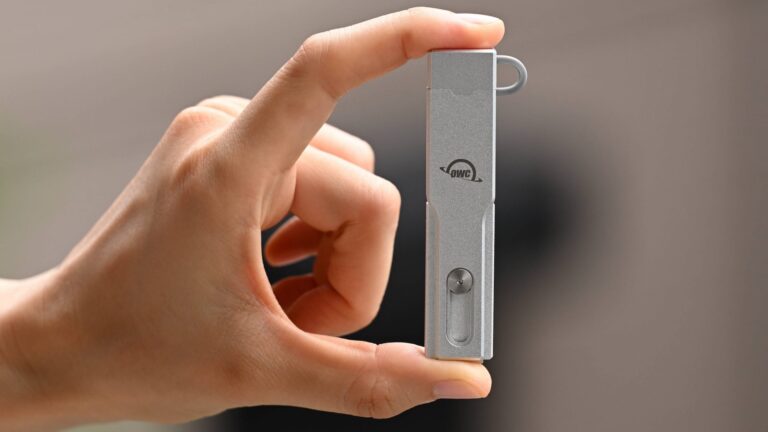
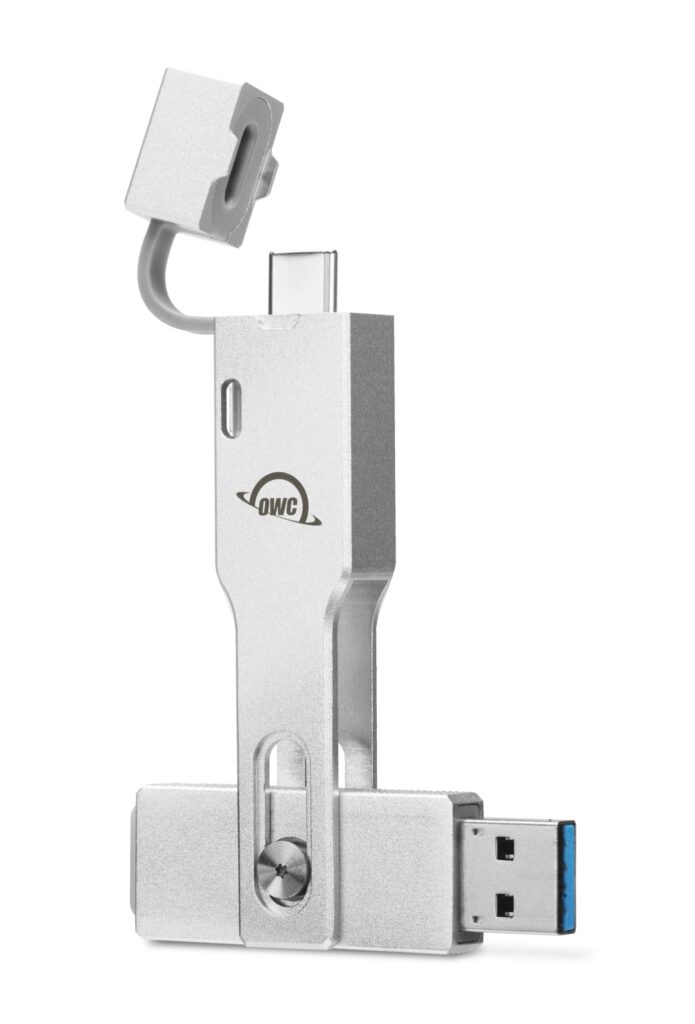
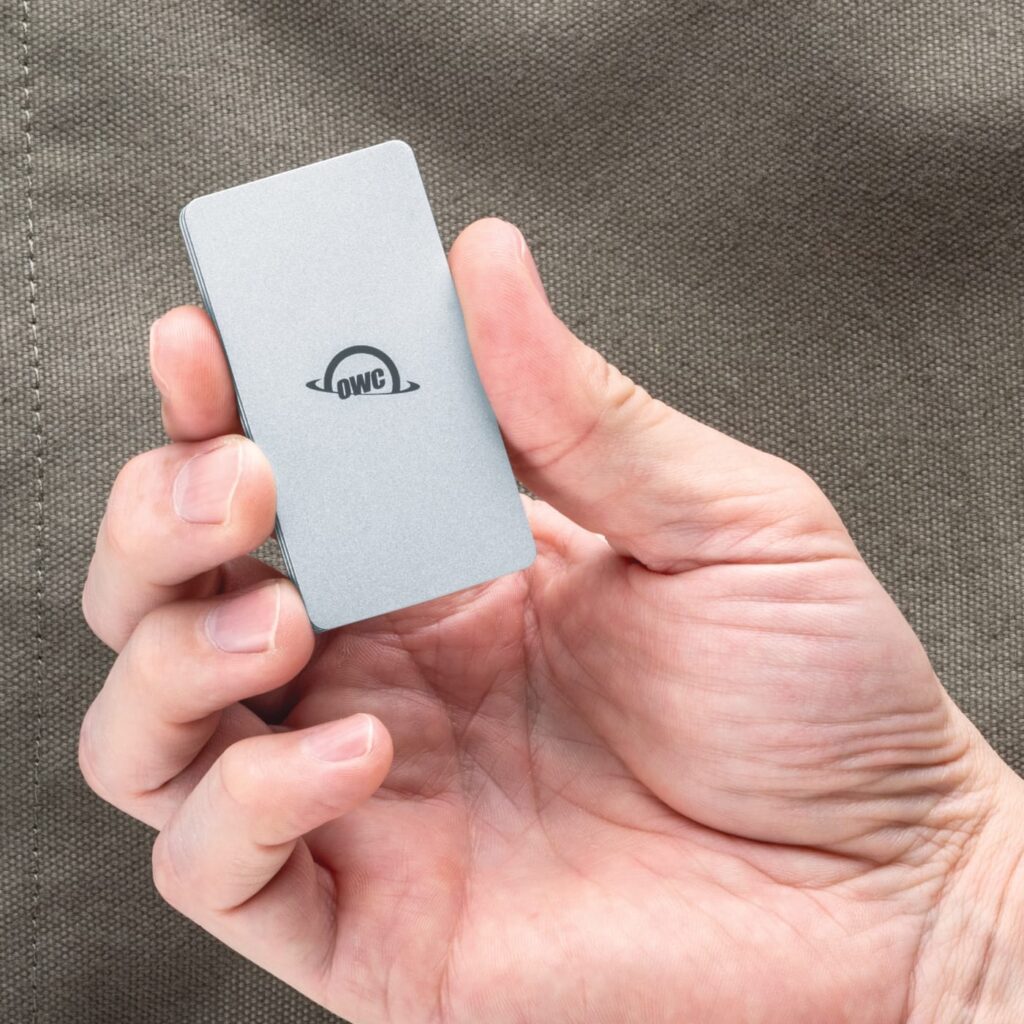
    In any event, the company recently loaned two solid-state storage solutions that I feel are of particular interest to the DJs: the Envoy Pro mini ultra-portable SSD stick and the incredibly compact Envoy ultra-portable SSD drive. For evaluation, both drives tested offer a whopping 2 Terabytes of solid-state storage, and both offer strong performance.  

    Of the two, I think the Envoy Pro mini is a great choice for DJs, since it has a classic USB stick form factor, making it a simple, one-piece solution; the regular Envoy is quite small, but requires a cable to interface the drive to either your computer, or to a media player or DJ controller.  

    The regular Envoy offers a slight edge in performance, perhaps given its NVMe M.2 roots, but make no mistake: both are, as USB-based drives go, incredibly fast. Some basic software-based testing on my MacBook Pro shows that both drives perform to their rated specs in terms of speed.  

    Both drives are available in multiple storage capacities, but I have to say, it’s really nice to have a full 2TB of storage space to tinker with. That’s enough space to hold my entire digital-music collection… all my club-centric EDM, all my multi-genre material for mobile gigs — everything… and still have an enormous amount of drive space leftover. If you consider one of the Envoys, of course, you can save some money by going a bit smaller.  
    In Practice  

    For testing purposes, I chose a pair of Denon DJ SC5000 media-player decks, running Denon’s latest 4.0.0 version of the Engine OS. Because of the file system types that Denon supports, I formatted the Envoy units to use the exFAT file system. I then copied a large chunk of music to the drive, then used Denon’s Engine DJ application on my Mac to pre-process the music, and store the catalog information on the drive itself. 

    I’ll point out that I’ve not had too much trouble using pretty run-of-the-mill USB stick media with the Denon drives (or other controllers) over the years, but both slow read performance and USB stick reliability have been periodic pain points — not to mention low storage capacities. In my testing, the OWC Envoy drives unsurprisingly left standard, consumer-grade USB sticks in the dust. The specific numbers varied by manufacturer and model, but the Envoys outperformed various mass market sticks I’ve often used in the past by a margin of roughly 4x. That results in a really strong performance margin.  

    While I’ve had good success with SanDisk thumb drives, in particular, in terms of reliability and durability, I’ve made the mistake of using really cheap ones from time to time, and that, in short, is a mistake. No-name thumb drives are notoriously slow, and prone to failure. Not only do I know this from personal experience, but the tech press was full of coverage early in 2024 when CBL Data Recovery, a German firm, reported the findings of their experience with teardowns of failed USB thumb drives. (If you want to read more, search for the Ars Technica article titled, “Those free USB sticks in your drawer are somehow crappier than you thought.” It’s pretty interesting reading and provides good evidence and a good reason to invest in decent USB drive media for your DJ efforts.)  

    In any case, while I can’t evaluate the long-term durability and reliability of the OWC products, I quickly became a convert just for performance reasons alone. Plugging either of the two Envoy products into a USB-C port on my newest Mac mini, which uses USB 3.1 Gen 2, both performed as advertised. Were they as fast as the on-board SSD storage? The answer is no; I wouldn’t expect that from a USB-connected device. But that’s sort of splitting hairs; they were damned fast.  

    My preferred Envoy, the stick-form-factor Pro mini, easily and reliably achieved right in the neighborhood of its stated 946MB/s sequential read/write maximum performance. That speed made it far less painful to load media onto the stick using my computer, and the performance of the Engine DJ software in its analysis phase was impressive, too. Once plugged into one of the Denon SC5000 decks, they worked perfectly, providing excellent, lag-free performance.   
    Conclusions 

    Capacity and performance don’t, however, run cheap. OWC Envoy Pro mini with 2TB (as tested) runs $300, while dropping to 1TB runs $170. (500GB and 250GB versions are also available.) The regular OWC Envoy is slightly less expensive, and is offered only in 1TB and 2TB configurations, for $150 and $280, respectively.  

    I still think I prefer the Envoy Pro mini; not only does its stick form factor provide cable-free interface to both your computer and your DJ controllers or media players, but the device has a unique, integrated, switchable connection to either USB-A or USB-C ports — a nice bonus. But whichever you might choose, if you’ve got a collection of digital music you need to cart from set to set? You’d be hard-pressed to do it more easily or more effectively than with the OWC Envoy family.  

    Latest OWC OWC Solid-State Drives Reviews

    Related Posts

    Day Trip Festival Set to Expand in ’26, Debut Long Beach Amphitheater Stage

    2nd Gen: Rane’s Spinning-Platter Controller [Review]

    Bring the Bass: Trulli Audio Introduces Trulli Bass50

    Apocalypse: Zombieland Reveals Phase One Lineup for ‘26

    RESISTANCE Drops Miami Music Week 2026 Lineups at M2

    ‘Why Not Now? Festival’ to Debut This Memorial Day Weekend in Brooklyn

    Comments are closed.

    Latest Posts

    Jake Alexander (DJ Boost) [Mobile Monday Spotlight]

    March 16, 2026

    Day Trip Festival Set to Expand in ’26, Debut Long Beach Amphitheater Stage

    March 13, 2026

    How to Make Your Website Speak to AI (Without Breaking What Already Works) 

    March 12, 2026

    2nd Gen: Rane’s Spinning-Platter Controller [Review]

    March 11, 2026
    Facebook Twitter Instagram
    • About
    • Digital Editions
    • Subscribe
    • Contact
    • Privacy Policy
    © 2026 DJ Life Magazine

    Type above and press Enter to search. Press Esc to cancel.

    Manage Consent
    To provide the best experiences, we use technologies like cookies to store and/or access device information. Consenting to these technologies will allow us to process data such as browsing behavior or unique IDs on this site. Not consenting or withdrawing consent, may adversely affect certain features and functions.
    Functional Always active
    The technical storage or access is strictly necessary for the legitimate purpose of enabling the use of a specific service explicitly requested by the subscriber or user, or for the sole purpose of carrying out the transmission of a communication over an electronic communications network.
    Preferences
    The technical storage or access is necessary for the legitimate purpose of storing preferences that are not requested by the subscriber or user.
    Statistics
    The technical storage or access that is used exclusively for statistical purposes. The technical storage or access that is used exclusively for anonymous statistical purposes. Without a subpoena, voluntary compliance on the part of your Internet Service Provider, or additional records from a third party, information stored or retrieved for this purpose alone cannot usually be used to identify you.
    Marketing
    The technical storage or access is required to create user profiles to send advertising, or to track the user on a website or across several websites for similar marketing purposes.
    • Manage options
    • Manage services
    • Manage {vendor_count} vendors
    • Read more about these purposes
    View preferences
    • {title}
    • {title}
    • {title}