

Facebook Twitter Instagram
    Trending
    • How to Make Your Website Speak to AI (Without Breaking What Already Works) 
    • Day Trip Festival Set to Expand in ’26, Debut Long Beach Amphitheater Stage
    • 2nd Gen: Rane’s Spinning-Platter Controller [Review]
    • HEAD TRIP Two-Day Event Heads to Indio Festival Grounds in October
    • Nostalgix: Setting Off an Inferno [Interview]
    • Bring the Bass: Trulli Audio Introduces Trulli Bass50
    Facebook Twitter Instagram
    DJ LIFE Magazine DJ LIFE Magazine
    • Home

      How to Make Your Website Speak to AI (Without Breaking What Already Works) 

      March 12, 2026

      Day Trip Festival Set to Expand in ’26, Debut Long Beach Amphitheater Stage

      March 12, 2026

      2nd Gen: Rane’s Spinning-Platter Controller [Review]

      March 11, 2026

      HEAD TRIP Two-Day Event Heads to Indio Festival Grounds in October

      March 11, 2026

      Nostalgix: Setting Off an Inferno [Interview]

      March 10, 2026
    • Magazine
      1. Issues
      2. Buy Print Issue
      3. Subscribe
      Featured

      DJ LIFE Magazine – February 2026 Issue Vol.6 No.1

      By Mark MancinoFebruary 20, 2026
      Recent

      DJ LIFE Magazine – February 2026 Issue Vol.6 No.1

      February 20, 2026

      DJ LIFE Magazine Issue Vol.5 No.6

      December 18, 2025

      DJ LIFE Magazine Issue Vol.5 No.5

      October 27, 2025
    • Interviews
      1. Interviews
      2. Mobile DJ Profiles
      Featured

      Nostalgix: Setting Off an Inferno [Interview]

      By Mark MancinoMarch 10, 2026
      Recent

      Nostalgix: Setting Off an Inferno [Interview]

      March 10, 2026

      Slim McGraw: Country Beats [Interview]

      February 27, 2026

      Kaskade: Storyteller [Interview]

      December 30, 2025
    • Tech
      1. Tech News
      2. Tech Reviews
      Featured

      How to Make Your Website Speak to AI (Without Breaking What Already Works) 

      By Brian LawrenceMarch 12, 2026
      Recent

      How to Make Your Website Speak to AI (Without Breaking What Already Works) 

      March 12, 2026

      2nd Gen: Rane’s Spinning-Platter Controller [Review]

      March 11, 2026

      Bring the Bass: Trulli Audio Introduces Trulli Bass50

      March 10, 2026
    • Music
      1. Music
      2. DJ Playlists
      3. Mixes
      4. DJ National Club Charts
      Featured

      10 Fresh Wedding Songs for March 2026

      By Matthew CampbellMarch 5, 2026
      Recent

      10 Fresh Wedding Songs for March 2026

      March 5, 2026

      Kygo x Khalid x GRYFFIN Join Forces on “Save My Love”

      February 20, 2026

      Discogs Launches “My Discography,” a New Series Celebrating Stories Behind Record Collections

      February 11, 2026
    • Events

      Day Trip Festival Set to Expand in ’26, Debut Long Beach Amphitheater Stage

      March 12, 2026

      HEAD TRIP Two-Day Event Heads to Indio Festival Grounds in October

      March 11, 2026

      Apocalypse: Zombieland Reveals Phase One Lineup for ‘26

      March 9, 2026

      RESISTANCE Drops Miami Music Week 2026 Lineups at M2

      March 6, 2026

      ‘Why Not Now? Festival’ to Debut This Memorial Day Weekend in Brooklyn

      March 5, 2026
    • Tips
      1. DJ Tips
      2. Business Tips
      3. DJ Life Lessons
      Featured

      How to Make Your Website Speak to AI (Without Breaking What Already Works) 

      By Brian LawrenceMarch 12, 2026
      Recent

      How to Make Your Website Speak to AI (Without Breaking What Already Works) 

      March 12, 2026

      Easy Needle Moving: Website & SEO Tips for ’26

      January 2, 2026

      A Tool to Prevent Bad Online Reviews

      November 26, 2025
    • Mobile DJ
      1. Mobile DJ Profiles
      2. Mobile Monday Spotlights
      3. Wedding DJ
      4. Business Tips
      5. DJX Subscribe
      Featured

      10 Fresh Wedding Songs for March 2026

      By Matthew CampbellMarch 5, 2026
      Recent

      10 Fresh Wedding Songs for March 2026

      March 5, 2026

      Wendy Walker [Mobile Monday Spotlight]

      March 2, 2026

      Daryl Bennett: Utah DJ Lights Up His Market [Mobile DJ Profile]

      February 24, 2026
    • DJX Show
    DJ LIFE Magazine DJ LIFE Magazine
    Home»Tech»Versatility & Portability: Numark Mixstream Pro Go
    Tech

    Versatility & Portability: Numark Mixstream Pro Go

    By DJ DeetsJanuary 4, 2024
    Share
    Facebook Twitter LinkedIn

    Could the new Numark Mixstream Pro Go be the Swiss Army Knife of all-in-one DJ controllers? Let’s investigate. 

    Swiss Army knives are known around the world for their versatility. They feature all manner of handy tools. They’ve become so famous that the very term has been used to describe almost anything that is versatile and immensely capable in a number of different situations. Could the new Numark Mixstream Pro Go be the Swiss Army Knife of all-in-one DJ controllers? Let’s investigate. 

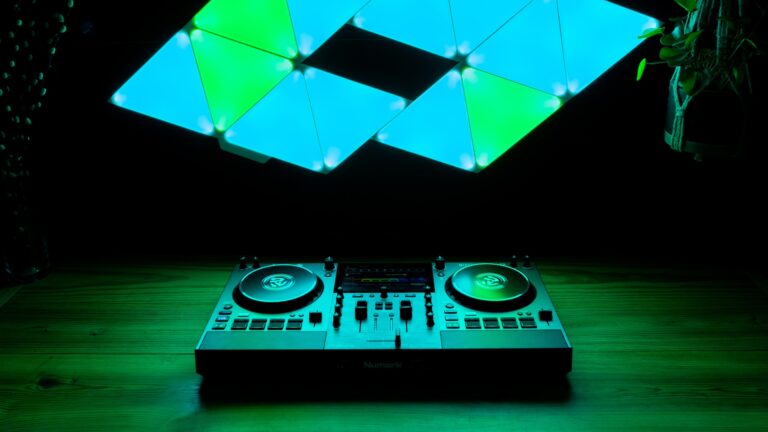
    The Basics: The Mixstream Pro Go ($839 MSRP) is a battery-powered 2-channel, all-in-one DJ controller with quite a few tricks up its sleeve. It is a revised version of Numark’s Mixstream all-in-one unit that was released a few years ago. The major change is the inclusion of a rechargeable battery for added portability.  

    Carried over from the original Mixstream are a big 7-inch touchscreen at the center and the two built-in speakers at the front of the unit. The speakers sound pretty good and get decently loud, but I probably wouldn’t use them for anything more than a small intimate gathering with a couple of friends.  

    The main focus of these speakers seems to be for DJs to hear themselves mix, as opposed to using them to fill a room with sound – this becomes especially apparent considering they’re at the front of the unit and face the DJ directly. In situations where there are external speakers, I could envision the built-in speakers being used as booth monitors, given their level is controlled separately from the main master output.  

    Layout & Feel: Hardware-wise, the Mixstream Pro Go feels a lot like other Numark controllers, including the Mixtrack and NS4FX. There are two identical deck sections with a 2-channel mixer in the middle. Each deck section has a 6-inch, touch-sensitive jogwheel, which feels good and has a buttery-smooth feel. Below the jogwheels are four performance pads, which can trigger hot cues, pre-saved loops, auto loops, and loop rolls.  

    Next to the pads are the pitch faders. They are quite small, but feature a click on center. I can forgive Numark for making them small, given everything that had to fit on the unit. Above the left jogwheel are the headphone controls, and above the right jogwheel are controls for the main output and the front speakers.  

    Also on each deck section are combo high/low-pass filter knobs. I’m used to seeing filter knobs located just below the EQ controls, so having them above the jogwheels did take some adjustment at first. After a few practice sessions, however, using them became pretty easy. I was also worried I would accidentally press the touch screen while using the filter knobs, but I never found that to be a problem. 

    The 2-channel mixer section lives in the center, just below the main touchscreen. The upfaders and crossfader are not the greatest ever fitted to a controller, but I certainly have no complaints. The crossfader curve can be adjusted within the settings menu via the screen. The EQ knobs have a nice, rubberized feel to them and are adjacent to the faders.  

    Also making an appearance on the mixer section are paddle-triggered effects, and I’m glad to see them here. Pulling the spring-loaded paddle down temporarily activates an effect, and pushing it upward locks the effect until the paddle is moved again. There are four effects in the center: echo, flanger, delay, and phaser. The intensity and timing of any selected effect are both controlled on the screen.  

    On the front of the unit, there are two sizes of headphone jacks (1/8-inch and ¼-inch) and a ¼-inch TRS connection for a microphone. A level knob for the microphone is also on the front. On the back, there are master outputs on both XLR and RCA outputs. External media sources can be plugged in via two USB ports or an SD card slot on the back panel.  


    Software & Connections: Tracks can be pre-prepared using the free-to-download Engine DJ software. This software is shared with Denon DJ hardware, such as the Prime series players. There’s also a USB Type-B port, which can allow users to connect the device to a computer. The Mixstream Pro Go currently supports Serato DJ Lite and can work with Serato DJ with a paid upgrade.  

    Lastly, on the back, there’s a connection for the included power/charging cable and the on-off button. In my testing, I found the on-off button to be a little bit overly-sensitive. Thankfully, screen prompts are used to prevent users from accidentally turning the unit on or off. For instance, you have to hold your finger on the center of the screen for a few seconds to turn the unit on and you can’t turn the device off without confirming on the screen. 

    The Screens: Now, let’s talk about these screens. Anyone who’s used the previous-generation Mixstream or Denon DJ’s Prime Go will feel immediately at home, given the shared operating system. That being said, I found the screens to be super easy-to-learn and navigate with just a little bit of practice.  

    The main view shows vertical waveforms for each channel with a center section devoted to track browsing. Tracks can be loaded from physical drives connected to the device or streamed via wi-fi from several streaming sources (Beatport, Beatsource, Tidal, and Amazon Music – a subscription is needed) or directly from a DJ’s own Dropbox account. The screen also allows DJs to tweak a ton of different playback parameters, including pitch range, quantization, whether you can load a new track on a deck that already has a track playing, and whether you want slip mode (called smart scratch) automatically turned on.  

    The screen also facilitates control of Engine Lighting. Namely, the unit can wirelessly connect to Philips Hue or Nanoleaf smart-lighting products and control compatible lighting hardware directly from the screens. Engine Lighting even unlocks control of DMX-based lighting and effects directly from the touch screen as well, with on-screen controls for color, position, and effects.  

    Conclusions: At just over $800, the Mixstream Pro Go is a very compelling all-in-one DJ solution. I could see this device being used by DJs who have to play for gatherings of family and friends. There’s the big advantage of not having to bring a laptop (or even speakers in some cases). I should mention also that Numark’s press photos feature the controller being used on a beach.  

    Mobile DJs also might want to consider using the Mixstream Pro Go as an all-in-one device for gigs. There are a few similar all-in-one controllers out there on the market, such as Pioneer DJ’s XDJ-RR and Denon DJ’s Prime Go. The Prime Go also shares the ability to run on battery power, but lacks the speakers seen on the Mixstream Pro Go.  

    After spending a good chunk of time with the Mixstream Pro Go, I can say I’m a fan. Now, I just need to find some friends who’ll invite me to a beach with it! Thumbs up. 

    Latest mobile dj NUmark Numark Mixstream Pro Go Tech News

    Related Posts

    How to Make Your Website Speak to AI (Without Breaking What Already Works) 

    Day Trip Festival Set to Expand in ’26, Debut Long Beach Amphitheater Stage

    2nd Gen: Rane’s Spinning-Platter Controller [Review]

    Bring the Bass: Trulli Audio Introduces Trulli Bass50

    Apocalypse: Zombieland Reveals Phase One Lineup for ‘26

    RESISTANCE Drops Miami Music Week 2026 Lineups at M2

    Comments are closed.

    Latest Posts

    How to Make Your Website Speak to AI (Without Breaking What Already Works) 

    March 12, 2026

    Day Trip Festival Set to Expand in ’26, Debut Long Beach Amphitheater Stage

    March 12, 2026

    2nd Gen: Rane’s Spinning-Platter Controller [Review]

    March 11, 2026

    HEAD TRIP Two-Day Event Heads to Indio Festival Grounds in October

    March 11, 2026
    Facebook Twitter Instagram
    • About
    • Digital Editions
    • Subscribe
    • Contact
    • Privacy Policy
    © 2026 DJ Life Magazine

    Type above and press Enter to search. Press Esc to cancel.

    Manage Consent
    To provide the best experiences, we use technologies like cookies to store and/or access device information. Consenting to these technologies will allow us to process data such as browsing behavior or unique IDs on this site. Not consenting or withdrawing consent, may adversely affect certain features and functions.
    Functional Always active
    The technical storage or access is strictly necessary for the legitimate purpose of enabling the use of a specific service explicitly requested by the subscriber or user, or for the sole purpose of carrying out the transmission of a communication over an electronic communications network.
    Preferences
    The technical storage or access is necessary for the legitimate purpose of storing preferences that are not requested by the subscriber or user.
    Statistics
    The technical storage or access that is used exclusively for statistical purposes. The technical storage or access that is used exclusively for anonymous statistical purposes. Without a subpoena, voluntary compliance on the part of your Internet Service Provider, or additional records from a third party, information stored or retrieved for this purpose alone cannot usually be used to identify you.
    Marketing
    The technical storage or access is required to create user profiles to send advertising, or to track the user on a website or across several websites for similar marketing purposes.
    • Manage options
    • Manage services
    • Manage {vendor_count} vendors
    • Read more about these purposes
    View preferences
    • {title}
    • {title}
    • {title}