

Facebook Twitter Instagram
    Trending
    • Don Diablo Launches ‘Restore Local Sessions’ With “Lete Sound” (ft. Ben Pol & Juliani)
    • Steve Aoki & Sebastian Maniscalco Turn Nightlife Chaos Into a Dance Anthem
    • Beyond Wonderland SoCal Announces ‘27 Return
    • Big FX: Eliminator Lighting Releases Elektron Bar FX
    • FETE ADK ’26 Brings Three Days of Dance Music to Lake George
    • DJ Dan, West Coast Pioneer (1968-2026)
    Facebook Twitter Instagram
    DJ LIFE Magazine DJ LIFE Magazine
    • Home

      Don Diablo Launches ‘Restore Local Sessions’ With “Lete Sound” (ft. Ben Pol & Juliani)

      April 3, 2026

      Steve Aoki & Sebastian Maniscalco Turn Nightlife Chaos Into a Dance Anthem

      April 3, 2026

      Beyond Wonderland SoCal Announces ‘27 Return

      April 2, 2026

      Big FX: Eliminator Lighting Releases Elektron Bar FX

      April 2, 2026

      FETE ADK ’26 Brings Three Days of Dance Music to Lake George

      April 1, 2026
    • Magazine
      1. Issues
      2. Buy Print Issue
      3. Subscribe
      Featured

      DJ LIFE Magazine – February 2026 Issue Vol.6 No.1

      By Mark MancinoFebruary 20, 2026
      Recent

      DJ LIFE Magazine – February 2026 Issue Vol.6 No.1

      February 20, 2026

      DJ LIFE Magazine Issue Vol.5 No.6

      December 18, 2025

      DJ LIFE Magazine Issue Vol.5 No.5

      October 27, 2025
    • Interviews
      1. Interviews
      2. Mobile DJ Profiles
      Featured

      Cosmic Gate: PERSPECTIVES [Interview]

      By Mark MancinoMarch 25, 2026
      Recent

      Cosmic Gate: PERSPECTIVES [Interview]

      March 25, 2026

      The DJ Museum: For the Record [Interview]

      March 20, 2026

      Laidback Luke: Facing Future [Interview]

      March 18, 2026
    • Tech
      1. Tech News
      2. Tech Reviews
      Featured

      Big FX: Eliminator Lighting Releases Elektron Bar FX

      By Mark MancinoApril 2, 2026
      Recent

      Big FX: Eliminator Lighting Releases Elektron Bar FX

      April 2, 2026

      Playtime: Novation/American Music & Sound Releases Novation Play

      March 25, 2026

      Akai Professional MPC Sample: Beatmaking Enters a Portable New Era

      March 24, 2026
    • Music
      1. Music
      2. DJ Playlists
      3. Mixes
      4. DJ National Club Charts
      Featured

      Don Diablo Launches ‘Restore Local Sessions’ With “Lete Sound” (ft. Ben Pol & Juliani)

      By Mark MancinoApril 3, 2026
      Recent

      Don Diablo Launches ‘Restore Local Sessions’ With “Lete Sound” (ft. Ben Pol & Juliani)

      April 3, 2026

      Steve Aoki & Sebastian Maniscalco Turn Nightlife Chaos Into a Dance Anthem

      April 3, 2026

      10 Fresh Wedding Songs for March 2026

      March 5, 2026
    • Events

      Beyond Wonderland SoCal Announces ‘27 Return

      April 2, 2026

      FETE ADK ’26 Brings Three Days of Dance Music to Lake George

      April 1, 2026

      GRYFFIN Announces ‘Ten Years of Music. One Night.’ Chapter 3/4 in LA

      March 26, 2026

      EDMAs 2026 Winners Revealed Ahead of Miami Takeover

      March 23, 2026

      Wynn Nightlife Unveils ‘The Year of Excess’ With Star-Studded Cinematic Short Film

      March 23, 2026
    • Tips
      1. DJ Tips
      2. Business Tips
      3. DJ Life Lessons
      Featured

      Video Bubble Widgets: How to Personalize Your Website & Drive More Bookings

      By Jordan St. JacquesMarch 17, 2026
      Recent

      Video Bubble Widgets: How to Personalize Your Website & Drive More Bookings

      March 17, 2026

      How to Make Your Website Speak to AI (Without Breaking What Already Works) 

      March 12, 2026

      Easy Needle Moving: Website & SEO Tips for ’26

      January 2, 2026
    • Mobile DJ
      1. Mobile DJ Profiles
      2. Mobile Monday Spotlights
      3. Wedding DJ
      4. Business Tips
      5. DJX Subscribe
      Featured

      DJ Jeff Greene [Mobile Monday Spotlight]

      By Mark MancinoMarch 30, 2026
      Recent

      DJ Jeff Greene [Mobile Monday Spotlight]

      March 30, 2026

      DJ Dyzell [Mobile Monday Spotlight]

      March 23, 2026

      Jake Alexander (DJ Boost) [Mobile Monday Spotlight]

      March 16, 2026
    • DJX Show
    DJ LIFE Magazine DJ LIFE Magazine
    Home»Tech»Terrific Tools: Nugen Audio’s Focus Elements
    Tech

    Terrific Tools: Nugen Audio’s Focus Elements

    By Wesley KingMarch 9, 2022
    Nugen Audio Focus Elements
    Share
    Facebook Twitter LinkedIn

    The fundamentals of mixing a music project in the studio haven’t really changed much over the years.  

    While it involves equal doses of art and science, it’s not that much more than setting the level of each track, and its pan (where it sits in the stereo field) so that each of the tracks in the project (vocal, bass, percussion, leads, etc.) work as a cohesive whole. To be sure, there’s nearly always EQ to be dialed in, as well as effects, filters and other tricks of the trade, but that’s the gist of it.  

    That said, it’s also one of the most time-consuming aspects of music production; one small tweak in one track can throw everything else out of whack to the point where it can become maddening. And that balance of art and science? Well, it’s just not easy, let’s put it that way. 

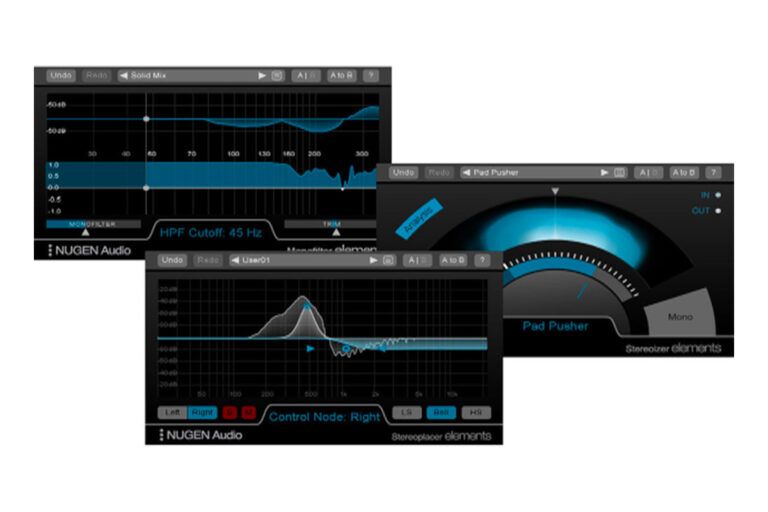
    Leeds, U.K.-based Nugen Audio have a small collection of tools that can help put a few more tricks up your sleeve when things aren’t working out as well as might be. Called Focus Elements, it’s a trio of audio plug-ins, each designed to address a very specific mixing challenge in the simplest, most direct way possible. 

    “Focus” is a great name for the trio, as that’s precisely what they provide: methods to help focus your mix. And adhering to a common naming convention, “elements” refers to the fact that these three plug-ins are simplified versions of three “big-iron” offerings of the same names that Nugen Audio has in their product line-up. While the company stripped back the feature set — and the price — what remains are powerful tools for any producer, and that I’ve found especially helpful with EDM. Let’s dig into each. 

    Monofilter 

    The basic goal of Monofilter is ensuring that the very low end of your mix is optimized to take maximum advantage of the available audio energy. The theory behind its operation is that low-frequency sounds are not particularly directional, so having any stereo information in that part of the frequency spectrum is not just unnecessary but can actually be detrimental to audio reproduction in the listening environment.  

    Monofilter tweaks the low end, resulting in a more focused result that maximizes the power and impact of the track within the stereo field, and helping avoid results that sound weak or flat.  

    Monofilter can be used on the master to correct the entire mix or can be used on individual tracks to achieve results that are otherwise difficult or impossible. One use case Nugen suggests is cleaning up the results of stereo-based effects on a track by centering the low end back into place to maintain its energy. Simply dropping it in as the final step in the effects chain and tweaking the simple settings can help ensure a solid result.  

    Monofilter includes an analyzer within the interface, so you visually see problem areas as you work to address them within the interface.  

    Stereoplacer 

    The Stereoplacer plug-in has a related set of capabilities, allowing you, in short, to pan in the stereo field by frequency range. Like Monofilter, it’s done within the context of visual analysis, so you can see both potential issues and the effects of your tweaks. 

    To give you a sense of what it can do, a particularly intriguing idea Nugen suggests in the manual for Stereoplacer is panning a bassline. Bass sounds, whether a bass guitar or a synthetic equivalent, are nearly always composed of a blend of frequency components, with some truly on the bass end of the spectrum, with other elements (like the attack) closer to midrange. If you want to pan a bass track, the low end moves in the stereo field, too, weakening its impact.  

    With Stereoplacer, you can leave the low end in the stereo center where it should be, while moving the higher frequency elements in the stereo field, positioning it where you want it without watering it down.  

    Frequency-specific panning has a number of other interesting possibilities depending on the source material; you could, for example, take a single synth line and pan just a portion of the overall sound, for example, for an interesting feel, or to get it out of the way for other parts of the mix. 

    Stereoizer 

    Of the three plug-ins included with Focus Elements, Stereoizer is perhaps the most fun – and most compelling. In short, it lets you widen the stereo field, and while you could use it on the master, it shines when dropped onto individual tracks that are getting lost in the mix. 

    I loaded a recent project into Ableton Live as a test bed for Focus Elements. A particular synth line in the mix was certainly present in the final result, and I wasn’t unhappy with the overall sound. But when I dropped Stereoizer onto that synth track and dialed up the level while listening, I was, in short, amazed.  

    The synth line “popped” without crowding anything else out, changing the entire character of the mix itself. My mind swam with possibilities for those times when a soloed synth sounded great, then proceeded to disappear in the context of the greater mix, no matter what I tried.  

    The manual for Stereoizer offers a number of interesting use cases, but one I found particularly interesting is using it to create space in a mix for vocals and leads. As the manual notes, pads, guitars and other instruments can sometimes conflict, and using EQ, pan and level adjustments alone doesn’t always provide an optimal result. Stereoizer on these tracks can be used to simplify that process.  

    One thing I would echo from the manual, and that is to take it easy with this plug-in. It can indeed be tempting to drop it into a track, max it out, and take in the incredible sounding results. But like any effect, misuse or overuse can turn a very useful tool into a disaster in the making.   

    Conclusions 

    Nugen Audio’s Focus Elements – $99 for the bundle of three plug-ins, $49 for each individual plug-in – provides a trio of tools that appear at first to have a very narrow mission, one perhaps with somewhat questionable value. But despite the seeming simplicity, they’re already proving themselves to be essential tools in my mixing arsenal. Providing subtle but powerful results, at an affordable price point ($99 for the bundle), I’m quite sure they’ll end-up being used on myriad projects in the years to come.  

    If you have any questions for Wesley Bryant-King or the Studio Sessions column, please send them to  

    If you have any questions for Wesley Bryant-King or the Studio Sessions column, please send them to djlife@hazanmediagroup.com.

    To check out more gear reviews, click here.

    Focus Elements Nugen Audio

    Related Posts

    Big FX: Eliminator Lighting Releases Elektron Bar FX

    Playtime: Novation/American Music & Sound Releases Novation Play

    Akai Professional MPC Sample: Beatmaking Enters a Portable New Era

    The O3: Spectrasonics Drops Omnisphere Version 3

    PreSonus Unveils StudioLive SE Rack Mixers for Live & Studio Workflows

    How to Make Your Website Speak to AI (Without Breaking What Already Works) 

    Comments are closed.

    Latest Posts

    Don Diablo Launches ‘Restore Local Sessions’ With “Lete Sound” (ft. Ben Pol & Juliani)

    April 3, 2026

    Steve Aoki & Sebastian Maniscalco Turn Nightlife Chaos Into a Dance Anthem

    April 3, 2026

    Beyond Wonderland SoCal Announces ‘27 Return

    April 2, 2026

    Big FX: Eliminator Lighting Releases Elektron Bar FX

    April 2, 2026
    Facebook Twitter Instagram
    • About
    • Digital Editions
    • Subscribe
    • Contact
    • Privacy Policy
    © 2026 DJ Life Magazine

    Type above and press Enter to search. Press Esc to cancel.

    Manage Consent
    To provide the best experiences, we use technologies like cookies to store and/or access device information. Consenting to these technologies will allow us to process data such as browsing behavior or unique IDs on this site. Not consenting or withdrawing consent, may adversely affect certain features and functions.
    Functional Always active
    The technical storage or access is strictly necessary for the legitimate purpose of enabling the use of a specific service explicitly requested by the subscriber or user, or for the sole purpose of carrying out the transmission of a communication over an electronic communications network.
    Preferences
    The technical storage or access is necessary for the legitimate purpose of storing preferences that are not requested by the subscriber or user.
    Statistics
    The technical storage or access that is used exclusively for statistical purposes. The technical storage or access that is used exclusively for anonymous statistical purposes. Without a subpoena, voluntary compliance on the part of your Internet Service Provider, or additional records from a third party, information stored or retrieved for this purpose alone cannot usually be used to identify you.
    Marketing
    The technical storage or access is required to create user profiles to send advertising, or to track the user on a website or across several websites for similar marketing purposes.
    • Manage options
    • Manage services
    • Manage {vendor_count} vendors
    • Read more about these purposes
    View preferences
    • {title}
    • {title}
    • {title}