

AI has been barging into practically every corner of society in the past few years, music production included. Not a day goes by without some new headline noting a new AI frontier, or a newly realized AI failure. And there’s little question that the music industry has been turned on its head by products like Suno. Those of us who create music might understandably be wondering why we should bother; it’s certainly crossed my mind a few times.
But, in general, I prefer to ponder the ways that AI might help those of us who are full of ideas and a desire to make music, but whose own musical chops in one area or another might be wanting. Which is perhaps why vocals are, in my view, where the conversation gets especially interesting. The appeal is obvious: the ability to sketch a vocal idea quickly, build harmonies without stacking endless takes, or hear a part performed with a different character (or by a different gender, even). The trick, of course, is separating novelty from something that can actually earn a place in a working studio.
Latvia-based Sonarworks is hardly a newcomer to serious studio tools. Long known for SoundID Reference – the excellent studio monitoring calibration solution I’ve used for years, and previously reviewed here — the company has built much of its reputation around solving practical problems for people who make music. With SoundID VoiceAI, Sonarworks turns its attention from accurate monitoring to vocal transformation, offering a DAW plug-in that can convert a recorded voice into another singing voice, generate backing-style vocal layers, and even transform melodic vocal input into instrument-like results, all inside a conventional production workflow. It supports AU, VST3, and AAX formats, so it slots neatly into any modern studio setup.
Sonarworks scores huge points with me in an area that I often grouse about in my reviews: The insistence by so many plug-in makers these days to roll-out software through a subscription model. As I’ve said many times, being nickeled and dimed every single month for streaming video, streaming audio, office software, creative software, cloud backups, online publications, web hosting, fitness apps, alarm systems, printer ink, and now even to unlock “premium” features in my own automobile, is getting tiresome and expensive – making most of us resentful in a time of continuing economic uncertainty. Enough is enough, and that’s apparently a message Sonarworks has taken on-board.
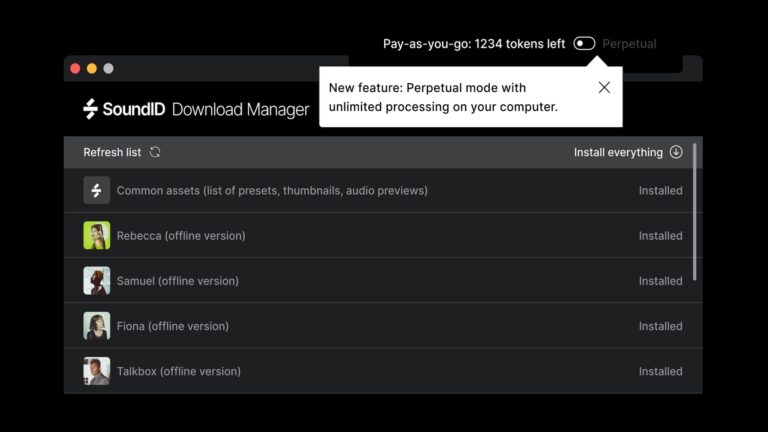
The company gives you the option: A perpetual license path centered on local processing, and a separate pay-as-you-go cloud option for those who’d rather offload the compute. That split, as I discovered, turns out to matter not only for cost, but also for workflow and practicality in a home-studio environment, and given the pricing involved here (more on that later), this review is already a positive one without even talking about the software itself.
But, of course, the software is important, so let’s dig-in.
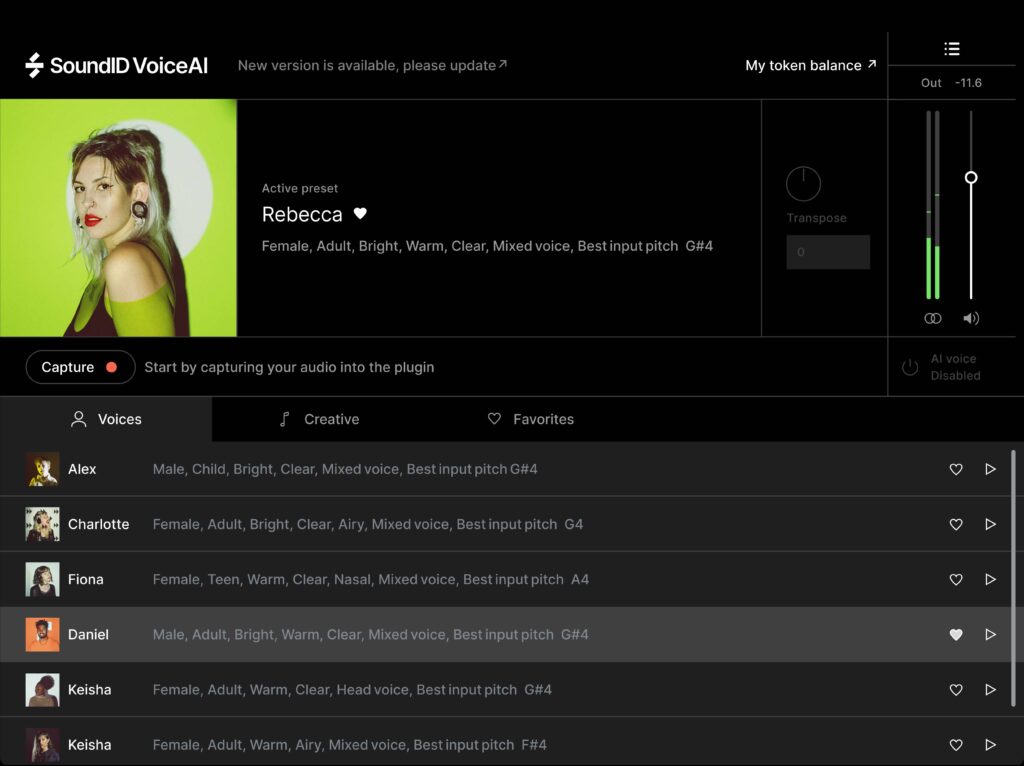
First Impressions: SoundID VoiceAI makes a smart first impression simply because Sonarworks has kept the concept razor-focused. It’s a plug-in meant to live in your DAW, capture a vocal performance, and turn that performance into something else – without forcing you to leave your session. The product is built around voice presets, creative or instrument-style, and, as I said above, two processing approaches: local or cloud.
That licensing split is one of the more interesting aspects of the product. The perpetual license is a one-time $99 purchase and unlocks unlimited local processing on your own CPU. The pay-as-you-go option, by contrast, uses cloud processing and token packs priced at $19.99, $39.99, and $69.99, corresponding to roughly 120, 300, and 600 minutes of audio processing. Cloud mode also includes the full preset catalog and expansion packs by default, while perpetual users get the factory library locally and can buy genre-focused expansion packs separately.
The local-versus-cloud decision also affects performance, but not in the way I expected. Sonarworks says the perpetual mode is significantly faster than pay-as-you-go, and Unison Mode, the feature designed for AI-powered vocal double-tracking and stacked unison-style backing vocals, is available only in perpetual mode, not in cloud processing mode. Sonarworks also notes that local processing requires downloaded preset data and at least 4 GB of free RAM, while cloud mode shifts the heavy lifting off the machine. That’s the sort of distinction that actually matters in the real world; some AI products hide the practical tradeoffs, while VoiceAI puts them right on the table.
Hands-On: My first attempts at using VoiceAI weren’t particularly impressive. What I didn’t at first understand is that each “voice” in VoiceAI expects a specific input pitch center in order to perform well. That relationship between a singer’s natural vocal range and the pitch expectations baked into AI voice-conversion models is the key to getting good results.
Taking a step back, and recalling that my own singing voice is a baritone, I decided to do a quick range check, something I’d not done in probably a decade or more. What I found is that my usable chest range is roughly between F2 and C4, with a natural vocal center almost exactly at C3. That number turned out to be surprisingly important, because it sits noticeably lower than the input pitch centers that the voices in VoiceAI suggest.
That mismatch explained the artifacts that I initially heard when feeding my natural voice directly into VoiceAI. Many of the male voice models in the plug-in suggest an ideal input pitch around the mid-to-upper G3 area. With my own vocal center seven semitones below that, the system was being asked to stretch both pitch and formant relationships simultaneously. The result was the familiar collection of telltale AI vocal artifacts: metallic shimmer, unstable vowels, and occasional synthetic coloration. Once that relationship between input pitch center and model pitch center became clear, the solution was straightforward.
I dropped an instance of Ableton Live’s Auto-Shift effect into the effects chain ahead of VoiceAI, and initially, bumped up my recorded vocal five semitones, moving my C3-centered performance into roughly the F3 region – close enough to the model’s expected G3 input that the AI no longer had to perform extreme reconstruction.
The improvement was immediate. Running that pitch-corrected vocal through VoiceAI produced a result that sounded far less like a re-tuned version of my own voice, and much more like a completely different singer performing the same part. The phrasing, breaths, and timing remained recognizably mine, as expected with voice-conversion systems that preserve performance features, but the timbre itself was convincingly transformed. Even vibrato and sustained notes carried through naturally, suggesting that the plug-in tracks and preserves pitch modulation rather than attempting to synthesize it independently. In other words, the AI wasn’t correcting my performance; it was rebuilding the vocal identity on top of it.
Pushing the experiment further, I raised the vocal a full octave using Auto-Shift, and tried converting it to a female model, a process that revealed both the strengths and limits of the technology. The transformation remained coherent, but enough of the original performance style persisted that it produced a voice that sat somewhere between clearly female and stylistically androgynous.
That outcome illustrates a broader truth about current voice-conversion tools: they can convincingly replace vocal identity, but they rarely overwrite the musical character of the original singer. In practice, that’s not necessarily a flaw. It means the technology works best when treated as a performance translator rather than a magic voice generator, aligning the singer’s natural pitch center with the model’s expectations and letting the AI handle the rest.
In a crazy stress test, I rendered that audio out, and brought the render back into Live, once again pitching-up (about five semitones), and applying one of the higher female voices. As you might imagine, that introduced a lot of artifacting, in large part due to my low, male performance and vocal style simply not translating to a female voice two octaves or so higher. Nevertheless, the software actually performed pretty admirably.
I used only local processing in my testing, and frankly, it was better than I expected. On my Apple M2-based Mac, processing typically took only a couple of minutes or so, which made experimentation feel practical rather than tedious. That matters, because VoiceAI encourages iterative work: capture, process, transpose, reprocess, compare. Sonarworks says cloud processing takes about 2.5x the duration of the source audio, while perpetual local processing is faster, and my own experience with local mode certainly supports the idea that the perpetual route is the more fluid one for people who intend to use the plug-in seriously. Honestly, I was surprised; in previous experiments with stem separation models local vs. cloud, cloud was always faster.
In any case, I spent most of my time in the straight vocal-conversion lane, but VoiceAI’s other modes do broaden its appeal. Unison Mode is designed to create up to eight AI-powered unison voices from a single take, with controls for pitch and timing variance and stereo spread. A quick pass through that side of the plug-in suggested a useful tool for thickening hooks and creating modern stacked vocal textures without cutting endless doubles. And the instrument-conversion side, where you turn humming, beatboxing, or melodic vocal input into instrument-style parts, is a genuinely clever extension of the concept, especially for sketching ideas when inspiration arrives faster than one’s willingness to reach for a keyboard.
And one more thing that I have to add: Sonarworks is committed to the concept of Ethical AI, something I feel to be important as AI-based tools continue to seep into creative workflows. The company’s Katrina Cabule penned an interesting post on the subject, available on their website; it’s worth a read if you have concerns, as I do, around the topic.
Conclusions: SoundID VoiceAI is one of the more practical AI music tools I’ve tried, precisely because it understands where it belongs: inside an existing studio workflow, serving the creator rather than trying to replace the musician. It won me over less as a gimmick than as a genuinely useful idea generator and production aid. The best results, at least in my experience, came when I treated it not as magic, but as a system with rules especially around pitch center and source preparation.
VoiceAI won’t make every singer into every other singer (as much as I’d love to transform my own voice in a pop-friendly tenor, and eliminate some of its roughness), and it doesn’t erase the fingerprints of the original performance. But used intelligently, it can do something arguably more valuable: translate an idea into a convincingly different vocal identity, quickly enough and well enough to keep the creative process moving. And in a modern production environment, that’s a trick worth having close at hand.