

“We’re now in the era of syncing, formats, and firmware and that means DJs need to be part tech support, part librarian, and still 100-percent performer.”
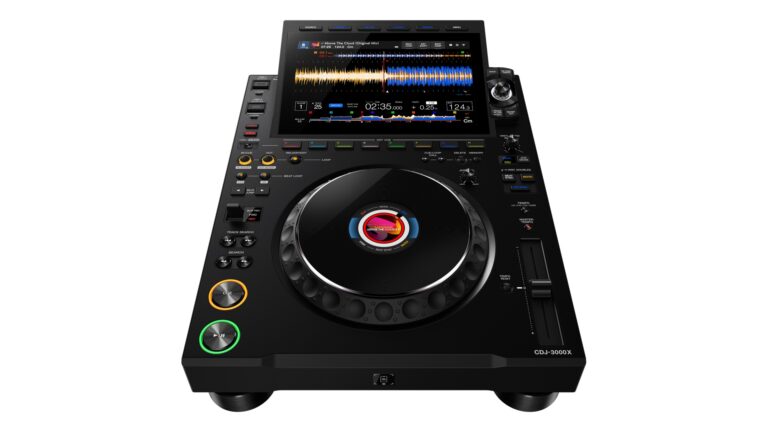
I am blessed to have been DJing for a long time. I’ve played on Pioneer DJ gear like the CDJ-500s, the CMX-5000s, and everything in between – and now I’m often playing on some version of CDJ-3000s (when a venue has them). Needless to say, I am pretty looped in when it comes to tech.
So, when I heard other DJs who play from USB sticks or SSDs start to complain, I didn’t understand. They show up to a gig, plug in their drive, and boom… playlists are gone. No tracks, no folders, just a blank screen. One minute their playlists are ready to go, the next their library looks empty.
So what happened to them and not to me?
The latest AlphaTheta firmware updates for the CDJ-3000 and CDJ-3000X quietly flipped a switch behind the scenes, and that switch decided which version of your rekordbox database the player reads. And, for a lot of DJs, that meant nothing showed up at all.
AlphaTheta has since pulled the update, but the damage was done. See, this wasn’t just a bad update; it exposed a deeper problem every USB-based DJ needs to understand before walking into their next set from here on in!
Let’s look at what happened, and more importantly how to make it not happen to you:
The Short Version (aka Why Your Drive Looked Empty)
When you export from rekordbox, it doesn’t just dump your tracks onto the USB like you would with pictures or documents like you would using Explorer. It also writes out a database. Basically, the brain that tells the player what songs you have, where your cue points are, and what playlists exist.
Lately, rekordbox has been writing two database types:
- Device Library (Legacy): The OG format older players still use.
- Device Library Plus (or “One Library”): The newer, shinier, cloud-friendly version.
The new CDJ firmware started defaulting to that newer Plus format, ignoring the older one. Problem is, if that Plus database on your drive wasn’t synced or was blank, or basically you never told rekordbox to turn your OG library into the newer one, the CDJ-3000 unit wouldn’t fall back to the old one. Thus, your entire library looked empty, even though the music was still there. So yeah, all your music was still on the stick, but the player just ignored it.
AlphaTheta pulled firmware 3.30 and told venues to roll back to 3.20 until things get sorted. If you’re playing anywhere soon, ask what version they’re running. It matters.
How rekordbox Actually Exports
To truly understand this, I reached out to my friend MixMaster G over in The Netherlands. He is the author of the DJ Conversion Utility Tool. It is a program meant to move libraries from one software to another.
Here’s the quick version of what happens when you export to a USB drive:
- Your music files go into artist or playlist folders – easy to see.
- Your metadata (cue points, loops, etc.) go into a hidden “PIONEER” folder.
That hidden folder is what the player really reads. It tells the deck where your tracks are, how they’re organized, and what memory points you set.
Now, rekordbox used to write just one database. Now it writes two! The new one (Device Library Plus/One Library) is for cloud and syncing across machines. That’s cool, right? AlphaTheta’s innovating. But, it’s cool until one database gets out of sync or doesn’t write properly, and that’s exactly what’s been happening.
Why Device Library Plus Exists
Now, this is not a fault or something AlphaTheta messed up on. It’s actually progress.
Device Library Plus showed up around rekordbox 6.8.5. It’s a cleaner, faster format built for the future, especially if you use multiple computers or the cloud. I myself use two laptops and a desktop computer.
The idea was that rekordbox would write both formats to your drive so you could plug into any set-up and play.
That was the plan.
But in the real world? Syncs failed. Exports got interrupted. DJs are busy. And some drives ended up with mismatched or missing databases. When the CDJ-3000 firmware defaulted to the new format, it only saw the empty half.
How Things Get Broken
A few easy ways your drive can go bad – spoiler… 75-percent are your fault:
- You cancelled one of the export progress bars.
- You exported from an older rekordbox version that didn’t make the new database.
- You synced drives between computers and one overwrote the other.
- You copied your music, but forgot or didn’t know about the hidden “PIONEER” folder.
When that happens and the player defaults to the Plus version, it won’t fall back to the OG database. That’s why your playlists vanish, even though the files are still there.
What to Do If You Plug In & See Nothing
If you walk into a gig and your USB looks empty, don’t panic. Here’s your move:
- Ask what firmware the club’s players are running. If it’s 3.30, tell them to roll back to 3.20.
- On your own laptop, install rekordbox 7.2.6 (or newer). It can rebuild or sync the new database properly.
- Sync and test your drives before the gig. Don’t try to fix it last-minute.
- Don’t fix it on someone else’s computer. If sync settings are on, you could overwrite your good data with bad data in seconds. And if you must use someone else’s rekordbox? Turn off sync, export manually, and check that your playlists and track counts match before you unplug.
Long-Term Fixes (Because This Isn’t Going Away)
This isn’t just about one bad firmware. Let’s be real, One Library is the future. Moving libraries between rekordbox, Traktor, or djay Pro is just how it’s going to be. You can complain about it, but it’s here to stay. So, if you want to stay gig-proof, here’s what you should be doing now… to stay ready for any booth:
- Update rekordbox. Stop using versions 5 or 6. Make sure your version supports One Library.
- Audit every stick you gig with. Make sure playlists and track counts match what’s in rekordbox.
- Backup everything – hidden folders included. That “PIONEER” folder is your library.
- Keep a single “master” rekordbox library. Sync everything there first.
- Always export from your own rekordbox. Borrowing laptops is how libraries die.
- Clone backup sticks. A few cheap drives can save you a lot of stress.
Format Your Drives Right
A Quick Refresher:
- FAT32 works everywhere – slower, smaller file limits.
- HFS+ (Mac OS Extended Journaled) is faster on Macs, but hides the metadata differently.
Whichever you choose, always copy hidden files when copying or backing up. If you don’t copy that hidden PIONEER folder, you’re not backing up your library – you’re just copying music files.
Test, Don’t Guess
If you don’t have CDJ-3000s at home, test smart:
- Get to the venue early and plug in.
- Ask your local Guitar Center or DJ store to test on their CDJ-3000, CDJ-3000X, XDJ-AZ, OMNIS-DUO, and or OPUS-QUAD. All of these support Device Library Plus (Now Open Library)
- Rent studio time before a big show in a studio with 3000s
It’s worth an hour now to save you the headaches later.
One Library Is Coming Whether You Like It or Not
So, rekordbox is moving everything toward One Library. Cloud, USB, mobile, the works. The tradeoff? Older gear like the CDJ-2000NXS2, released in February of 2016, might not read that new database in the future.
And here’s the kicker: The conversion is mostly one-way. You can move to One Library, but you can’t easily go back. So, if you play on mixed setups (old and new), double-check your drives and test them before every gig.
Pre-Gig Checklist
✅ Update rekordbox
✅ Confirm your playlists and tracks are in sync
✅ Back up your entire drive (hidden folders included)
✅ Clone a second drive for safety
✅ Test on CDJs before showtime
✅ Ask venues to stay on firmware 3.20 for now
The Real Talk: What This Means for DJs
Talking to MixMaster G, I think we both agree: This is 10-percent AlphaTheta and 90-percent DJs. AlphaTheta has put the notices up. “Hey, update to Device Library Plus.” But they never got stern with DJs to do so, nor warned this could happen. DJs, for their part, beg for modern features, but are happy to stay on older software because of “muscle memory” or whatever excuse they come up with to not update.
The good news is. this whole situation is fixable. MixMaster G posted a quick fix on his Instagram (@atgrnl). However, this is also a reality check. The days of “I exported once, I’m good forever” are gone. We asked for it… and finally, the gear’s getting smarter, but that means our prep game has to be tighter!
We’re now in the era of syncing, formats, and firmware and that means DJs need to be part tech support, part librarian, and still 100-percent performer. Stay updated, back everything up, and test before you plug in. That way, the only thing empty at your next gig is the dance floor before you start your set.
Have you run into the “empty USB” issue yet? DM me (@djmikemarquez on all social media) — I’d love to hear how it went down and what saved your night.