

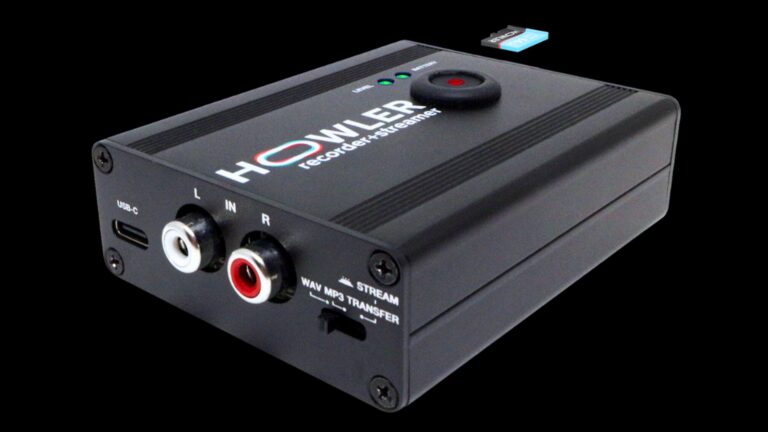
“The Howler Recorder + Streamer solves one of the biggest issues DJs face: clean, high-quality audio without a messy setup.”
Back in 2020 while the world was locked in quarantine, I, like most DJs, first decided to DJ on Instagram, and then settled on Twitch as my platform. However, living in NYC – the greatest city in the world – I decided to do it differently: I would stream outdoors and take advantage of Gotham’s unique surroundings.
I live-streamed outdoor DJ sets for over a year. And as amazing as that was, and even though I have video of me doing that, the one thing I do not have is my audio from those sets. Yes, I could record the audio from the DJ software, but my mic wasn’t piped into the final recording. And although there were some devices that could help with getting the audio to the stream, being outdoors, I did not need a mess of cables to do it.
Back in 2020, I was tired of complicated set-ups when I just wanted to record my DJ sets. And unless I was using a bigger soundcard, I knew I couldn’t stream live with pro-level audio. Those were just the breaks.
Fast forward to 2025 and streaming is still a thing, as are real DJ gigs – thank God! That said, now there’s a device that could record my club sets, work as a soundcard when I stream, and do both in pristine audio – no, I didn’t scream to get my hands on it for a review, I howled!
Designed with DJs in mind, the Howler Recorder + Streamer combines the functionality of a recorder and an audio interface inside a well-built housing that fits in your palm, making it easier than ever to capture your performances and broadcast them live with the minimum amount of fuss.
Features & Design
The Howler is a small, super-sturdy box that truly packs serious functionality into its portable form factor. With its all-metal casing, it feels like a professional piece of kit – think of a small version of the old Serato boxes – built to withstand the demands of a DJ’s life on the go. On the top, it features a large record button, a battery meter and a level meter. The device is built to be simple and intuitive, perfect for use in the often-crazy environment of the DJ booth or at home.
On one side, you’ll find a USB-C port, RCA inputs, and a mode switch that toggles between recording and streaming – we will get to that switch in a minute. The other side houses the power button, a micro SD slot with a pre-installed 64GB microSD card, and a pair of through RCA outputs to run it through to a pair of speakers if you are at home. This thoughtful layout ensures you have all the connections you need at your fingertips, no matter the situation.
USB-C Port: Versatile Connectivity
The USB-C port serves several key purposes:
- Charging. The Howler charges fully in a few hours and offers an impressive 30 hours of battery life. That is beyond enough to last through multiple DJ sets.
- Audio Interface. When plugged into a laptop, tablet, or phone, the Howler acts as a 2-in audio interface. This means you can stream live with clean, high-quality audio directly into your streaming software, such as OBS, Streamlabs, etc., delivering 24bit 48kHz lossless audio for pristine sound.
- File Transfer. After recording on the included microSD card, simply connect the Howler to your computer via USB-C. It appears as an external drive, allowing you to drag and drop your recordings without removing the microSD card. Everything about transferring files is designed to be easy.
Apple Devices
For all Android and newer iPhone models (iPhone 15 and later), the Howler works seamlessly with a standard USB-C cable. However, for iPhone users with models prior to the iPhone 15 (or basically those with the lightning ports), the Howler requires a camera connection kit to ensure proper signal flow. The company offers an affordable version of this adapter, which acts like Apple’s Camera Connection Kit, but at a lower price.
If you plan to use the Howler with a phone or tablet and want to keep your devices charged during long sessions, there is a special 2-in-1 USB-C cable available. This cable simultaneously powers your mobile device and trickle charges the Howler, so you never run out of juice mid-set. But in my testing, there has been no need. The battery life is superb.
Recording/Streaming/Videos
Getting started with the Howler is straightforward – literally taking seconds to set up. To power on, press the button on the side. The battery meter will indicate the current charge, and the level meter shows your audio input levels.
To record your set, select either WAV or MP3 format using the switch, then press the large record button on top. The button flashes to indicate recording is in progress. Press it again to stop recording, and your audio is saved to the microSD card in 24bit 48kHz lossless quality, if WAV is selected.
(Although the Howler comes included with a 64GB microSD card, I highly recommend going higher to a 256GB card, especially since WAV files take up a lot of space. According to Howler, there is no reason why cards larger than 256GB won’t work. They do suggest to reformat your SD card to FAT32 for 64GB and larger cards.)
When streaming, simply toggle the mode switch to “stream.” This disables recording and sends live audio directly through the USB-C connection to your streaming device. Your streaming software will recognize the Howler as an audio input, delivering clean, professional sound without fuss.
One bonus here is for those DJs that love making routine videos. You can use the Howler with your native camera/video app on your phone. This allows for uploading DJ videos to YouTube and skipping the painstaking process of syncing music to video. You can edit your videos as normal without a sync. To do this, just set the Howler to livestream mode and connect to your phone, launch your camera app and make a video. The audio in the video comes from Howler similar to a wireless microphone would.
Why Every DJ Will Love the Howler:
- Superior 2-In Audio Interface for DJs. Many DJs appreciate the convenience of a 2-in audio interface to get high-quality audio into their computers or mobile devices. The Howler excels here, offering a rugged, portable solution that fits neatly alongside your DJ gear. Unlike larger, production-focused audio interfaces that are bulky and over-featured, the Howler is designed specifically for the DJ’s lifestyle — compact, durable, and exceptionally easy to use.
Two popular alternatives in this space have been the Evermix box and the iRig Stream. While both served similar purposes, the Howler stands out with its better all-metallic build quality and unique features tailored to DJs who want to both record high quality, and stream easily.
- Recording from Single-Output DJ Gear. A common challenge DJs face is recording sets when their equipment only has a single audio output. The Howler solves this by providing through RCA outputs, allowing you to plug it into the record output of your DJ gear and simultaneously send audio to the venue’s sound system. This means you can capture your entire set without interrupting the party.
Think of it as a modern upgrade from the old days when DJs would use cassette decks to tape their parties. Now, you can record hours of your performance in high quality, 24bit 48kHz lossless audio, then edit and share the recordings later.
- Seamless DJ Livestreaming Set-Up. If you live-stream your DJ sets, the Howler is a game-changer. Many DJs use one laptop for DJing software (like rekordbox) and another for streaming software (like OBS). The Howler connects to the streaming laptop via USB-C and appears as a clean audio input source. This set-up simplifies routing your DJ audio and microphone chat directly into your livestream without complicated audio routing or additional hardware.
A Few Issues
While the Howler offers excellent functionality, there are a couple of minor limitations to be aware of:
- No simultaneous recording and streaming. Remember when I mentioned that Mode switch earlier? You have to choose either record (WAV, MP3) or stream mode. Yes, if you’re streaming through a laptop, you can still record your set in your streaming software as a workaround. The company suggests chaining two Howlers after each other by its THRU output, one for recording, and one for live streaming. But, currently, Howler’s tech is unable to live-stream and record at the same time.
- Extra cables for certain iPhones. If you use a Lightning iPhone, you’ll need the camera connection kit adapter, which is an additional purchase. This is a minor inconvenience, but more of Apple’s fault than anyone else since it is standard for most older Apple audio devices.
- Price point: At $219, the Howler is certainly not the cheapest option on the market. However, this price includes a valuable package: the Howler itself, a free 64GB microSD card, free shipping, and a two-year product warranty. Considering it’s a boutique product made in small runs with quality components and a very specific, powerful DJ-focused feature set, the overall value proposition is very strong and the price is justified given the comprehensive offering.
Should You Get the Howler Recorder + Streamer?
The Howler Recorder + Streamer solves one of the biggest issues DJs face: clean, high-quality audio without a messy setup. Its rugged, all-metallic build, long battery life, and versatile connectivity make it a standout choice for DJs who want a simple yet powerful audio interface and recorder for both home use and on-the-go.
As a radio DJ, club DJ, and a former streaming DJ, I can wholeheartedly say, whether you’re recording from single-output DJ gear, streaming live to your fans, or simply want a hassle-free way to capture your performances anywhere, this “little box” howls to get your attention.