

Nearly eight years ago, I had the opportunity to build a new home. I’m not sure it’s something I want to put myself through a second time, but I nevertheless don’t regret it, and key among the reasons was the opportunity to customize a basement bedroom to serve as a dedicated home-studio space.
While it sounds straightforward enough, one of the biggest challenges involved the home studio build-out was room treatment — the term people use to refer to “tuning” the monitoring environment. In short, it’s making sure that audio frequency ranges are neither tamped nor accentuated by the design of the room, its finishes, or furnishings. Much of the process involves installing various types of sound-absorption material to control reflections. But short of hiring a team of experts and spending a small fortune, there’s not much of a chance of achieving perfection with a more cost-effective DIY approach that most people (me included) likely take to creating a home studio.
From my very first attempts at mixing and mastering in my shiny new studio, I knew that things weren’t perfect. Good? Maybe. Perfect? Definitely not. Thankfully, some years after we moved in, I was introduced to Latvian software company Sonarworks and its offering, Reference 4. I was, to put it mildly, an immediate, diehard fan. Not long ago, Sonarworks rolled out a new version of its solution, with a new name: SoundID Reference. Given the difference that the old Reference 4 made in my studio work, I was anxious to give SoundID Reference a try, and recently had the chance.
So, what is it, exactly? In short, SoundID Reference is comprehensive package of room analysis and compensation tools that both accurately measure how your monitoring environment behaves through a combination of hardware and software. Then, via software, it provides inline adjustments for the audio, allowing you to hear a corrected, true, and accurate version of the audio you’re producing, mixing and/or mastering — free of the frequency peaks and valleys caused by the room itself (or as I’ll explain, the headphones you might be using).
Room Analysis
It all begins with room analysis, and the complete SoundID Reference package includes an individually numbered, calibration microphone. After downloading, installing, and activating the software, you start the analysis process with the microphone connected to your audio interface. After entering the mic’s unique serial number, the software will download its profile and guide you through the process.
One of the best parts of Sonarworks’ solution has always been the software, and it appears that the company spent a considerable amount of time making SoundID Reference even more robust, both in its look and feel, as well as its function. The analysis wizard includes video clips that show you visually what to do, along with polished graphics and easy-to-follow instructions.
It uses audible pings and measurement of sound wave propagation delays to know where in space the microphone is located, initially making uncannily accurate measurements of the distance between the left and right monitors, and the distance to the speakers from your listening position. It then takes you through a 37-point room analysis process, where you move the microphone around your monitoring environment to specific physical points (you’re guided by interactive visuals in the software), and using frequency sweeps, the software learns the response characteristics of your monitors and the room itself.
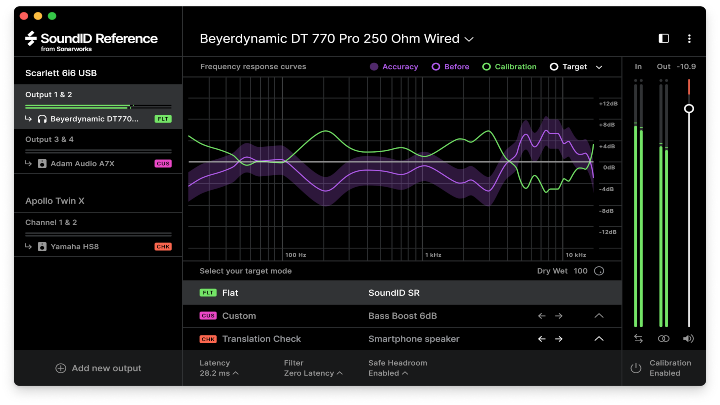
When you’re finished, the software displays a visual response curve, and prepares an opposing correction curve that’s then used for correction.
Audio Calibration
The SoundID Reference solution includes a two-part system for calibrating audio. One, appropriately called systemwide, applies the correction curve to all general computer audio, in the process appearing to the operating system as an audio device itself. It allows routine OS audio from applications (audio players, streaming services, etc.) to be corrected.
The second is a DAW plug-in, which is placed on the master track of your projects. Because DAWs “talk” directly to the audio interfaces, this allows correction to take place right at the source during your various audio production steps. Before rendering a track in your DAW, the plug-in must be bypassed so the resulting audio isn’t colored by your own room corrections being applied to the output files.
It’s worth noting that SoundID Reference can’t make up for shortcomings in your studio monitors’ frequency response range. If the low-end of your monitors only goes down to (for example) 55Hz, SoundID Reference calibrations aren’t going to magically extend that lower; only adding a studio subwoofer can. What it can do is boost or cut the areas of the audible frequency spectrum that are overly absorbed (or overly reflected) by your room.
While the microphone and analysis software are essential for room correction, for those doing mixing and mastering with headphones full- or part-time, Sonarworks has you covered, too. SoundID Reference includes support for a broad and always growing array of headphones, including models designed specifically for studio work, as well as popular general models. As of this writing, it offers 532 different headphone profiles in the software. Sonarworks has analyzed countless headphone examples in its labs, and for each supported model, an average response curve profile has been created and can be applied in the same way as the monitor profiles created during the analysis process.
What’s New?
For the most part, everything I just outlined applied equally to the company’s prior version, Reference 4. But Sonarworks has added some interesting new functionality to the solution in the move to SoundID Reference.
On the surface, it’s hard to miss that the company has done a slight rebranding. From the packaging of the product to the software user interface, everything is refined, polished, professional, and brand-forward — as if they may have borrowed a page from Apple’s playbook. It’s clear the company has an eye for details that carries over to the software itself and the attention paid to creating a slick, inviting user experience.
But the changes are not just skin deep. New in the software is an ability to create custom target profiles in addition to the product’s standard “flat” profile. With the new capabilities, you can selectively apply corrections starting at specific thresholds, or tweak things as you see fit with tools typical of EQ plug-ins.
Also new are what the company calls Translation Checks. They’ve created a series of profiles designed to shape the audio to emulate a number of different listening situations, including various car-audio environments, home-theater environments, and even mobile devices and popular earbuds. While most producers will mix and master based on an accurate, flat listening environment — the main point of SoundID Reference, actually — being able to preview a mix in other environments can nevertheless influence mixing and mastering decisions. Doing these previews in software, rather than rendering a potential mix and physically taking it to other environments or devices to see how it sounds, is a massive time-saver.
Also new are several improvements for users on Windows computers. As a Mac user, I’ll confess that I didn’t dig into these improvements personally. But the two operating systems have fairly different technology models for audio handling, and the company appears to have invested a lot of effort in enabling Windows users to take maximal advantage of SoundID Reference and its myriad benefits.
Conclusions
I’m a confessed fan of Sonarworks’ studio solutions; I use them in every studio monitor review I do, as a way to confirm factory-stated frequency response. It’s also a key tool in my own home studio day-to-day, and it’s great to see work and refinement continuing on what was already a very capable way to ensure the accuracy of one’s mixing and mastering efforts.
SoundID Reference offers a range of improvements for existing users, starting from a low $39 upgrade price point for headphones – the full-version upgrade is $89. Of course, now with its improvements, Sonarworks provides new users more reasons than ever to get on-board. SoundID Reference is available in a “headphones-only” version for $99, with the “full speakers + headphones version,” with calibration microphone, for just $299.
In my experience, it’s a low price of entry for the long-term benefits you can achieve through its use – your mixes will truly be better for it.
To check out more gear reviews, click here.