

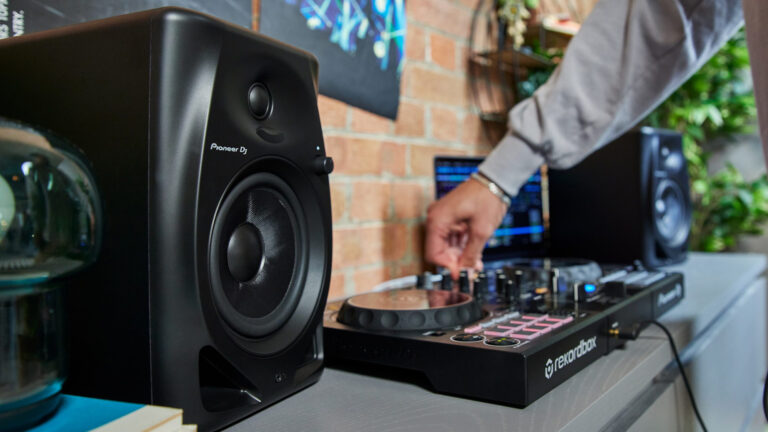
Facebook Twitter Instagram
    Trending
    • DJX ’27 Dates Announced for Atlantic City Return
    • Give Thanks Festival Reveals 2026 Lineup
    • Roland Opens U.S. Flagship Store in New York City
    • Time Warp Announces Lineup for Debut ’26 Los Angeles Edition
    • Beatport Connect LA Finalizes ‘26 Program With Expanded Artist and Industry Lineup
    • AutoTune Go Brings Vocal Tuning to Every FL Studio User
    Facebook Twitter Instagram
    DJ LIFE Magazine DJ LIFE Magazine
    • Home

      DJX ’27 Dates Announced for Atlantic City Return

      September 18, 2026

      Give Thanks Festival Reveals 2026 Lineup

      September 17, 2026

      Roland Opens U.S. Flagship Store in New York City

      September 17, 2026

      Time Warp Announces Lineup for Debut ’26 Los Angeles Edition

      September 16, 2026

      Beatport Connect LA Finalizes ‘26 Program With Expanded Artist and Industry Lineup

      September 16, 2026
    • Magazine
      1. Issues
      2. Buy Print Issue
      3. Subscribe
      Featured

      DJ LIFE Magazine – August 2026 Issue Vol.6 No.4

      By Mark MancinoAugust 10, 2026
      Recent

      DJ LIFE Magazine – August 2026 Issue Vol.6 No.4

      August 10, 2026

      DJ LIFE Magazine – June 2026 Issue Vol.6 No.3

      June 22, 2026

      DJ LIFE Magazine – April 2026 Issue Vol.6 No.2

      April 30, 2026
    • Interviews
      1. Interviews
      2. Mobile DJ Profiles
      Featured

      Mike Walter: Greatest Songs Ever? [Interview]

      By Jim TremayneAugust 27, 2026
      Recent

      Mike Walter: Greatest Songs Ever? [Interview]

      August 27, 2026

      Jason Ross: Finds His True North [Interview]

      August 26, 2026

      Roger Sanchez: Spectrum Sounds [Interview]

      August 25, 2026
    • Tech
      1. Tech News
      2. Tech Reviews
      Featured

      Roland Opens U.S. Flagship Store in New York City

      By Mark MancinoSeptember 17, 2026
      Recent

      Roland Opens U.S. Flagship Store in New York City

      September 17, 2026

      AutoTune Go Brings Vocal Tuning to Every FL Studio User

      September 15, 2026

      VirtualDJ 2026 Part 3 Pushes AI Further Into the DJ Workflow

      September 15, 2026
    • Music
      1. Music
      2. DJ Playlists
      3. Mixes
      4. DJ National Club Charts
      Featured

      10 Country Bangers for Your Wedding Playlist

      By Herbert HollerSeptember 9, 2026
      Recent

      10 Country Bangers for Your Wedding Playlist

      September 9, 2026

      10 Songs You Should Never Play at Any Wedding. Ever.

      August 19, 2026

      Above & Beyond Marks 25 Years With Career-Spanning Apple Music One Mix

      July 28, 2026
    • Events

      DJX ’27 Dates Announced for Atlantic City Return

      September 18, 2026

      Give Thanks Festival Reveals 2026 Lineup

      September 17, 2026

      Time Warp Announces Lineup for Debut ’26 Los Angeles Edition

      September 16, 2026

      Beatport Connect LA Finalizes ‘26 Program With Expanded Artist and Industry Lineup

      September 16, 2026

      JACKPOT Festival Returns to Downtown Las Vegas to Close Out ‘26

      September 11, 2026
    • Tips
      1. DJ Tips
      2. Business Tips
      3. DJ Life Lessons
      Featured

      The Modern DJ: What the Hell Do DJs Actually Do?

      By Just ChrisSeptember 10, 2026
      Recent

      The Modern DJ: What the Hell Do DJs Actually Do?

      September 10, 2026

      10 Timeless Tips: A Wedding Expert’s Guide

      August 25, 2026

      The Side-Hustle DJ

      August 20, 2026
    • Mobile DJ
      1. Mobile DJ Profiles
      2. Mobile Monday Spotlights
      3. Wedding DJ
      4. Business Tips
      5. DJX Subscribe
      Featured

      10 Country Bangers for Your Wedding Playlist

      By Herbert HollerSeptember 9, 2026
      Recent

      10 Country Bangers for Your Wedding Playlist

      September 9, 2026

      10 Timeless Tips: A Wedding Expert’s Guide

      August 25, 2026

      Mark Brenneisen: Upstate DJ Does EPIC Events [Mobile DJ Profile]

      August 24, 2026
    • DJX Show
    DJ LIFE Magazine DJ LIFE Magazine
    Home»Tech»Versatile Monitor: Pioneer DJ DM-50D
    Tech

    Versatile Monitor: Pioneer DJ DM-50D

    By Wesley KingApril 28, 2022
    Share
    Facebook Twitter LinkedIn

    I recently had the opportunity to review Pioneer DJ’s new XDJ-XZ controller (read about that here). When the trusty guy in the brown uniform dropped off the loaner unit of the controller, there was an extra box in tow with “DM-50D” printed in large black letters on the outside of the container. And indeed, inside was a pair of the company’s new 5-inch audio monitors of the same name. Well, how ’bout that? 

    Unwrapping them and setting them up at my review workstation, I was impressed with the visual design of the units. With cabinets of roughly 7-inches wide, a bit over 10-inches tall, and around 10-inches deep, they’re a good size for the typical DJ’s workspace.  

    The promise of the DM-50Ds is that they’re dual purpose; that they’re equally at home for production use and for DJ use. The company says that a switch on the back of the left monitor (more on that in a moment) changes the EQ profile of the DSP (digital signal processor) that’s built into the integrated amplifier. I was anxious to give the feature a try. 

    Getting Started 

    First things first – the approach with the DM-50Ds. Unlike most professional audio monitors, which are supplied individually as identical units for left and right, Pioneer DJ chose to configure the system with what I’d call a “desktop-computer-speakers” approach. The left monitor of the pair contains the audio and power connections, and obviously, then, the amplifier circuits as well. The left unit is ever so slightly deeper in measurement on the spec sheet, and a bit heavier as well. Common speaker wire (supplied in the box) connects the left main unit to the right remote unit.  

    I get why the company chose this route; it’s certainly less costly to produce than putting a full amplifier and power supply into both the left and right units, in turn no doubt making it possible to offer the DM-50D set at a price point that’s a bit more appealing. In fact, with a suggested price of $199, it is indeed fairly economical. That said, it’s not my personal preference as monitors go, although I can certainly see that for use in a DJ environment, it would have its advantages in terms of connection convenience.  

    The company did provide a generous array of connection options. You can pick between ¼-inch TRS connections, the usual RCA, and even a stereo mini-connector. Apart from those, the speaker-wire connections for the right remote unit and a power connection (and switch), the only other thing on the left side is that aforementioned EQ profile switch, which Pioneer DJ labels “Sound Mode.” Simply pick “DJ” or “production” to suit your use case – and off you go.  

    As I set up the units, about the only issue I came up with is that the bottom surface of the units is the same textured covering as the rest of the monitor cabinet. You will need some sort of isolation for the speakers (speaker stands or something similar), otherwise, you may end up with vibrations and noise against the work surface — or perhaps even some “creep” of the speakers as the thumpity-thump of the bass might well make them walk a bit. A minor point, but a small patch of isolation foam would have been a nice (and not very costly) addition on the factory floor.  
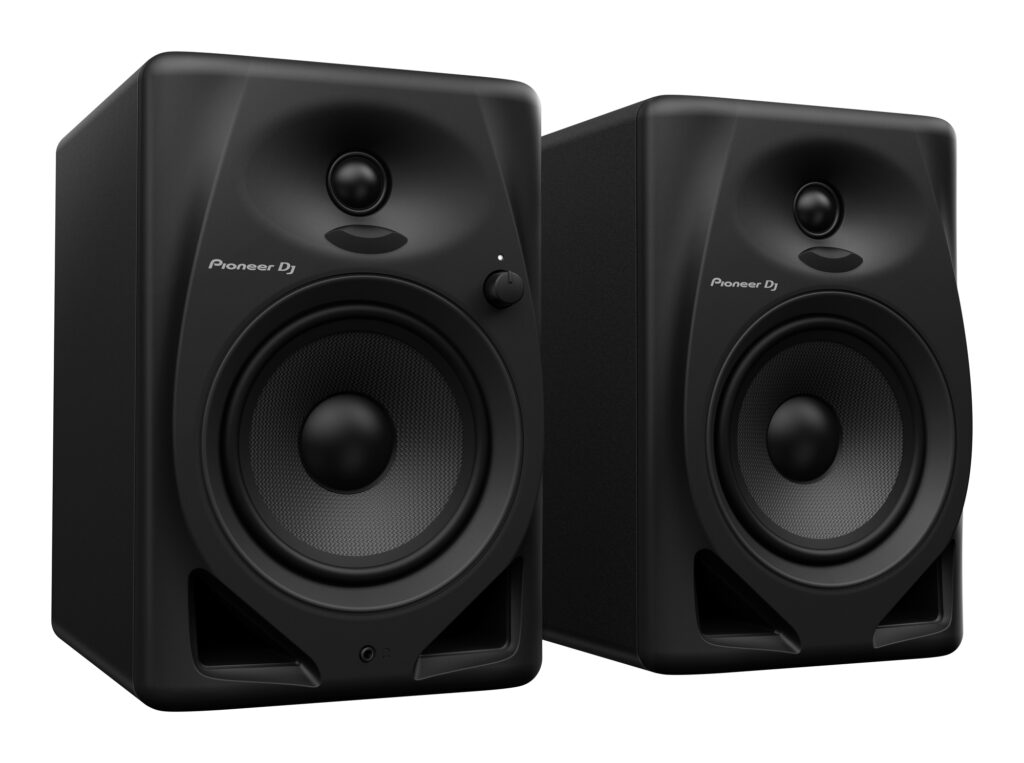
    pioneer dj dm-50d

    In Use 

    Another desktop-computer-speaker-like feature of the DM-50D is the volume control on the front panel of the left unit. I didn’t actually see it at first, leading me to wonder why my audio wasn’t working. (The control was turned all the way down, as it arguably should be when brand new.) The volume control is a nice touch, but perhaps a little gratuitous in most cases.  

    Once I got the audio playing through the system, however, I was immediately impressed. Given the small 5-inch main driver, I truly wasn’t expecting the speakers to deliver so much punch at the low end. But, they do have a rather nice, full sound when the sound-mode switch was in the DJ position.  

    Switched over to the production position, I couldn’t honestly discern a huge difference. First, the selection seems to take a couple of seconds to take effect, and it’s a somewhat slow crossover, making a direct A/B comparison a little difficult. As near as I’m able to tell, and as one might expect, the DJ position delivers more low end, while the production position is ostensibly more flat.  

    I saw “ostensibly” because Pioneer DJ doesn’t appear to publish audio specifications for the DM-50D. There are no response curve graphs, and nothing related to the range reproduced by the speakers, or precisely how it all changes as the sound mode switch is moved. As a result, it’s a little difficult to tell without the appropriate diagnostic equipment just exactly what these speakers are doing in the two sound modes, or indeed how well they’re performing.  

    A big part of audio monitoring is shaped by the room design. So, these monitors (or any other, typical home-studio applications) will usually benefit from the use of room sound correction solutions (like Sonarworks) if one intends to do any serious production mastering with the DM-50Ds. 

    For general DJ use, however? As I disconnected the monitors from my system to be packed up and returned to the company, I was left with the lingering sense that they’d make a terrific and cost-effective monitoring solution for nearly any DJ booth. And at around $200? The price of admission is pretty appealing indeed.

    To check out more gear reviews, click here.

    featured Pioneer DJ Pioneer DJ DM-50D

    Related Posts

    DJX ’27 Dates Announced for Atlantic City Return

    Roland Opens U.S. Flagship Store in New York City

    Beatport Connect LA Finalizes ‘26 Program With Expanded Artist and Industry Lineup

    AutoTune Go Brings Vocal Tuning to Every FL Studio User

    VirtualDJ 2026 Part 3 Pushes AI Further Into the DJ Workflow

    JACKPOT Festival Returns to Downtown Las Vegas to Close Out ‘26

    Comments are closed.

    Latest Posts

    DJX ’27 Dates Announced for Atlantic City Return

    September 18, 2026

    Give Thanks Festival Reveals 2026 Lineup

    September 17, 2026

    Roland Opens U.S. Flagship Store in New York City

    September 17, 2026

    Time Warp Announces Lineup for Debut ’26 Los Angeles Edition

    September 16, 2026
    Facebook Twitter Instagram
    • About
    • Digital Editions
    • Subscribe
    • Contact
    • Privacy Policy
    © 2026 DJ Life Magazine

    Type above and press Enter to search. Press Esc to cancel.

    Manage Consent
    To provide the best experiences, we use technologies like cookies to store and/or access device information. Consenting to these technologies will allow us to process data such as browsing behavior or unique IDs on this site. Not consenting or withdrawing consent, may adversely affect certain features and functions.
    Functional Always active
    The technical storage or access is strictly necessary for the legitimate purpose of enabling the use of a specific service explicitly requested by the subscriber or user, or for the sole purpose of carrying out the transmission of a communication over an electronic communications network.
    Preferences
    The technical storage or access is necessary for the legitimate purpose of storing preferences that are not requested by the subscriber or user.
    Statistics
    The technical storage or access that is used exclusively for statistical purposes. The technical storage or access that is used exclusively for anonymous statistical purposes. Without a subpoena, voluntary compliance on the part of your Internet Service Provider, or additional records from a third party, information stored or retrieved for this purpose alone cannot usually be used to identify you.
    Marketing
    The technical storage or access is required to create user profiles to send advertising, or to track the user on a website or across several websites for similar marketing purposes.
    • Manage options
    • Manage services
    • Manage {vendor_count} vendors
    • Read more about these purposes
    View preferences
    • {title}
    • {title}
    • {title}