

Facebook Twitter Instagram
    Trending
    • Jake Alexander (DJ Boost) [Mobile Monday Spotlight]
    • Day Trip Festival Set to Expand in ’26, Debut Long Beach Amphitheater Stage
    • How to Make Your Website Speak to AI (Without Breaking What Already Works) 
    • 2nd Gen: Rane’s Spinning-Platter Controller [Review]
    • HEAD TRIP Two-Day Event Heads to Indio Festival Grounds in October
    • Nostalgix: Setting Off an Inferno [Interview]
    Facebook Twitter Instagram
    DJ LIFE Magazine DJ LIFE Magazine
    • Home

      Jake Alexander (DJ Boost) [Mobile Monday Spotlight]

      March 16, 2026

      Day Trip Festival Set to Expand in ’26, Debut Long Beach Amphitheater Stage

      March 13, 2026

      How to Make Your Website Speak to AI (Without Breaking What Already Works) 

      March 12, 2026

      2nd Gen: Rane’s Spinning-Platter Controller [Review]

      March 11, 2026

      HEAD TRIP Two-Day Event Heads to Indio Festival Grounds in October

      March 11, 2026
    • Magazine
      1. Issues
      2. Buy Print Issue
      3. Subscribe
      Featured

      DJ LIFE Magazine – February 2026 Issue Vol.6 No.1

      By Mark MancinoFebruary 20, 2026
      Recent

      DJ LIFE Magazine – February 2026 Issue Vol.6 No.1

      February 20, 2026

      DJ LIFE Magazine Issue Vol.5 No.6

      December 18, 2025

      DJ LIFE Magazine Issue Vol.5 No.5

      October 27, 2025
    • Interviews
      1. Interviews
      2. Mobile DJ Profiles
      Featured

      Nostalgix: Setting Off an Inferno [Interview]

      By Mark MancinoMarch 10, 2026
      Recent

      Nostalgix: Setting Off an Inferno [Interview]

      March 10, 2026

      Slim McGraw: Country Beats [Interview]

      February 27, 2026

      Kaskade: Storyteller [Interview]

      December 30, 2025
    • Tech
      1. Tech News
      2. Tech Reviews
      Featured

      How to Make Your Website Speak to AI (Without Breaking What Already Works) 

      By Brian LawrenceMarch 12, 2026
      Recent

      How to Make Your Website Speak to AI (Without Breaking What Already Works) 

      March 12, 2026

      2nd Gen: Rane’s Spinning-Platter Controller [Review]

      March 11, 2026

      Bring the Bass: Trulli Audio Introduces Trulli Bass50

      March 10, 2026
    • Music
      1. Music
      2. DJ Playlists
      3. Mixes
      4. DJ National Club Charts
      Featured

      10 Fresh Wedding Songs for March 2026

      By Matthew CampbellMarch 5, 2026
      Recent

      10 Fresh Wedding Songs for March 2026

      March 5, 2026

      Kygo x Khalid x GRYFFIN Join Forces on “Save My Love”

      February 20, 2026

      Discogs Launches “My Discography,” a New Series Celebrating Stories Behind Record Collections

      February 11, 2026
    • Events

      Day Trip Festival Set to Expand in ’26, Debut Long Beach Amphitheater Stage

      March 13, 2026

      HEAD TRIP Two-Day Event Heads to Indio Festival Grounds in October

      March 11, 2026

      Apocalypse: Zombieland Reveals Phase One Lineup for ‘26

      March 9, 2026

      RESISTANCE Drops Miami Music Week 2026 Lineups at M2

      March 6, 2026

      ‘Why Not Now? Festival’ to Debut This Memorial Day Weekend in Brooklyn

      March 5, 2026
    • Tips
      1. DJ Tips
      2. Business Tips
      3. DJ Life Lessons
      Featured

      How to Make Your Website Speak to AI (Without Breaking What Already Works) 

      By Brian LawrenceMarch 12, 2026
      Recent

      How to Make Your Website Speak to AI (Without Breaking What Already Works) 

      March 12, 2026

      Easy Needle Moving: Website & SEO Tips for ’26

      January 2, 2026

      A Tool to Prevent Bad Online Reviews

      November 26, 2025
    • Mobile DJ
      1. Mobile DJ Profiles
      2. Mobile Monday Spotlights
      3. Wedding DJ
      4. Business Tips
      5. DJX Subscribe
      Featured

      Jake Alexander (DJ Boost) [Mobile Monday Spotlight]

      By Mark MancinoMarch 16, 2026
      Recent

      Jake Alexander (DJ Boost) [Mobile Monday Spotlight]

      March 16, 2026

      10 Fresh Wedding Songs for March 2026

      March 5, 2026

      Wendy Walker [Mobile Monday Spotlight]

      March 2, 2026
    • DJX Show
    DJ LIFE Magazine DJ LIFE Magazine
    Home»Tech»Multiple-App Use: Mackie’s Onyx8 Mixer Delivers
    Tech

    Multiple-App Use: Mackie’s Onyx8 Mixer Delivers

    By DJ DeetsNovember 24, 2021
    mackie onyx8
    Share
    Facebook Twitter LinkedIn

    I love a good pro-audio mixer. For many DJs, they can be Swiss Army knives that help wrangle multiple inputs and outputs with greater ease than most dedicated pieces of DJ gear. Mackie‘s Onyx8 makes life easy.  

    Mobile DJs know exactly what I’m talking about. Depending on the event, they might have to juggle multiple microphones, speakers at different parts of a room, and multiple playback sources. It’s not easy to handle all these inputs and outputs on a typical DJ controller or DJ mixer.  

    This is where a good multi-channel mixer comes in. It might be easy to think that all pro-audio mixers are created equal, but that’s not exactly the case. The mixer can make or break things – whether it’s a live show or a live stream.  

    Onyx8: As many of you know, Mackie is no stranger to audio mixers. Across its range, the Bothell, Wash.-based manufacturer seems to have a mixer for every situation – for small bands all the way up to large studios, touring productions, or front-of-house installations.  

    This past winter, Mackie released four new units to its Onyx range of mixers – Onyx8, Onyx12, Onyx16 and Onyx24 (all named for their number of input channels). They’re described as “premium analog mixers with multi-track USB,” and that’s exactly right. 

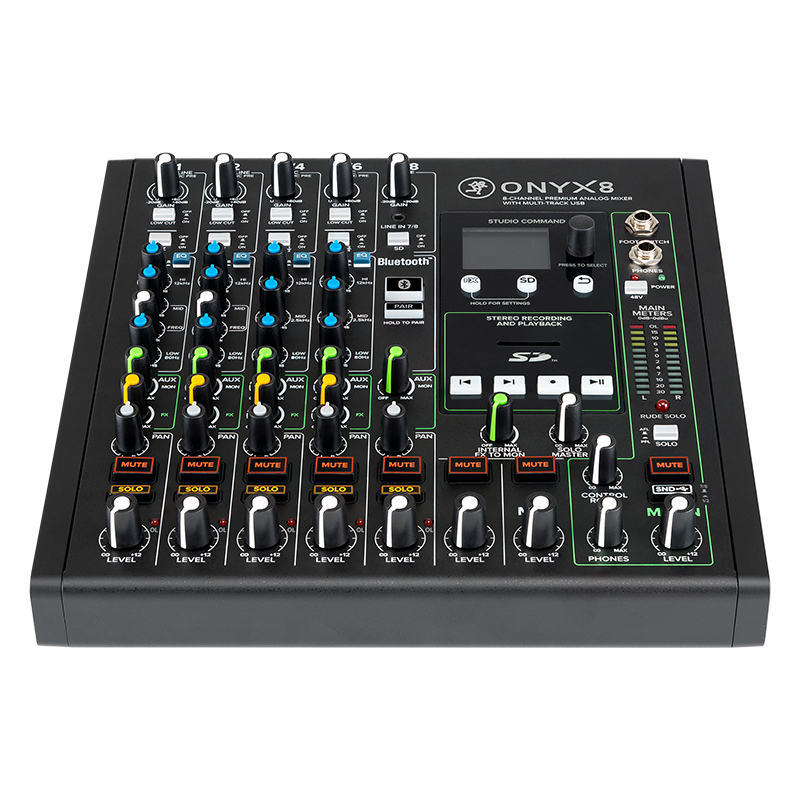
    At eight channels, Mackie’s Onyx8 sits at a sweet spot for a home studio or a mobile DJ. Like most mixers, it can accept signal via XLR jacks and TRS jacks, or through a 1/8-inch headphone jack that routs into channel 7/8. But, aside from these usual suspects, the Onyx8 has a few tricks up its sleeve. For instance, it can accept wirelessly streamed media through a Bluetooth connection.  

    Pairing the mixer to my smartphone took almost no time, and I was able to stream music to the mixer in less than 10 seconds. Additionally, the Onyx8 also has an SD card slot on the front of the unit. Here, users can record the mixer’s output to an SD card or play existing files that are on the SD card.  

    Full multi-track recording can be accomplished by plugging the mixer into a computer via a USB cable. All channels have dedicated level controls, pan controls, gain controls, and mute and solo controls, and Channels 1 through 6 have fully featured EQ controls. The mute/solo buttons light up when pressed and require deliberate effort to activate, meaning it’s difficult to accidentally press them. There are also bright VU meters for the master output. 

    The main master output of the mixer comes out via XLR or TRS jacks. There is also a secondary output – called “Control Room” – that comes out through TRS jacks, and levels for this Control Room output are controlled separately from the master output. On other mixers, this feature would likely be called a “Booth Output.” Users can plug their headphones into the ¼-inch jack on the top of the mixer. 

    Most of the inputs and outputs are located on the back of the mixer. I was surprised to see none of the channels accept an RCA connection, given that a lot of DJ gear has RCA-style master outputs – especially smaller controllers that don’t have XLR or TRS connections. Theoretically, you could always use various cables and adaptors to bridge the gap, but a built-in RCA connection would have been nice.  

    Like Mackie’s latest-generation PA speakers, the Onyx8 has a small full-color LCD screen. On it, users can control FX and load media from a connected SD card. Onscreen parameters are controlled by a small, black knob adjacent to the screen, and there are dedicated transport controls for media playback. 

    Ultimately, the Onyx8 has just about everything you could want from a $500 audio mixer. Connected to various sources, the audio quality sounds great, and I found myself having more than enough headroom on the mixer to achieve loud volumes without distortion. Even streaming signal from Bluetooth sounded really good.  

    Conclusions: I can see this mixer being bought by mobile DJs who want to achieve greater versatility in their setups. For a mobile DJ, this mixer can run multiple microphones, control playback from two or more DJ setups, stream music from a phone or MP3 player, and play custom audio files directly from the mixer.  

    Additionally, given this mixer’s capabilities, I could see it being bought by podcasters, music producers, or content creators for their studios. Mackie’s Onyx8 is a solid, well-built mixer with some compelling features for a number of different use cases. It’s versatile, and it’s a winner. 

    To check out more gear reviews, click here.

    Mackie Mackie Onyx8

    Related Posts

    How to Make Your Website Speak to AI (Without Breaking What Already Works) 

    2nd Gen: Rane’s Spinning-Platter Controller [Review]

    Bring the Bass: Trulli Audio Introduces Trulli Bass50

    Beatport & Beatsource Unite Into One Premium DJ Platform

    ColorBanded: Chauvet DJ Introduces COLORband Spectra ILS

    Splice Launches ‘Sounds Of KSHMR Vol. 5’ with Dharma Studio

    Comments are closed.

    Latest Posts

    Jake Alexander (DJ Boost) [Mobile Monday Spotlight]

    March 16, 2026

    Day Trip Festival Set to Expand in ’26, Debut Long Beach Amphitheater Stage

    March 13, 2026

    How to Make Your Website Speak to AI (Without Breaking What Already Works) 

    March 12, 2026

    2nd Gen: Rane’s Spinning-Platter Controller [Review]

    March 11, 2026
    Facebook Twitter Instagram
    • About
    • Digital Editions
    • Subscribe
    • Contact
    • Privacy Policy
    © 2026 DJ Life Magazine

    Type above and press Enter to search. Press Esc to cancel.

    Manage Consent
    To provide the best experiences, we use technologies like cookies to store and/or access device information. Consenting to these technologies will allow us to process data such as browsing behavior or unique IDs on this site. Not consenting or withdrawing consent, may adversely affect certain features and functions.
    Functional Always active
    The technical storage or access is strictly necessary for the legitimate purpose of enabling the use of a specific service explicitly requested by the subscriber or user, or for the sole purpose of carrying out the transmission of a communication over an electronic communications network.
    Preferences
    The technical storage or access is necessary for the legitimate purpose of storing preferences that are not requested by the subscriber or user.
    Statistics
    The technical storage or access that is used exclusively for statistical purposes. The technical storage or access that is used exclusively for anonymous statistical purposes. Without a subpoena, voluntary compliance on the part of your Internet Service Provider, or additional records from a third party, information stored or retrieved for this purpose alone cannot usually be used to identify you.
    Marketing
    The technical storage or access is required to create user profiles to send advertising, or to track the user on a website or across several websites for similar marketing purposes.
    • Manage options
    • Manage services
    • Manage {vendor_count} vendors
    • Read more about these purposes
    View preferences
    • {title}
    • {title}
    • {title}