

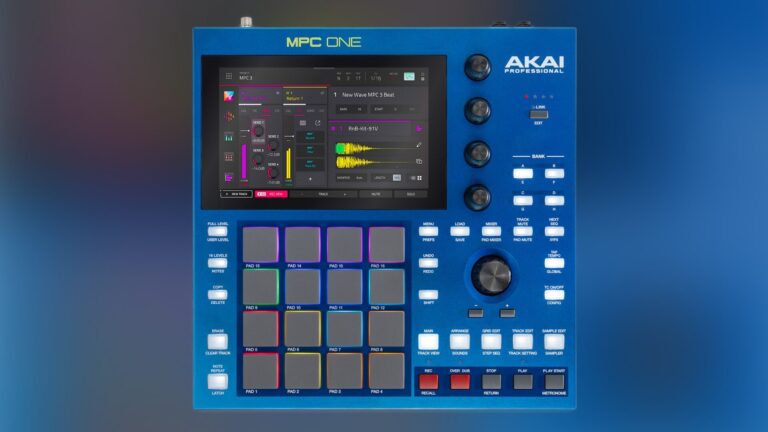
“From the original MPC60 to today’s standalone systems, the MPC has become synonymous with sampling, sequencing and hands-on music creation.”
For decades Akai’s MPC line has been at the core of beatmaking and hardware production. From the original MPC60 to today’s standalone systems, the MPC has become synonymous with sampling, sequencing and hands-on music creation. What started as a tool for building beats has evolved into a complete production environment capable of handling everything from initial ideas to finished arrangements and live performance.
The MPC One G2 continues that evolution in a compact format. At first glance, the G2 looks almost unchanged from the original MPC One… but after spending some time with it the improvements start to become obvious. It doesn’t feel like a smaller version of a traditional MPC, it’s a complete production setup compact enough to fit on your studio desk.
Hardware & Build: One of the first things that stands out about the MPC One G2 is the amount of functionality managed to fit into such a compact piece of hardware. The 4×4 pad layout is still the heart of the MPC experience. The pads have a responsive feel and make the G2 feel more like an instrument than a traditional computer controller. The dedicated controls surrounding the display also help keep common functions within reach instead of forcing you to rely entirely on touchscreen navigation.
The 7-inch touchscreen is another important part of the hardware. Having the touchscreen alongside physical buttons, pads and Q-Link controls creates a good balance between visual navigation and hands on control. You can use the screen when precision is needed and reach for a physical control when you want a more immediate interaction.
The overall design also makes sense for producers who move between the studio and live environment. It is small enough to transport without much hassle, but it does not feel like a stripped-down controller. That balance is one of the G2’s biggest hardware advantages. You get a substantial amount of control in a package that can easily become part of a larger studio or performance setup without requiring a huge amount of space.
There is still plenty of room for experimentation, too. You can start with a basic drum pattern and continue building without having to commit to a rigid workflow. The ability to quickly try an idea, change direction and keep moving is especially useful during the early stages of production, when getting an idea down is often more important than having a perfectly organized session. The flexibility is what makes the system useful across different styles of production, from sample-based music to electronic and live-performance workflows.
Sampling is still one of the MPC’s biggest strengths, and the G2 makes that process feel immediate. You can record directly into the MPC, chop samples, pitch them, time stretch them, manipulate individual slices and map them across the pads without having to leave the hardware. Combined with MPC’s built in effects and instruments, the G2 gives you a lot of room to take a simple sound and turn it into something completely different.
MPC3 Workflow: A major part of what makes the MPC One G2 is the MPC3 operating system. Previous MPC workflows were built heavily around sequences and patterns, which made the hardware excellent for creating loops, but could make building a complete song feel less intuitive. MPC3 moves the experience closer to a traditional production environment while keeping the hands on workflow that makes an MPC unique.
MPC3 Standalone gives each track its own dedicated sequence. The addition of a more linear arrangement workflow also makes it easier to see how a track develops from beginning to end. Automation also becomes a more natural part of the process. You can make changes to effects, levels and other parameters as the arrangement progresses, giving the track more humanization and detail. You can play sounds directly from the pads, automate parameters, process them with effects and incorporate them into the arrangement without leaving the project.
Applications: The G2 also makes a lot of sense outside the studio. Both its standalone functionality and compact size makes it easy to bring into a live setup, and the pads give you a straightforward way to trigger drums, samples and loops.
Alternatively, you can connect it to a computer over USB-C and use the MPC as a hands-on controller for Ableton Live. For producers who already have an established DAW workflow, this integration is a major advantage. You don’t have to choose between working entirely in the MPC or entirely in the box. The G2 can occupy whatever role makes the most sense for the project, whether that means being the primary production environment or the centerpiece of a larger hybrid studio.
Akai now officially supports Live control mode on the G2 through USB-C which gives the much deeper computer integration than the previous One+. Akai lists 24-in/24-out USB audio and 32 channels of bidirectional USB MIDI on the G2.
In practice, this means you’re not limited to sending a single stereo mix. You can have multiple individual MPC tracks routed into Ableton, while also sending audio from Ableton back into the MPC. That opens up some interesting possibilities for production and performance.
Conclusions: At the time of writing, the Akai MPC One G2 retails for $799. Included with the unit is a 12V power supply, USB-C cable, MPC3 software, 64GB of internal storage and a collection of factory expansion content and plug-ins, including Hype, Organ, Odyssey, Solina, Mellotron and Fabric Select.
The MPC can be the entire studio or just one part of it. The G2 isn’t trying to replace every piece of gear you already own. It doesn’t need to. Its strength is that it can be whatever your workflow needs it to be, a standalone production machine, a sampler, a controller, a studio centerpiece or a live instrument.