

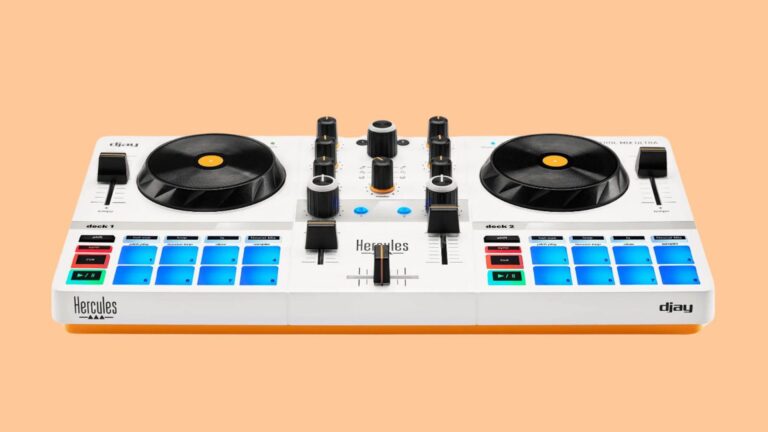
“The standout feature is the Neural Mix integration… With the press of a button, you can split a song live into its core components: drums, instruments, and vocals.”
I am pretty blessed as a DJ. Having grown up the son of a club DJ-turned-mobile DJ, I have been exposed to DJing all my life. Having been a radio DJ at 18, and club DJ the year after, and now, still on the radio, and traveling internationally to do this, I can safely say that I have seen many technological leaps in our field since I first started. Here in 2025, the technology is making things I needed reel-to-reels, DATs, or even a million CD-RWs to do all one-button tasks in software and on controllers. One particular software, Algoriddim’s djay Pro, is particularly blurring the lines between DJ and producer with its innovative Neural Mix feature. However, the biggest problem with djay Pro is the lack of a proper controller that allows people to use djay’s feature set properly.
So, when I saw the layout for the Hercules DJControl Mix Ultra, I thought this would finally be the controller for me. With a layout that a beginner or a professional can use, and one that mimics basic functions from standard gear, along with a simple easy way to use the Neural Mix functionality both through pads and rotary knobs, I was sold. However, reading the specs, my enthusiasm quickly turned to skepticism.
A wireless-first controller with no built-in audio outputs? This could be seen as a major step back, especially since other brands corrected course last year (notably Alpha Theta with its DDJ-FLX-2)? Well, in a desire to get deeper into the djay Pro ecosystem, I asked for a DJControl Mix Ultra to use to explore the software better. For the past three months I have recorded my syndicated “Diaries of a House Head” mixshow four times, taken it to bar gigs around New York City and even went to the park just to get air and play some tunes, and I am left asking: Is the DJControl Mix Ultra a wireless wonder or missed opportunity?
Elephant in the Room
Let’s address the biggest question mark right away: the connections, or rather, the lack thereof. The DJControl Mix Ultra has no headphone jack and no speaker outputs. The only physical port is a USB-C connection used for charging the internal battery, but it also can be used on a computer running djay Pro. However, the controller is designed and marketed to connect to your phone or tablet via Bluetooth.
For any DJ, the ability to cue tracks in your headphones before the crowd hears them is crucial. Thus, since the Ultra has no audio interface (soundcard), it relies on your device and a special splitter cable that Hercules includes in the box. This cable converts a single stereo headphone jack into two mono outputs – one for your headphones, one for a speaker.
If you are using the Ultra on a laptop, this can be doable since most laptops still have a headphone port. However, given that the controller is marketed to be used wirelessly with phones and tablets, this set-up feels messy. First, you lose stereo sound. Second, since most modern phones and tablets lack a headphone jack, you’ll immediately need to buy a separate USB-C or Lightning port adapter for older Apple devices.
Want to charge your device while you play? You’ll need yet another specialized dongle. While it technically works, it’s an impractical and clumsy solution for any situation involving an audience, even a small house party. At the few bar gigs I used it at, it became a major annoyance and removed the “wireless” concept right away. This is the controller’s biggest limitation, and for many, it will be a deal-breaker right away.
First Impressions
If you can look past the lack of a soundcard, the hardware itself is extremely impressive. Take the DJControl Mix Ultra out of its box and you can feel its solid construction, despite its all-plastic build. It truly is ultra-portable and slides easily into a backpack. Hercules even includes a protective cover that doubles as a stand for your tablet or phone; however, you’ll have to remove your device’s case for it to fit properly.
Another issue with the plastic cover is it can slide on slick surfaces when you are using it to hold your tablet or phone. However, to get a hard-plastic protective case on a sub-$220 controller is definitely appreciated.
The layout is clean and intuitive. The classic two-deck-and-a-mixer design is perfect for learning the ropes. The faders have a decent feel, and unlike many budget controllers under the $220 price tag, the Ultra gives you a full three-band EQ and a dedicated filter knob for each channel.
The jog wheels are small, but they have a nice, weighted feel for nudging tracks into place. A scroll knob and load buttons make browsing and loading tracks easy – it’s a feature often missing from beginner controllers. Also the pads are soft; although not RGB, they’re still bright blue, tactile and a perfect size for this controller.
Creative Power in Your Pocket
Connecting to Algoriddim’s djay app via Bluetooth is a breeze. Once you’re in, the fun begins. The eight performance pads I mentioned above unlock a surprising number of creative tools. You get the essentials like Hot Cues and looping, but also advanced modes like Pitch Play for creating melodies and a Slicer for chopping up tracks on the fly.
The standout feature, however, is the Neural Mix integration. The Ultra unlocks the full Neural Mix stem separation in djay without a subscription. With the press of a button, you can split a song live into its core components: drums, instruments, and vocals. Want to create a quick instrumental or an acapella to mix in? Just toggle the vocal stem off. It works incredibly well and opens up creative possibilities usually reserved for much more expensive gear.
In addition, as a house/dance-music DJ, the fact that I can control the Neural Mix with the 3-band EQ knobs as well – after pressing the Neural Mix button – makes me feel right at home, as it’s akin to removing the bass of an outgoing song and raising the bass of another.
I was also surprised by the wireless performance. The controls are remarkably responsive over Bluetooth, with very low latency for general mixing and EQing. You only notice a slight delay during timing-sensitive actions like quick cuts or scratching, which this controller isn’t really built for anyway.
Innovation at a Price
There are two features that truly set the Ultra apart and show a real thoughtfulness in its design. First is the battery life – the internal battery lasts 10 hours. In fact. I have charged it once since I got the unit back in April. Better yet, the battery is accessible via a simple cover and is a generic type you can replace cheaply.
Second is its utilization of Bluetooth. Most people know Bluetooth for delivering wireless music to headphones and speakers; but here, it’s the MIDI signal it sends to the software that’s the key. A simple touch of the jog wheel shows how little latency there is between the controller and software.
That said, one is left to wonder, because of the cost of placing a removable battery, and relying on MIDI only, along with quality pads and a protective cover, did this cost us the perfect entry-level controller by having to omit the soundcard – or was this a design choice?
Final Thoughts
So, who is it for? Who should buy the DJControl Mix Ultra?
It’s not for the aspiring DJ who dreams of playing in clubs or even for crowds at house parties. But it 100-percent could have been. This could have been the controller for beginner DJs to begin their gigging journey. However, the audio output solution is simply too compromised for reliable live performance.
That said, it is for the absolute beginner who wants to learn the fundamentals of DJing in their bedroom without a complex set-up. It’s for the music lover who wants to experiment with Neural Mix and create fun mixes for themselves. And it’s for the traveling DJ who wants a silent, compact companion to practice and prepare sets on a plane or in a hotel room.
If you fall into one of those categories and prioritize a simple, fully wireless experience for personal enjoyment, the DJControl Mix Ultra is a fantastic and well-executed product.