

Facebook Twitter Instagram
    Trending
    • Jake Alexander (DJ Boost) [Mobile Monday Spotlight]
    • Day Trip Festival Set to Expand in ’26, Debut Long Beach Amphitheater Stage
    • How to Make Your Website Speak to AI (Without Breaking What Already Works) 
    • 2nd Gen: Rane’s Spinning-Platter Controller [Review]
    • HEAD TRIP Two-Day Event Heads to Indio Festival Grounds in October
    • Nostalgix: Setting Off an Inferno [Interview]
    Facebook Twitter Instagram
    DJ LIFE Magazine DJ LIFE Magazine
    • Home

      Jake Alexander (DJ Boost) [Mobile Monday Spotlight]

      March 16, 2026

      Day Trip Festival Set to Expand in ’26, Debut Long Beach Amphitheater Stage

      March 13, 2026

      How to Make Your Website Speak to AI (Without Breaking What Already Works) 

      March 12, 2026

      2nd Gen: Rane’s Spinning-Platter Controller [Review]

      March 11, 2026

      HEAD TRIP Two-Day Event Heads to Indio Festival Grounds in October

      March 11, 2026
    • Magazine
      1. Issues
      2. Buy Print Issue
      3. Subscribe
      Featured

      DJ LIFE Magazine – February 2026 Issue Vol.6 No.1

      By Mark MancinoFebruary 20, 2026
      Recent

      DJ LIFE Magazine – February 2026 Issue Vol.6 No.1

      February 20, 2026

      DJ LIFE Magazine Issue Vol.5 No.6

      December 18, 2025

      DJ LIFE Magazine Issue Vol.5 No.5

      October 27, 2025
    • Interviews
      1. Interviews
      2. Mobile DJ Profiles
      Featured

      Nostalgix: Setting Off an Inferno [Interview]

      By Mark MancinoMarch 10, 2026
      Recent

      Nostalgix: Setting Off an Inferno [Interview]

      March 10, 2026

      Slim McGraw: Country Beats [Interview]

      February 27, 2026

      Kaskade: Storyteller [Interview]

      December 30, 2025
    • Tech
      1. Tech News
      2. Tech Reviews
      Featured

      How to Make Your Website Speak to AI (Without Breaking What Already Works) 

      By Brian LawrenceMarch 12, 2026
      Recent

      How to Make Your Website Speak to AI (Without Breaking What Already Works) 

      March 12, 2026

      2nd Gen: Rane’s Spinning-Platter Controller [Review]

      March 11, 2026

      Bring the Bass: Trulli Audio Introduces Trulli Bass50

      March 10, 2026
    • Music
      1. Music
      2. DJ Playlists
      3. Mixes
      4. DJ National Club Charts
      Featured

      10 Fresh Wedding Songs for March 2026

      By Matthew CampbellMarch 5, 2026
      Recent

      10 Fresh Wedding Songs for March 2026

      March 5, 2026

      Kygo x Khalid x GRYFFIN Join Forces on “Save My Love”

      February 20, 2026

      Discogs Launches “My Discography,” a New Series Celebrating Stories Behind Record Collections

      February 11, 2026
    • Events

      Day Trip Festival Set to Expand in ’26, Debut Long Beach Amphitheater Stage

      March 13, 2026

      HEAD TRIP Two-Day Event Heads to Indio Festival Grounds in October

      March 11, 2026

      Apocalypse: Zombieland Reveals Phase One Lineup for ‘26

      March 9, 2026

      RESISTANCE Drops Miami Music Week 2026 Lineups at M2

      March 6, 2026

      ‘Why Not Now? Festival’ to Debut This Memorial Day Weekend in Brooklyn

      March 5, 2026
    • Tips
      1. DJ Tips
      2. Business Tips
      3. DJ Life Lessons
      Featured

      How to Make Your Website Speak to AI (Without Breaking What Already Works) 

      By Brian LawrenceMarch 12, 2026
      Recent

      How to Make Your Website Speak to AI (Without Breaking What Already Works) 

      March 12, 2026

      Easy Needle Moving: Website & SEO Tips for ’26

      January 2, 2026

      A Tool to Prevent Bad Online Reviews

      November 26, 2025
    • Mobile DJ
      1. Mobile DJ Profiles
      2. Mobile Monday Spotlights
      3. Wedding DJ
      4. Business Tips
      5. DJX Subscribe
      Featured

      Jake Alexander (DJ Boost) [Mobile Monday Spotlight]

      By Mark MancinoMarch 16, 2026
      Recent

      Jake Alexander (DJ Boost) [Mobile Monday Spotlight]

      March 16, 2026

      10 Fresh Wedding Songs for March 2026

      March 5, 2026

      Wendy Walker [Mobile Monday Spotlight]

      March 2, 2026
    • DJX Show
    DJ LIFE Magazine DJ LIFE Magazine
    Home»Tech»Tech Reviews»Akai Pro APC64: Ableton Live Controller
    Tech Reviews

    Akai Pro APC64: Ableton Live Controller

    By Wesley KingMarch 22, 2024
    Share
    Facebook Twitter LinkedIn

    “The inevitable question is whether the APC64 is the optimal choice for those seeking an Ableton-Live-specific controller.” 

    It sort of boggles my mind that later this year, I’ll celebrate two decades as a user of Ableton Live, the innovative DAW (digital audio workstation) software that originally debuted in 2001.  

    A lot has happened between the product’s market entry (and when I started using it in 2004), and today – notably, the release of hardware tightly integrated with, and designed to help make the most of Live. It all started in 2009 with a collaboration between Ableton and Akai Professional, resulting in the APC40. 

    Since then, the basic concept of the APC40 has been extended and reimagined in various ways and at various times. For one, Ableton started producing its own hardware, the Push series, the first of which (introduced in 2013) was itself designed in collaboration with Akai Professional (an inMusic brand). Both companies have continued to innovate; just recently, in fact, Ableton introduced its latest Push controller, the Push 3. 

    But Akai Professional has itself continued to improve and expand the APC family with a mix of controllers much like the original APC40 in form, along with keyboard controllers as well. The company’s latest offering in the series is the APC64, introduced late last year. After getting my hands on one, I’ve been spending time with it in my studio alongside Live.  


    Controls Abound 

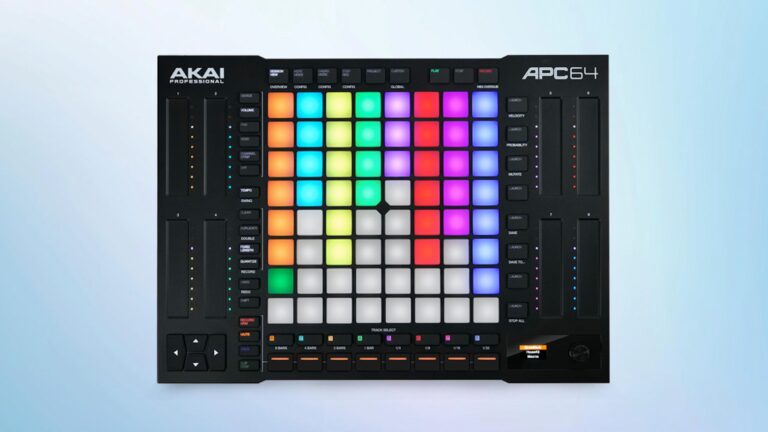
    At its core, the APC64 features the typical grid of backlit pads. In the case of the APC64, there are (as you might have guessed) 64 of them, all RGB-illuminated and offering velocity sensitivity and polyphonic aftertouch. This 8×8 pad matrix, as you’d expect, pulls double duty; you can play notes or chords, and trigger percussion samples in Live’s Drum Racks, as well as trigger clips in Live’s Session View.  

    On the left and right sides of the unit, there are eight assignable touch-strip faders with nine RGB LEDs for each one that indicate relative level. They can be used for various functions, from controlling volume or pan, to controlling effects or macros. Rather like the pads, I might have preferred actual faders for better accuracy and control, but the advantage of the strips is a top surface almost completely devoid of “stuff” that projects upward, a plus for portability, and likely durability as well. 

    More than 50 additional buttons surrounding the main grid provide a wide array of functions for the APC64 itself, as well as for controlling Live. The extensive use of illumination and color on these buttons, and throughout, provides clear visual feedback as you navigate the unit in your own production workflow.  

    Interestingly, the APC64 also offers an internal eight-track, 32-step sequencer that can be used standalone. The primary use case seems to be to provide control of external sound devices outside of the DAW environment through either MIDI, or through the eight on-board CV/gate outputs. This delivers the flexibility to control just about any external sound-generating device you want to throw at it, from modern synths to vintage drum machines to your favorite Eurorack modules. Once you’ve come up with the perfect sequence to get your project started, it can be transferred to Live for use within the DAW. 

    Those MIDI connections, by the way? You get two outs, and one in, and they use 1/8-inch connectors on the backplane of the unit; adapter cables for standard MIDI 5-pin DIN are included.  

    In addition to all the buttons and pads and touch strips, the unit also includes a tiny color LCD display on the top panel with an adjacent knob for basic navigation and configuration. Given its extraordinarily small size and somewhat cumbersome interface, however, I found it to be pretty much the only disappointment of the APC64’s design. (Perhaps my expectations were skewed by the Push 2 controller I’ve had in my home studio for years now, leaving me wishing for a bigger screen and more capability.) 

    One benefit of the APC64 is that it doesn’t require any sort of external power supply, and the inconvenient “wall-wart” bricks that it usually entails. Instead, it runs fully off USB power alone, provided through the unit’s USB-C connector.  

    Lastly, the APC64 comes bundled with Ableton Live Lite to help get new users started. There’s an easy upgrade path to paid versions of the software, of course. 


    In Use 

    Hands-on, as I expected, I found the APC64 to be exceptionally easy to use. Like any new controller, there’s a learning curve to understand how to set up the device properly, and it takes time to develop the muscle memory to use it effectively as part of a production or performance workflow. In that regard, the APC64 is no easier, nor more difficult, than other options on the market. To Akai Professional’s credit, they provide on their website a series of tutorial videos under the “APC Academy” banner that make everything much easier to understand.  

    Perhaps my only criticism is that the APC64’s pads strike me as a bit of a compromise in terms of usability when it comes to getting the sort of note velocities I’m after, and as a result, the subtlety of expression can suffer a bit. (I admittedly prefer a standard music keyboard.) With my fingers, anyway, the hits are invariably too hard, or too soft, and only occasionally where I really want them.  

    In this regard, however, the APC64 is no different than other similarly designed controllers; I’ve struggled with this on the Push 2 as well. I’d also suggest that it’s more important to get the right notes down, as velocities and other subtleties can always be adjusted in the DAW after the fact. 

    I suppose the inevitable question is whether the APC64 is the optimal choice for those seeking an Ableton-Live-specific controller, especially against other options including Ableton’s own new Push 3. The answer is that it’s a bit of an apple-to-oranges comparison. The APC64 offers a lot of bang for a pretty modest buck; with a street price of just under $400, it’ll provide both a solid platform for musical experimentation and a great way to drive home just how impractical a computer mouse is for certain operations in a DAW.  

    Ableton’s Push 3, on the other hand, comes in two flavors that start at more than twice the cost. Obviously, you get a lot for the extra spend, but whether you need (or can justify) those capabilities is an entirely separate question.  


    Conclusions 

    Akai Professional’s new APC64 is a solid addition to any Ableton Live user’s studio or performance environment. With a solid feature set, plenty of options for creative musical experimentation, the ability to make Live easier to use across myriad workflows, and great portability — all at an affordable price — it seems like a rather obvious choice for any serious Ableton Live user.  


    Ableton Live Akai Akai Pro Akai Pro APC64 featured

    Related Posts

    Jake Alexander (DJ Boost) [Mobile Monday Spotlight]

    How to Make Your Website Speak to AI (Without Breaking What Already Works) 

    2nd Gen: Rane’s Spinning-Platter Controller [Review]

    HEAD TRIP Two-Day Event Heads to Indio Festival Grounds in October

    Nostalgix: Setting Off an Inferno [Interview]

    10 Fresh Wedding Songs for March 2026

    Comments are closed.

    Latest Posts

    Jake Alexander (DJ Boost) [Mobile Monday Spotlight]

    March 16, 2026

    Day Trip Festival Set to Expand in ’26, Debut Long Beach Amphitheater Stage

    March 13, 2026

    How to Make Your Website Speak to AI (Without Breaking What Already Works) 

    March 12, 2026

    2nd Gen: Rane’s Spinning-Platter Controller [Review]

    March 11, 2026
    Facebook Twitter Instagram
    • About
    • Digital Editions
    • Subscribe
    • Contact
    • Privacy Policy
    © 2026 DJ Life Magazine

    Type above and press Enter to search. Press Esc to cancel.

    Manage Consent
    To provide the best experiences, we use technologies like cookies to store and/or access device information. Consenting to these technologies will allow us to process data such as browsing behavior or unique IDs on this site. Not consenting or withdrawing consent, may adversely affect certain features and functions.
    Functional Always active
    The technical storage or access is strictly necessary for the legitimate purpose of enabling the use of a specific service explicitly requested by the subscriber or user, or for the sole purpose of carrying out the transmission of a communication over an electronic communications network.
    Preferences
    The technical storage or access is necessary for the legitimate purpose of storing preferences that are not requested by the subscriber or user.
    Statistics
    The technical storage or access that is used exclusively for statistical purposes. The technical storage or access that is used exclusively for anonymous statistical purposes. Without a subpoena, voluntary compliance on the part of your Internet Service Provider, or additional records from a third party, information stored or retrieved for this purpose alone cannot usually be used to identify you.
    Marketing
    The technical storage or access is required to create user profiles to send advertising, or to track the user on a website or across several websites for similar marketing purposes.
    • Manage options
    • Manage services
    • Manage {vendor_count} vendors
    • Read more about these purposes
    View preferences
    • {title}
    • {title}
    • {title}