

One of the most-exciting niches in the DJ gear space is what I like to call the intermediate controller – this is the first step up from an entry-level controller.
At this point, if you own one of these units, you’re likely a proud, card-carrying member of the DJ community, and here is where some of the cool features found on flagship DJ gear first begin to make appearances.
Cumberland, R.I.-based Numark, an inMusic brand, is no stranger to this space. After all, its Mixtrack lineup has provided an accessible gateway to the world of DJing for over 10 years. Numark’s all-new NS4FX feels like a bigger brother to the very-solid Mixtrack Platinum FX, and DJs of all skill levels (especially those who might be graduating from a Mixtrack) will feel right at home. It’s one of the most-accessible 4-channel controllers on the market and a compelling proposition for DJs wanting control over four physical channels.
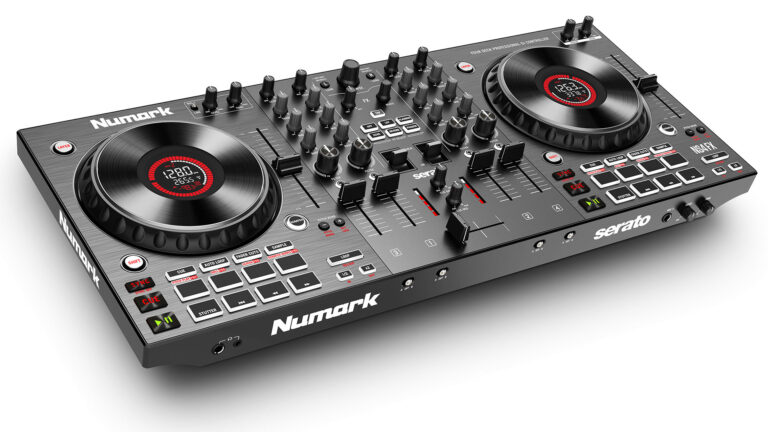
The NS4FX currently supports Serato DJ Lite, Serato DJ Pro (upgrade needed), Virtual DJ, and Algoriddim’s DJay Pro. It’s around 23-inches wide and weighs just over 6.5-pounds. It’s able to be this light because its construction is predominantly plastic. It’s definitely not flimsy, but I wouldn’t call it as solid-feeling as a metal-made controller. There’s a tradeoff here – some DJs would gladly choose lightness over metal for specific applications.
It has a gray finish that is lighter than the typical black we’re used to seeing on a lot of DJ controllers. In some situations, I did notice some glare and reflections from the top surface of the controller, but it was never terribly bothersome.
The controller layout consists of two deck sections with a mixer section in the center. The deck sections are identical, as opposed to mirrored – this means the transport controls (play, cue, sync) are always on the left, and the pitch fader is always on the right. I personally prefer this layout over the mirrored layout because it feels more natural to me. Each deck section has a large 6-inch jogwheel with a bright center display in the middle.
Let’s talk about these jogwheels: They’re some of the best on any controller under a thousand dollars. They’ve each got a good amount of weight to them, and their size is a real asset. I’ve really enjoyed scratching and beat-juggling on them.
The center jogwheel display recalls the displays found on Numark’s smaller Mixtrack Platinum FX and larger NS6II. It shows a bunch of helpful information, including a visual playhead, the BPM of the current track, and which deck is selected. In my opinion, it’s a very handy feature at this price point.
Below the jogwheels, you have eight performance pads. The pads are a bit on the small side, but I recognize the stars of the show are the jogwheels. The pads control different things depending on what software the controller is running, but all the usual suspects are here, including hot cues, auto loops, loop roll, and samples.
Carried over from the current-generation Mixtracks is Fader Cuts mode. Activating the pads in this mode triggers pre-set crossfader patterns, which can be helpful for DJs who might need to quickly deploy a scratch sequence and don’t want to worry about the crossfader. I didn’t end up using this feature a whole lot because I’d much prefer having manual control over the crossfader when scratching.
Next to the performance pads are the loop controls. Pressing the loop button quickly activates a loop, and there are options to halve or double the loop length below. To the right of the jogwheels are long pitch sliders. These were heavily praised on the current Mixtracks, and I’m glad to see them make an appearance here. There are physical buttons for pitch bending, key lock, and controlling the tempo range of the pitch slider.
The mixer section has four channels. Each channel has a 3-band EQ with a dedicated gain knob at the top and a combo low-pass/high-pass filter knob at the bottom. Both the pitch faders and crossfader feel nice. It is worth noting that the mixer section cannot function as a standalone mixer and can only control a software-based mixer. The effects section in the middle of the mixer made its debut with the latest Mixtracks, and I’m glad to see it here again.
There are two spring-loaded paddles that can trigger effects. Pulling the paddles down temporarily activates an effect, but only as long as the paddle is pressed; if you let go, the paddle springs back to neutral and the selected effect is deactivated. On the other hand, pushing the paddle up locks in the effect. Above, there’s a wet/dry knob and a beat knob.
I think the paddle system is a really fun way to play with effects and an efficient use of space. Having a single dedicated effects section at the center of the mixer, as opposed to individual effects units at the top of each deck section, leaves more room for oversized jogwheels. The only drawback I see with this arrangement is that you cannot have different effects on multiple decks simultaneously.
On the front of the unit, you have two headphone jacks (a ¼-inch and an 1/8-inch), crossfader assignments for each channel, and a second mic input on a ¼-inch jack with level and tone controls. On the back, there is a balanced output on XLRs and a booth output on RCAs. Both the main output and the booth output have individual level controls, allowing DJs to set different levels for each.
There’s also another mic input on a ¼-inch jack and an auxiliary input on RCAs. The aux and mic level is controlled by a knob on the left deck section. You can only run either a line-level aux input or a microphone at one time. Of course, there’s always the other mic input on the other side.
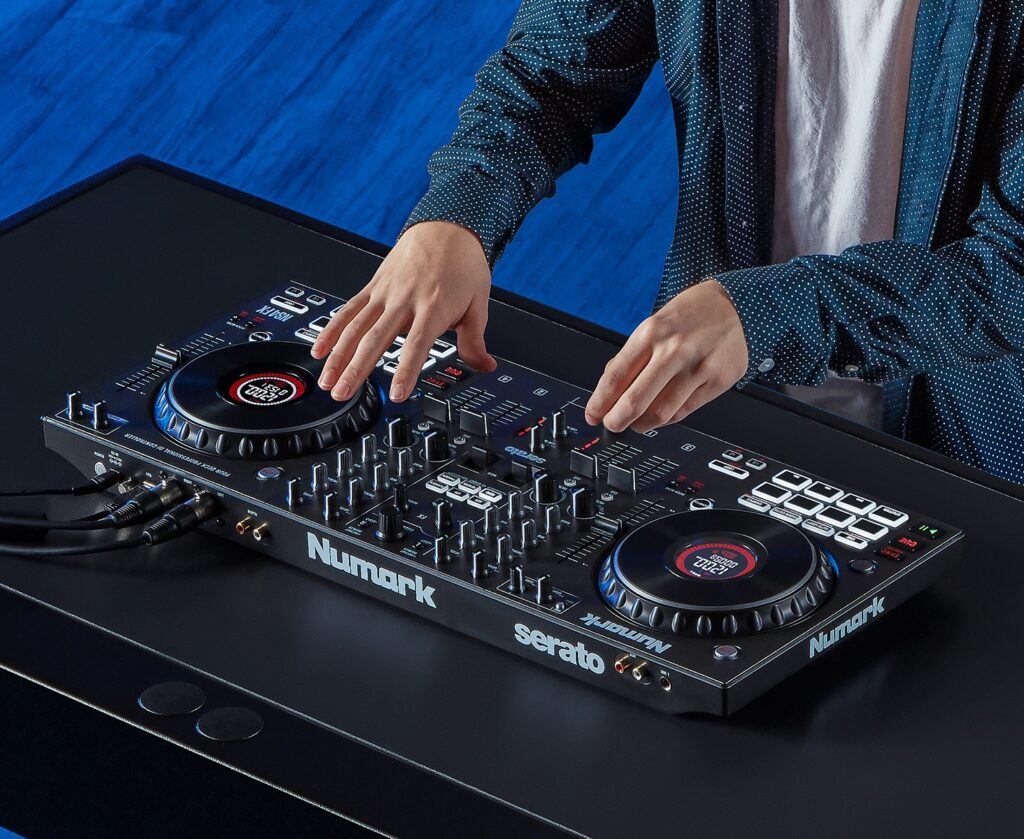
DJs who do a lot of live-streaming will like that the external inputs are routed through the USB, allowing them to record or broadcast the mic or aux input. Finally, there is a USB type-B connection for connecting the controller to a laptop and a connection for the external power supply. Personally, I would’ve preferred the controller to be USB-powered – this makes one less cord to carry. However, sound quality is exactly as expected – no complaints in that department. (Editor’s Note: According to Numark/inMusic, “In order to have XLR outputs, you need more power than bus-powered USB offers. So, wanting that feature would mean you couldn’t have XLR, which we knew was important for that next level of DJing.”)
As mentioned earlier, the NS4FX works with Serato DJ Lite, Virtual DJ, and Algoriddim’s DJay Pro right out of the box. You can certainly use it with Serato DJ Pro, but you’ll need to pay for a license. Many have lamented the fact the unit doesn’t automatically unlock Serato DJ Pro, and I find myself agreeing. This controller would have been almost unstoppable if it shipped with the ability to activate Serato DJ Pro. (Editor’s Note: According to Numark/inMusic: “This controller also will control Stems with Serato DJ Lite out of the box. At the original writing, this would not have been known, but it is now.”)
I can easily see this controller being purchased by mobile DJs who might want a portable 4-channel DJ controller with XLR outputs and dual microphone inputs – this could easily work for gigs that might not need a larger controller. Bedroom DJs and house-party DJs also want to consider the NS4FX: It could be a great next step for DJs who want greater control of four decks and are stepping up from 2-channel controllers.
However, the real winners are DJs who record or live-stream their mixes over the internet. Having the microphones and aux inputs route through the computer’s recording output is a killer feature and something not typically seen at this price point. One of its closest competitors is Pioneer DJ’s slightly-more-expensive DDJ-FLX6 – this controller offers 4-channel functionality and control of Serato DJ Pro, but is less portable and lacks XLR outputs and center jogwheel displays.
That said, Numark’s NS4FX ($549 MAP and currently available exclusively via Guitar Center) is one of the industry’s most-accessible 4-channel DJ controllers. It offers a great deal of features and functionality, all wrapped in a very portable form-factor. Well-done, Numark.
To check out more business tips, click here.