


Facebook Twitter Instagram
    Trending
    • Coconino Campout Returns to Flagstaff in ‘26
    • Do LaB Delivers Weekend One Madness & Magic at Coachella ‘26
    • Splice Launches New AI Tools, Expands Creator Compensation Model
    • DJ Deni-D [Mobile Monday Spotlight]
    • Anyma & LISA Unleash Hypnotic New Single “Bad Angel”
    • AFROJACK, David Guetta & Sia Reunite for Anticipated New Collab, “Awake Tonight”
    Facebook Twitter Instagram
    DJ LIFE Magazine DJ LIFE Magazine
    • Home

      Coconino Campout Returns to Flagstaff in ‘26

      April 16, 2026

      Do LaB Delivers Weekend One Madness & Magic at Coachella ‘26

      April 15, 2026

      Splice Launches New AI Tools, Expands Creator Compensation Model

      April 15, 2026

      DJ Deni-D [Mobile Monday Spotlight]

      April 13, 2026

      Anyma & LISA Unleash Hypnotic New Single “Bad Angel”

      April 10, 2026
    • Magazine
      1. Issues
      2. Buy Print Issue
      3. Subscribe
      Featured

      DJ LIFE Magazine – February 2026 Issue Vol.6 No.1

      By Mark MancinoFebruary 20, 2026
      Recent

      DJ LIFE Magazine – February 2026 Issue Vol.6 No.1

      February 20, 2026

      DJ LIFE Magazine Issue Vol.5 No.6

      December 18, 2025

      DJ LIFE Magazine Issue Vol.5 No.5

      October 27, 2025
    • Interviews
      1. Interviews
      2. Mobile DJ Profiles
      Featured

      Cosmic Gate: PERSPECTIVES [Interview]

      By Mark MancinoMarch 25, 2026
      Recent

      Cosmic Gate: PERSPECTIVES [Interview]

      March 25, 2026

      The DJ Museum: For the Record [Interview]

      March 20, 2026

      Laidback Luke: Facing Future [Interview]

      March 18, 2026
    • Tech
      1. Tech News
      2. Tech Reviews
      Featured

      Splice Launches New AI Tools, Expands Creator Compensation Model

      By Mark MancinoApril 15, 2026
      Recent

      Splice Launches New AI Tools, Expands Creator Compensation Model

      April 15, 2026

      Serato DJ Pro 4.0.6 Adds Support for Essential Pioneer DJ Mixers

      April 9, 2026

      Big FX: Eliminator Lighting Releases Elektron Bar FX

      April 2, 2026
    • Music
      1. Music
      2. DJ Playlists
      3. Mixes
      4. DJ National Club Charts
      Featured

      Anyma & LISA Unleash Hypnotic New Single “Bad Angel”

      By Mark MancinoApril 10, 2026
      Recent

      Anyma & LISA Unleash Hypnotic New Single “Bad Angel”

      April 10, 2026

      AFROJACK, David Guetta & Sia Reunite for Anticipated New Collab, “Awake Tonight”

      April 10, 2026

      10 Fresh Wedding Songs for April 2026

      April 8, 2026
    • Events

      Coconino Campout Returns to Flagstaff in ‘26

      April 16, 2026

      Do LaB Delivers Weekend One Madness & Magic at Coachella ‘26

      April 15, 2026

      Dirtybird Campout x Northern Nights Unveils Phase One Lineup for ‘26 Return

      April 9, 2026

      Hulaween ’26 Lineup Drops: Excision, Pretty Lights & More Announced

      April 8, 2026

      Beyond Wonderland SoCal Announces ‘27 Return

      April 2, 2026
    • Tips
      1. DJ Tips
      2. Business Tips
      3. DJ Life Lessons
      Featured

      Video Bubble Widgets: How to Personalize Your Website & Drive More Bookings

      By Jordan St. JacquesMarch 17, 2026
      Recent

      Video Bubble Widgets: How to Personalize Your Website & Drive More Bookings

      March 17, 2026

      How to Make Your Website Speak to AI (Without Breaking What Already Works) 

      March 12, 2026

      Easy Needle Moving: Website & SEO Tips for ’26

      January 2, 2026
    • Mobile DJ
      1. Mobile DJ Profiles
      2. Mobile Monday Spotlights
      3. Wedding DJ
      4. Business Tips
      5. DJX Subscribe
      Featured

      DJ Deni-D [Mobile Monday Spotlight]

      By Mark MancinoApril 13, 2026
      Recent

      DJ Deni-D [Mobile Monday Spotlight]

      April 13, 2026

      10 Fresh Wedding Songs for April 2026

      April 8, 2026

      DJ IMMS [Mobile Monday Spotlight]

      April 6, 2026
    • DJX Show
    DJ LIFE Magazine DJ LIFE Magazine
    Home»Tips»Business Tips»Presto: Quick Video Creation Using A.I. Tools
    Business Tips

    Presto: Quick Video Creation Using A.I. Tools

    By Jordan St. JacquesJuly 28, 2022
    video creation
    Share
    Facebook Twitter LinkedIn

    Perhaps the biggest time-sink these days when it comes to creating and maintaining your digital branding is the aspect of video creation. Producing real video content takes time, with steps such as Raw Footage, Lower Thirds Overlays, Intros & Outros… and then rendering for YouTube, Tik Tok and Reels formats.

    Indeed, one good from-scratch video can take an entire afternoon to create and publish. Don’t get me wrong, I’m not complaining… great video content can make a massive difference in a client choosing you and your brand for their wedding, or a Bridesmaid party choosing one nightclub over another for their night out. There are many instances though where a full from-scratch video just isn’t necessary, and it’s more cost effective to “cut corners” when it comes to the video creation work necessary. That’s where A.I. Video Creation comes in.

    There’s more than a few A.I. Video Creators out there currently. All the good ones share some key features, including the following:

    • A.I. Avatars, that not only take the form of different “models,” but are also trained so that their lips move to the speech in a natural manner.
    • Text-To-Speech Audio functionality, designed in a format where all you have to do is type the text that you want your Avatar to speak. Also included here is the selection of a custom voice.
    • Custom Background design for both Image or Video, where you can design what your video background looks like while your Avatar speaks your script.
    • A simple-to-use interface, designed so that you can run through the video creation process within minutes.

    The end result is that you can create hyper-fast videos in a fraction of the time at virtually zero cost. Let’s take a look at the tool that I’ve been using these last two months… which is located here: https://synthesys.io/
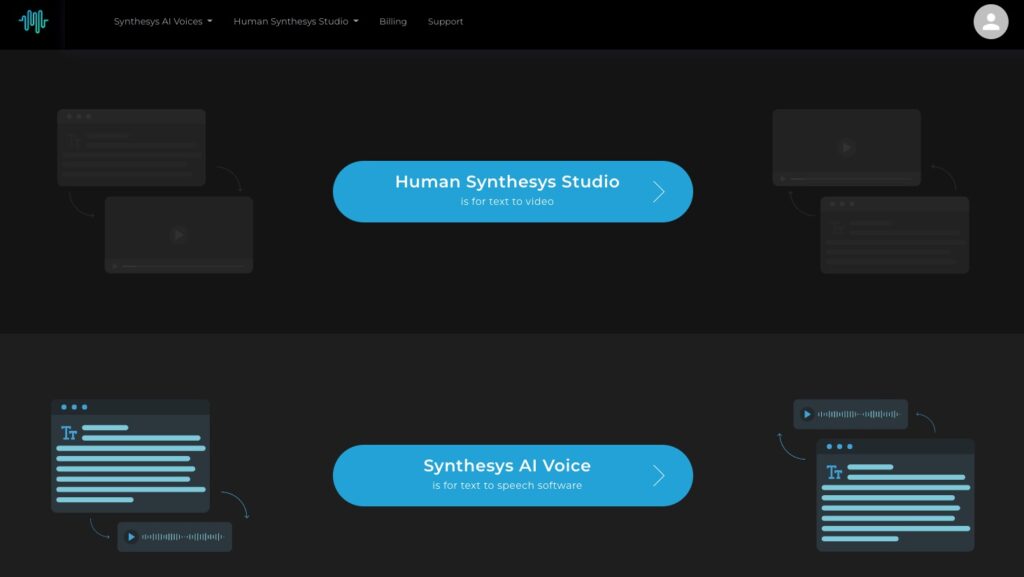
    Logging in brings us to the first screen, which is a simple choice of Audio or Video creation (yes, Synthesis does Audio Text-To-Speech by itself as well). For this article, we’re going to choose Video.
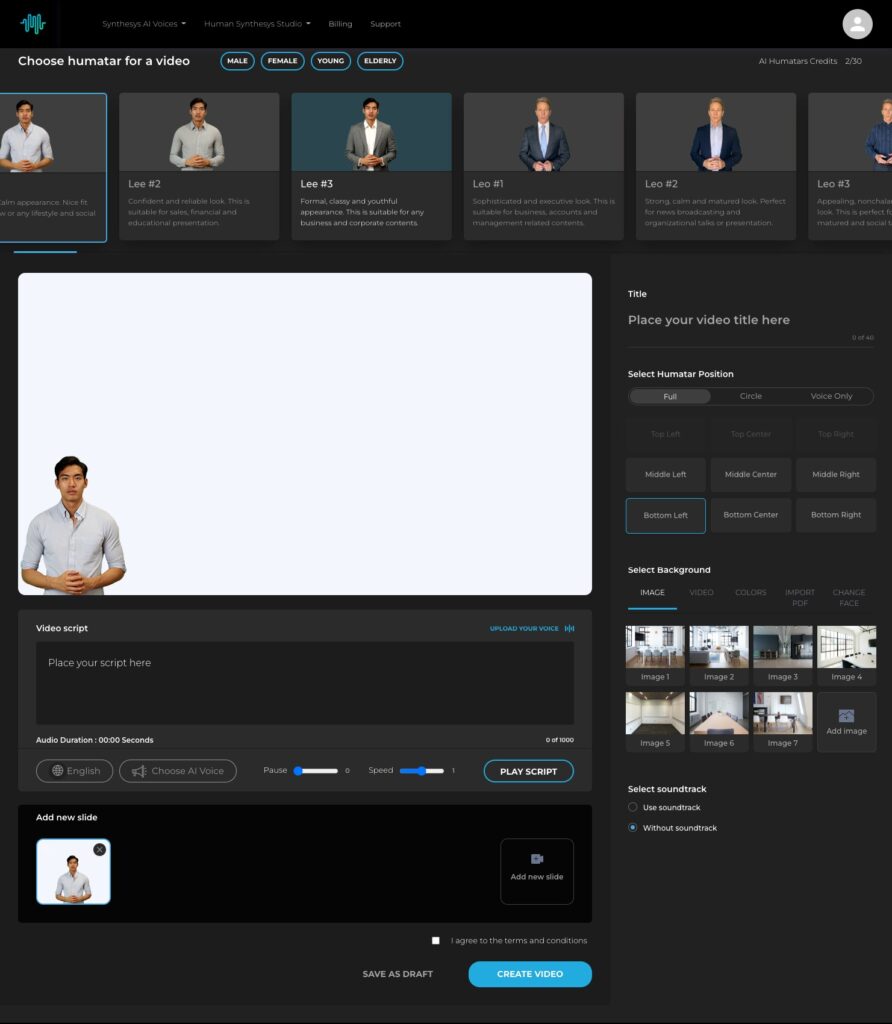
    Once we choose Video creation, we arrive at the meat of the product. Everything is on this page to create your video right to the final output. Here are the steps to go through:

    • First, choose your Avatar (they’re calling them Humantars). You have a choice of Male, Female, Young or Elderly as a filtering. For my test case, I used Jenny #3 (perhaps the coder of this platform has a little bit of Forrest Gump envy?). Just click whichever Avatar you want to use, so that it’s highlighted.
    • Next, start filling out the details of your video, including the following;
      • Title
      • Avatar position, including both type and location. I chose Circle and Bottom Right.
      • Select a background, or upload your own custom background. This can also be done for raw video footage as a background, a custom color background or a custom PDF.
      • If you like, use the tool’s Change Face feature to really get customized (reminds me of the World Of Warcraft face customizer).
      • Type the script of what you want your Avatar to speak.
      • Lastly, choose your custom voice (I chose a British female, of course… lol).
    • After testing your script, you may want to edit it to speak differently. For example, I had to adjust SEO to actually be “S E O” so the Avatar would speak it properly.
    • Once you’re happy with your configuration, scroll down and click the light blue CREATE VIDEO button. Your video should be ready in 20 to 40 minutes depending on how long your text for speech paragraph is.

    My test video, which I made as a DJX Promo Video, came out to 15 seconds and took 14 minutes to render. I’m happy with the quality for what it is, but see for yourself:

    https://djlifemag.com/wp-content/uploads/2022/07/4_DJX-Promo.mp4

    For what this tool is meant to do, I’m getting great use out of it. This company has a roadmap for the future, so I’m sticking with them. If your brand needs videos such as Explainer Videos, clips for Blog Articles, etc., you can save time and money by using one of these video creators. Avoid hiring video actors, cut back drastically on video creation time, avoid costly post-production, and streamline your overall video workflow. After all, time is money!

    Want to know more about this feature? Ask Jordan St. Jacques at DJX in August where he’ll be presenting seminars each day!

    Jordan St. Jacques is the President/Lead Digital Marketer at Digitera.Interactive in Ottawa, Ont., Canada.

    To check out more business tips, click here.

    Latest Video Creation

    Related Posts

    Coconino Campout Returns to Flagstaff in ‘26

    Splice Launches New AI Tools, Expands Creator Compensation Model

    DJ Deni-D [Mobile Monday Spotlight]

    AFROJACK, David Guetta & Sia Reunite for Anticipated New Collab, “Awake Tonight”

    Serato DJ Pro 4.0.6 Adds Support for Essential Pioneer DJ Mixers

    Hulaween ’26 Lineup Drops: Excision, Pretty Lights & More Announced

    Comments are closed.

    Latest Posts

    Coconino Campout Returns to Flagstaff in ‘26

    April 16, 2026

    Do LaB Delivers Weekend One Madness & Magic at Coachella ‘26

    April 15, 2026

    Splice Launches New AI Tools, Expands Creator Compensation Model

    April 15, 2026

    DJ Deni-D [Mobile Monday Spotlight]

    April 13, 2026
    Facebook Twitter Instagram
    • About
    • Digital Editions
    • Subscribe
    • Contact
    • Privacy Policy
    © 2026 DJ Life Magazine

    Type above and press Enter to search. Press Esc to cancel.

    Manage Consent
    To provide the best experiences, we use technologies like cookies to store and/or access device information. Consenting to these technologies will allow us to process data such as browsing behavior or unique IDs on this site. Not consenting or withdrawing consent, may adversely affect certain features and functions.
    Functional Always active
    The technical storage or access is strictly necessary for the legitimate purpose of enabling the use of a specific service explicitly requested by the subscriber or user, or for the sole purpose of carrying out the transmission of a communication over an electronic communications network.
    Preferences
    The technical storage or access is necessary for the legitimate purpose of storing preferences that are not requested by the subscriber or user.
    Statistics
    The technical storage or access that is used exclusively for statistical purposes. The technical storage or access that is used exclusively for anonymous statistical purposes. Without a subpoena, voluntary compliance on the part of your Internet Service Provider, or additional records from a third party, information stored or retrieved for this purpose alone cannot usually be used to identify you.
    Marketing
    The technical storage or access is required to create user profiles to send advertising, or to track the user on a website or across several websites for similar marketing purposes.
    • Manage options
    • Manage services
    • Manage {vendor_count} vendors
    • Read more about these purposes
    View preferences
    • {title}
    • {title}
    • {title}